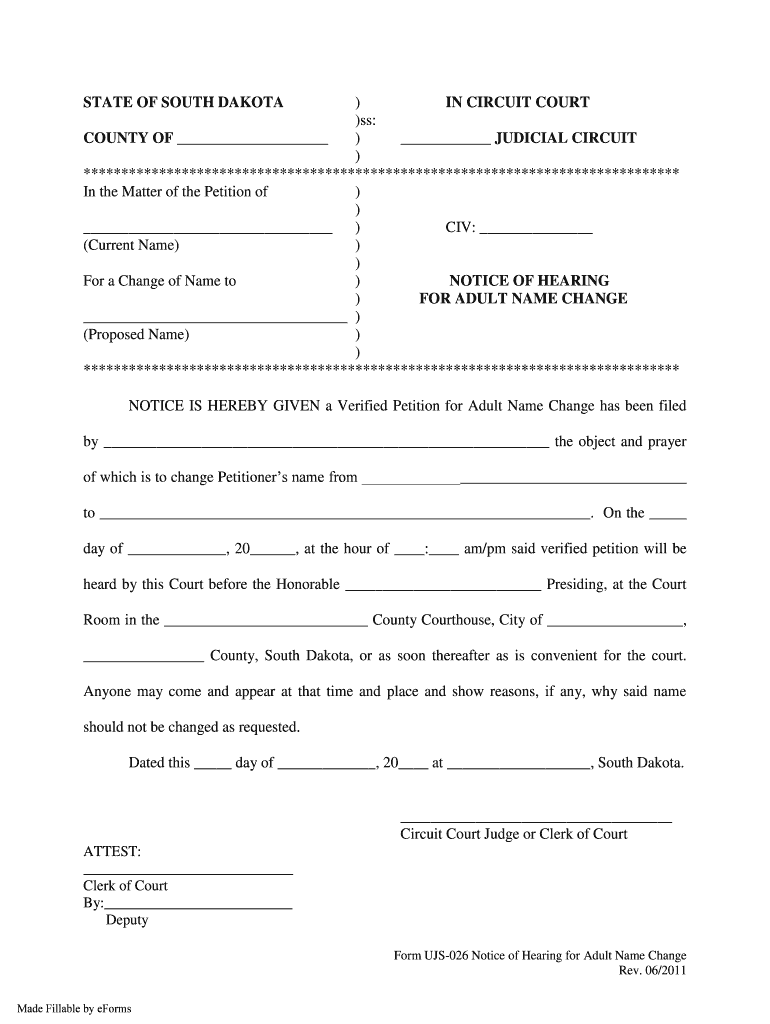
Matter of the Petition of ) ) ) CIV: (Current Name) ) ) For a Change of Name to ) NOTICE OF HEARING ) FOR ADULT NAME CHANGE ) (Proposed Name) ) ) ******************************************************************************* NOTICE IS HEREBY GIVEN a Verified Petition for Adult Name Change has been filed by the object and prayer of which is to change P.
Loading

Open form follow the instructions

Easily sign the form with your finger

Send filled & signed form or save
How to fill out the SD UJS-026 online
The SD UJS-026 form is used for petitioning a change of name for adults in South Dakota. This guide provides step-by-step instructions to help users successfully complete the form online, ensuring all necessary information is accurately provided.
Follow the steps to fill out the SD UJS-026 form online.
- Click ‘Get Form’ button to obtain the form and open it in the editor.
- Complete the first section by entering your current name as the petitioner. Make sure to provide your full legal name accurately.
- Fill in the proposed name you wish to adopt. Ensure this reflects exactly what you want your new name to be.
- In the space provided for the case number, leave it blank if not applicable; it will be filled in by the court later.
- Enter the date and time of the hearing when the petition will be addressed by the court. This date should be after youfiled the petition.
- Fill in the name of the presiding judge and the court location, which is generally your local county courthouse.
- Complete any other miscellaneous required fields, ensuring all information is accurate and clearly legible.
- Review the completed form for accuracy before proceeding to save it. Ensure all fields are filled out according to the instructions given.
- Once finalized, you have the option to save changes, download, print, or share the completed form.
Take the next step to complete your documents online.
Experience a faster way to fill out and sign forms on the web. Access the most extensive library of templates available.
Related content
NOTICE IS HEREBY GIVEN that a Verified Petition for Adult Name Change has been filed by...
[SD026] South side of eastbound I90 - To SD US SDDOT [2012-2019]. [SD026] South side of...
mcsSprinklers is an integrated commercial / residential irrigation control package that...
Get answers to your most pressing questions about US Legal Forms API.
How do you change your name in SD?
To change your name in South Dakota, you must file a petition with the court. You will need to complete the SD UJS-026 form, which is specifically designed for name change requests. It is important to include all required documentation to support your application. Once filed, attend the court hearing where a judge will review your case and decide whether to grant your name change.
How to get SD card to show up?
To make your SD card visible again, start by checking the physical connections and ensuring the card is secure. You might also want to explore your device's storage settings to see if it is disabled. Additionally, the SD UJS-026 can provide insights and steps to help your SD card reappear reliably.
Why is my SD card not showing up?
If your SD card is not appearing, check if it is correctly inserted into the device. You should also explore whether the card has been corrupted or damaged. The SD UJS-026 can be a valuable tool to troubleshoot and resolve these issues, ensuring your SD card is recognized when needed.
How to get SD from 3DS?
To retrieve the SD card from a Nintendo 3DS, gently open the card slot cover and pull out the card carefully. Make sure to turn off the device beforehand to avoid any issues during removal. Once removed, you can use the SD UJS-026 to format or manage any files stored on the card effectively.
How to get SD card to pop up on phone?
To ensure that your SD card appears on your phone, make sure it is properly inserted and check your device's storage settings. Sometimes, a simple restart can resolve the issue if the phone fails to recognize the card. For recurring problems, consider the SD UJS-026 for a more comprehensive check.
How to get SD card permission?
To gain permission for your SD card, navigate to your device's settings and look for storage settings. You may need to adjust permissions under app preferences or privacy settings. Utilizing the SD UJS-026 tool can further streamline this process by guiding you through permission adjustments.
How to see SD card on PC?
To view your SD card on a PC, insert it into the card reader and check if it appears in the File Explorer. Sometimes, updating your computer's drivers or using a different USB port can help. If you continue to face issues, the SD UJS-026 can assist in identifying if the issue stems from the card or the computer.
How to fix SanDisk SD card not detected?
If your SanDisk SD card is not detected, first try inserting it into another device to ensure the card is functioning. Next, check if the card is seated properly in the slot. Additionally, consider using the SD UJS-026 tool to diagnose potential issues and see if there are any device settings related to SD card detection.
How to fill out the application form?
To fill out the application form, make sure to access the correct SD UJS-026 document. Provide all requested information in a clear and organized manner. It is vital to review your application for any mistakes before submission to enhance your chances for success.
How to fill out a service form?
To fill out a service form, begin by reading the instructions for the SD UJS-026 carefully. Enter your information clearly and accurately in each section. After filling out the form, review your entries to ensure they meet all requirements before submitting.
Use professional pre-built templates to fill in and sign documents online faster. Get access to thousands of forms.
If you believe that this page should be taken down, please follow our DMCA take down process here.