Loading
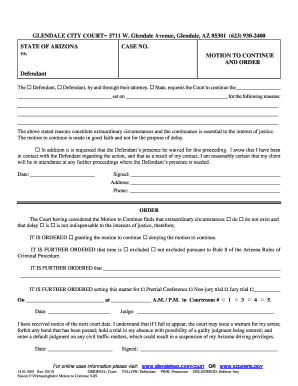
Get Glendale City Court- 5711 W
How it works
-

Open form follow the instructions
-

Easily sign the form with your finger
-

Send filled & signed form or save
How to fill out the GLENDALE CITY COURT- 5711 W online
This guide provides a step-by-step approach to filling out the GLENDALE CITY COURT- 5711 W form online. Whether you are a person with little legal experience or someone looking to refresh your knowledge, these instructions will help you navigate the process smoothly.
Follow the steps to complete your form effectively.
- Click the 'Get Form' button to access the GLENDALE CITY COURT- 5711 W form and open it for editing.
- Begin by filling out the case number section. Ensure that you enter the correct case number to avoid any confusion.
- In the next section, specify the reasons for requesting a continuance. Clearly articulate your reasons, as this will support your motion.
- Indicate whether the presence of the Defendant is to be waived for the proceeding. If so, provide confirmation that you have communicated with the Defendant regarding their attendance.
- Add the date, your signature, address, and phone number in the designated fields to complete the motion.
- Review the court's order section. This is where the Judge will indicate whether the motion is granted or denied. You may need to leave this section blank.
- Finalize your form by saving changes. Once completed, you can download, print, or share the form as required.
Complete your documents online for a hassle-free experience.
To speak with the Detective assigned to your report, please call (623) 930-3000, listen to the options, and select option #2. This will take you to records.