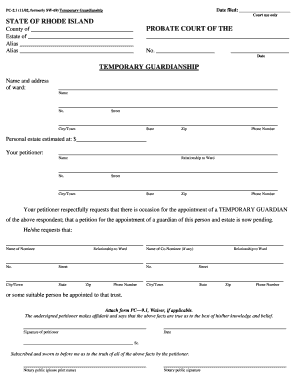
Alias Alias PROBATE COURT OF THE No. Date TEMPORARY GUARDIANSHIP Name and address of ward: Name No. Street.

How it works
  • Open form

    Open form follow the instructions

  • Easily sign form

    Easily sign the form with your finger

  • Share form

    Send filled & signed form or save

How to fill out the RI PC-2.1 online

The RI PC-2.1 form is used to petition for temporary guardianship in the state of Rhode Island. This guide provides clear, step-by-step instructions to help you complete the form accurately and efficiently online.

Follow the steps to successfully complete the RI PC-2.1 form online.

  1. Click ‘Get Form’ button to obtain the form and open it in the digital editor.
  2. In the section titled 'Name and address of ward,' enter the full name of the person who will be under guardianship, along with their street address, city or town, state, zip code, and phone number.
  3. Next, move to the 'Personal estate estimated at' field. Provide an estimated value of the personal estate of the ward.
  4. In the section labeled 'Your petitioner,' fill in your name, relationship to the ward, your street address, city or town, state, zip code, and phone number.
  5. In the 'Your petitioner respectfully requests' section, specify the name and relationship of the nominee you are proposing for temporary guardianship. If applicable, include a co-nominee's details in the provided fields.
  6. Ensure to attach form PC-9.1, Waiver, if applicable, as required.
  7. Complete the signature of the petitioner along with the date of signing in the designated area.
  8. If required, a notary public must sign and print their name in the section for notarization.
  9. After filling out all necessary sections, review the form for accuracy and completeness, and then save your changes.
  10. Finally, choose to download, print, or share the completed form as needed.

Complete your RI PC-2.1 form online today to ensure timely processing.

Get form

Experience a faster way to fill out and sign forms on the web. Access the most extensive library of templates available.

Related content

DATE FILED

PC-2.1 (Rev. 03/21). State of Rhode Island. Probate Court. Page 1 of 2. STATE OF RHODE...

Learn more
Model Rules of Professional Conduct - Table of...

Counselor. Rule 2.1 Advisor. Podcasting of Model Rule 2.1. Rule 2.2 (Deleted) Rule 2.3...

Learn more
Grotesque Guardians/Strategies

The Grotesque Guardians are a pair of gargoyle slayer bosses that reside at the roof of...

Learn more
Questions & Answers

Get answers to your most pressing questions about US Legal Forms API.

Contact support

How to fill a PC 1 form?

Filling out a PC 1 form is similar to other forms like the RI PC-2.1. Begin by downloading the form and opening it with the right software. Fill in the required fields carefully, and make sure to save your file when done to keep all entered data intact.

To fill out a form on your PC, you first need to acquire the correct version, such as the RI PC-2.1. Open it with suitable software that enables form completion. Input your details into the designated areas, and remember to save your work frequently to avoid losing any information.

If you cannot fill in a PDF form on your computer, it may be due to using software that doesn't support form filling. Ensure you open the RI PC-2.1 form with a PDF reader designed for editing. If the form is not fillable, check if it is locked or protected, which may require a different approach to complete.

To fill out a form emailed to you, save the attached RI PC-2.1 form to your computer. Open this form using compatible software that supports editing. After entering your information, you can either send it back as a completed PDF or follow any specific instructions provided in the email.

Filling out a PDF form on your PC is straightforward. After obtaining the RI PC-2.1 PDF file, open it with a PDF reader that allows form filling. You can then type your answers directly into the fields, ensuring to save your changes once you finish to preserve your input.

To fill in a form on your PC, start by downloading the RI PC-2.1 form you need. Open the form using a PDF reader or word processing software that supports form filling. Click on the fields to enter your information, and once completed, save the form to keep your entries.

If a person dies with less than $15,000 of personal property, probate may be shortened under the "small estate" provision. The executor of the estate will have to file the necessary forms with the probate court, but the waiting time for the closure of these estates is typically much shorter and far less costly.

You may be able to avoid probate in Rhode Island using any of the following strategies: Make a Revocable Living Trust. Title property as: Joint Tenancy. Community Property with Right of Survivorship. ... Name beneficiaries on accounts and policies/create assets as TOD or POD (Transfer on Death; Payable on Death)

If you are in possession of a will of a deceased person, you must either file it with the appropriate court or deliver it to the person named in the will as executor, as under Rhode Island law the will is to be filed within 30 days after death.

Rhode Island estate tax credit and threshold set for 2023 For decedents dying on or after January 1, 2023, the credit amount is $80,395, exempting from taxation the first $1,733,264 of an estate.

Get This Form Now!

Use professional pre-built templates to fill in and sign documents online faster. Get access to thousands of forms.

If you believe that this page should be taken down, please follow our DMCA take down process here.

Get RI PC-2.1