Loading
Form preview
  • US Legal Forms
  • Form Library
  • Legal Forms
  • California Legal Forms
  • Ca Death Statement 2004

Get Ca Death Statement 2004-2026

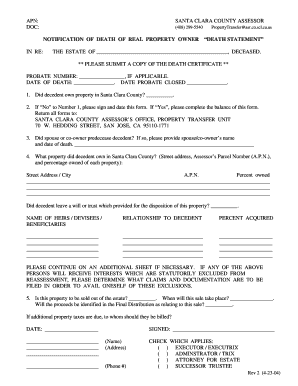
APN DOC SANTA CLARA COUNTY ASSESSOR 408 299-5540 NOTIFICATION OF DEATH OF REAL PROPERTY OWNER IN RE PropertyTransfer asr. co. scl*ca*us DEATH STATEMENT THE ESTATE OF DECEASED. PLEASE SUBMIT A COPY OF THE DEATH CERTIFICATE PROBATE NUMBER IF APPLICABLE* DATE OF DEATH. DATE PROBATE CLOSED. 1. Did decedent own property in Santa Clara County. 2. If No to Number 1 please sign and date this form* If Yes please complete the balance of this form* Return all forms to 70 W* HEDDING STREET SAN JOSE CA 95110.

How it works

  1. Open form

    Open form follow the instructions

  2. Easily sign form

    Easily sign the form with your finger

  3. Share form

    Send filled & signed form or save

How to fill out the CA Death Statement online

Filling out the CA Death Statement is an essential process when notifying the appropriate authorities of the death of a property owner. This guide will help you complete the form accurately and efficiently, ensuring you provide all necessary information.

Follow the steps to successfully complete the CA Death Statement.

  1. Click ‘Get Form’ button to access the CA Death Statement and open it within an online editor.
  2. Begin by filling in the estate information for the deceased. Enter the full name of the deceased in the specified field.
  3. Provide the probate number, if applicable, along with the date of death and date when probate was closed.
  4. Indicate whether the decedent owned property in Santa Clara County by marking 'Yes' or 'No'. If you select 'No', sign and date the form to submit it. If 'Yes', continue to the next step.
  5. If applicable, specify whether the spouse or a co-owner predeceased the decedent. Include their name and date of death if relevant.
  6. List all properties owned by the decedent in Santa Clara County. Provide the street address, assessor's parcel number (A.P.N.), and the percentage owned for each property.
  7. State whether the decedent left a will or trust concerning the property and fill in the details about the heirs, devisees, or beneficiaries. Include their names, relationship to the decedent, and the percentage they will acquire.
  8. If necessary, use an additional sheet to continue listing heirs or to state any exclusions from reassessment.
  9. Specify if the property is to be sold out of the estate. If yes, input the anticipated date of sale and specify how the proceeds will be documented in the final distribution.
  10. Finally, ensure the document is signed with your name, address, and phone number. Check the box that applies to your role in the estate (executor, administrator, attorney for estate, or successor trustee).
  11. Review all information for accuracy, and then you can save changes, download, print, or share the completed form as needed.

Complete your CA Death Statement online today for a smooth filing process.

Get form

Experience a faster way to fill out and sign forms on the web. Access the most extensive library of templates available.
Get form

Related content

How to Obtain a Certified Copy of a Death Record...
Death records are available two weeks after the date of event. You may request a copy from...
Learn more
California Electronic Death Registration System...
How are death certificates used? ▫ A legal document stating the fact(s) of death. ▫ A...
Learn more
REVIEW ARTICLE
by LA Rocha · 2017 · Cited by 17 — Creating an accurate cause of death statement on a...
Learn more

Related links form

OH Consent For Tuberculin Skin Test - City Of Massillon 2017 WV Breast And Cervical Cancer Screening Program Y600 2022 Wright-Patt Credit Union Payroll Authorization Form 2006 SBS Construction Conditional Waiver And Release On Progress Payments 2012

Questions & Answers

Get answers to your most pressing questions about US Legal Forms API.

Contact support

Yes, it is possible to settle an estate without going through probate in California if the assets are below a certain value. Utilizing a CA Death Statement can facilitate this process, as it allows for the proper transfer of assets. You'll need to gather necessary documentation and follow specific legal guidelines. If you're unsure, consider using platforms like US Legal Forms to assist with the paperwork.

After someone dies, several important documents need to be sorted out. This includes obtaining the death certificate, submitting a CA Death Statement, and addressing any estate matters. You will also want to handle any insurance claims, notification for Social Security, and asset distribution paperwork as required. Organizing these documents properly will help streamline the process.

Typically, the funeral home will notify Social Security when a person passes away. They usually take care of the necessary paperwork, including filing the CA Death Statement. If you handle the arrangements yourself, you should contact Social Security directly to report the death. This action helps ensure any benefits are properly managed or stopped.

You can submit a death certificate to the IRS by attaching it to the final tax return for the deceased individual. Make sure to include the completed CA Death Statement as well, which helps to clarify the situation to the IRS. Always keep a copy of both documents for your records. Submitting these documents accurately maintains compliance and shows due diligence on your part.

When someone dies in California, the first step is to obtain the death certificate from the attending physician or hospice. Next, you need to submit a CA Death Statement to relevant institutions, including the DMV and Social Security. It's also essential to inform the deceased's bank and any other necessary organizations about the passing. Following these steps ensures that you handle the situation properly and legally.

Yes, you must notify the DMV if someone passes away in California. This is crucial for updating the vehicle registration and driver's license records. You can do this by submitting a completed CA Death Statement, along with a copy of the death certificate. Keeping the DMV informed helps prevent future complications with vehicle ownership.

When listing the cause of death, ensure you provide a clear and concise description. Include the primary condition that led to death and any significant contributing conditions. Make your language as direct as possible to enhance the clarity of the CA Death Statement. This clarity benefits both legal and medical record-keeping.

In the cause of death section, write the specific medical or external factor that directly led to death. This might include conditions like 'diabetes complications' or 'accident.' A well-defined cause supports the integrity of the CA Death Statement, making it crucial for various legal procedures and insurance claims.

Writing a sworn statement for Calfresh involves providing a detailed account of your circumstances. Start by clearly stating your full name, address, and a declaration of the information being true. Use a simple format with a clear structure to make it straightforward. A well-written CA Death Statement can also enhance related claims, such as for benefits.

An example of a cause of death might be 'heart failure' or 'cerebral aneurysm.' These terms directly indicate the medical condition that resulted in the individual's passing. Including clear and specific causes in the CA Death Statement helps clarify the circumstances surrounding the death for legal and regulatory purposes.

Get This Form Now!

Use professional pre-built templates to fill in and sign documents online faster. Get access to thousands of forms.
Get form
If you believe that this page should be taken down, please follow our DMCA take down processhere.

Industry-leading security and compliance

US Legal Forms protects your data by complying with industry-specific security standards.
  • In businnes since 1997
    25+ years providing professional legal documents.
  • Accredited business
    Guarantees that a business meets BBB accreditation standards in the US and Canada.
  • Secured by Braintree
    Validated Level 1 PCI DSS compliant payment gateway that accepts most major credit and debit card brands from across the globe.
Get CA Death Statement
Get form
  • Adoption
  • Bankruptcy
  • Contractors
  • Divorce
  • Home Sales
  • Employment
  • Identity Theft
  • Incorporation
  • Landlord Tenant
  • Living Trust
  • Name Change
  • Personal Planning
  • Small Business
  • Wills & Estates
  • Packages A-Z
  • Affidavits
  • Bankruptcy
  • Bill of Sale
  • Corporate - LLC
  • Divorce
  • Employment
  • Identity Theft
  • Internet Technology
  • Landlord Tenant
  • Living Wills
  • Name Change
  • Power of Attorney
  • Real Estate
  • Small Estates
  • Wills
  • All Forms
  • Forms A-Z
  • Form Library
  • Legal Hub
  • About Us
  • Help Portal
  • Legal Resources
  • Blog
  • Affiliates
  • Contact Us
  • Delete My Account
  • Site Map
  • Industries
  • Forms in Spanish
  • Localized Forms
  • State-specific Forms
  • Forms Kit
  • Real Estate Handbook
  • All Guides
  • Notarize
  • Incorporation services
  • For Consumers
  • For Small Business
  • For Attorneys
  • USLegal
  • FormsPass
  • pdfFiller
  • signNow
  • altaFlow
  • DocHub
  • Instapage
Form Packages
  • Adoption
  • Bankruptcy
  • Contractors
  • Divorce
  • Home Sales
  • Employment
  • Identity Theft
  • Incorporation
  • Landlord Tenant
  • Living Trust
  • Name Change
  • Personal Planning
  • Small Business
  • Wills & Estates
  • Packages A-Z
Form Categories
  • Affidavits
  • Bankruptcy
  • Bill of Sale
  • Corporate - LLC
  • Divorce
  • Employment
  • Identity Theft
  • Internet Technology
  • Landlord Tenant
  • Living Wills
  • Name Change
  • Power of Attorney
  • Real Estate
  • Small Estates
  • Wills
  • All Forms
  • Forms A-Z
  • Form Library
Customer Service
  • Legal Hub
  • About Us
  • Help Portal
  • Legal Resources
  • Blog
  • Affiliates
  • Contact Us
  • Delete My Account
  • Site Map
  • Industries
  • Forms in Spanish
  • Localized Forms
  • State-specific Forms
  • Forms Kit
Legal Guides
  • Real Estate Handbook
  • All Guides
Prepared for you
  • Notarize
  • Incorporation services
Our Customers
  • For Consumers
  • For Small Business
  • For Attorneys
Our Sites
  • USLegal
  • FormsPass
  • pdfFiller
  • signNow
  • altaFlow
  • DocHub
  • Instapage
Social Media
Call us now toll free:
+1 833 426 79 33
As seen in:
© Copyright 1999-2026 airSlate Legal Forms, Inc. 3720 Flowood Dr, Flowood, Mississippi 39232
  • Your Privacy Choices
  • Terms of Service
  • Privacy Notice
  • Content Takedown Policy
  • Bug Bounty Program