Loading
Get Wright-patt Credit Union Payroll Authorization Form 2006-2026
How it works
-

Open form follow the instructions
-

Easily sign the form with your finger
-

Send filled & signed form or save
How to fill out the Wright-Patt Credit Union Payroll Authorization Form online
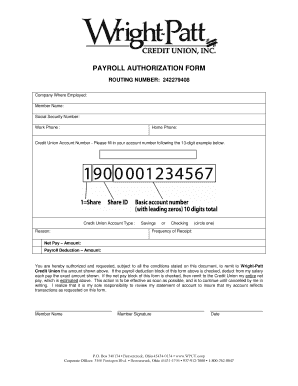
Filling out the Wright-Patt Credit Union Payroll Authorization Form online is a straightforward process designed to help users efficiently set up their payroll deductions or net pay deposits. This guide will provide you with clear, step-by-step instructions to ensure that you complete the form accurately and effectively.
Follow the steps to successfully complete your payroll authorization form.
- Click 'Get Form' button to access the form and open it in the editor.
- In the section labeled 'Company Where Employed', enter the name of the company you work for. This helps in verifying your employment.
- Fill in your full name in the 'Member Name' field. Ensure that your name matches the name on your bank account for accurate processing.
- Enter your Social Security Number in the designated field. This is required for identification purposes and to process your payroll correctly.
- Provide your work phone number, followed by your home phone number. Including both ensures that the Credit Union can reach you if needed.
- In the 'Credit Union Account Number' field, enter your 13-digit account number. Follow the example provided for accuracy.
- Select the 'Credit Union Account Type' by circling either 'Savings' or 'Checking' to indicate where you would like your funds to be deposited.
- Indicate the reason for the payroll authorization in the 'Reason' section. This helps to clarify the purpose of your request.
- Specify the 'Frequency of Receipt' to indicate how often you want the transactions to occur.
- Fill in the 'Net Pay – Amount' field if you wish to deposit your entire net pay. Alternatively, enter the 'Payroll Deduction – Amount' for specific deductions from your salary.
- Review the authorization details below and ensure you understand that this authorization is effective until cancelled by you in writing.
- Sign your name in the 'Member Signature' field and enter the date to validate the authorization.
- Once all fields are completed, ensure that you save your changes. You can then download, print, or share the form as needed.
Start filling out the Wright-Patt Credit Union Payroll Authorization Form online today to streamline your payroll process.
Get a direct deposit form from your employer Ask for a written or online direct deposit form. If that isn't available, ask your bank or credit union for one. We've included a list of forms from top banks and credit unions, including the Capital One and Bank of America direct deposit forms.