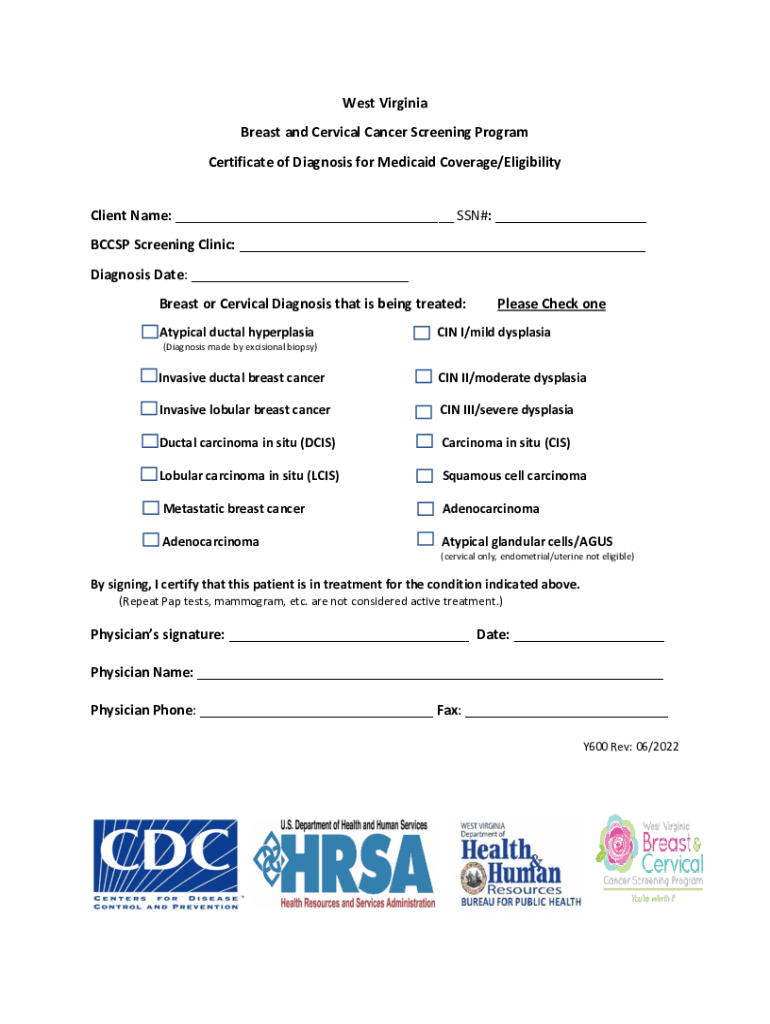
CSP Screening Clinic: Diagnosis Date: Breast or Cervical Diagnosis that is being treated: Atypical ductal hyperplasia Please Check one CIN I/mild dysplasia (Diagnosis made by excisional biopsy) Invasive ductal breast cancer CIN II/moderate dysplasia Invasive lobular breast cancer CIN III/severe dysplasia Ductal carcinoma in situ (DCIS) Carcinoma in situ (CIS) Lobular carcinoma in situ (LCIS) Squamous.
Loading

Open form follow the instructions

Easily sign the form with your finger

Send filled & signed form or save
How to fill out the WV Breast And Cervical Cancer Screening Program Y600 online
Filling out the WV Breast And Cervical Cancer Screening Program Y600 online is a straightforward process that allows users to apply for Medicaid coverage or eligibility for breast and cervical cancer treatments. This guide will provide comprehensive steps to help you complete the form accurately and efficiently.
Follow the steps to complete your application:
- Press the ‘Get Form’ button to access the form and open it in your browser.
- In the first section, enter the client's name and Social Security Number (SSN) in the designated fields.
- Identify the screening clinic by filling in the name of the BCCSP screening clinic in the provided space.
- Specify the diagnosis date for the condition being treated by writing the date in the designated field.
- Indicate the breast or cervical diagnosis by checking the corresponding box for the diagnosis that is being treated, ensuring to select only one option.
- The physician needs to sign the form at the designated location, certifying the patient is in treatment for the indicated condition.
- Include the physician's name, phone number, and fax number in the respective fields.
- Finally, review all the provided information for accuracy. Once confirmed, you can save the changes, download the completed form, print it, or share it as required.
Complete your application online today to ensure timely access to necessary services.
Experience a faster way to fill out and sign forms on the web. Access the most extensive library of templates available.
Related content
General Instructions for Completing Death Certificates . ... diagnosis. A death...
Judith Siegel is Professor of Social Work and Director of the Post-Master's Certificate...
A trauma center (or trauma centre) is a hospital equipped and staffed to provide care for...
Get answers to your most pressing questions about US Legal Forms API.
What do you write on a medical certificate?
Name, address & signature of the physician issuing the doctor's certificate. Patient's name. Date of diagnosis or examination. Date of issuance of the certificate. Dates when patient was or is unfit to attend office or school.
How do I get my FAA medical certificate?
You must contact an AME of your choosing, schedule an appointment, complete an official FAA application form via MedXPress, and undergo a physical examination by an AME. If you meet the appropriate medical standards, the AME will issue you a medical certificate. Search for Aviation Medical Examiners in your area.
What is medical fitness certificate?
A medical certificate or doctor's certificate is a written statement from a physician or another medically qualified health care provider which attests to the result of a medical examination of a patient. ...
How do I issue a medical certificate?
The Certificate should only be issued in respect of an illness or injury observed by the doctor or reported by the patient and deemed to be true by the doctor. Indicate the date the Certificatewas written and signed. Name, signature, qualifications and registered number of the consulting Registered MedicalPractitioner.
How do I get a medical certificate UK?
Medical certificate applications are handled by your Aeromedical Examiner (AME) or your GP. You will have to undergo a medical examination and if you meet the necessary requirements you will be given your medical certificate by the doctor examining you.
What is the meaning of medical certificate?
A medical certificate or doctor's certificate is a written statement from a physician or another medically qualified health care provider which attests to the result of a medical examination of a patient. It can serve as a sick note (documentation that an employee is unfit for work) or evidence of a health condition.
How can I make medical certificate?
Make sure you know the rules. ... Ensure that you already have a scheduled appointment with your doctor. ... If you are under a medical insurance, obtain a medical certificate directly. ... Also, always observe workplace policies.
What is the purpose of a medical certificate?
The medical certificate will also help the insurer to develop an injury management plan with the injured worker and their doctor, which facilitates appropriate medical treatment and a return to work. The medical certificate is the most important document in the process.
Who may sign the medical certificate?
(2) The medical certificate must be issued and signed by a medical practitioner or any other person who is certified to diagnose and treat patients and who is registered with a professional council established by an Act of Parliament.
Which doctor can issue medical certificate?
Yes, a medical practitioner can issue a medical certificate after a patient has taken sick leave, providing the certificate states: the date the certificate was issued. the period during which the practitioner believes the patient would have been unfit for work.
Use professional pre-built templates to fill in and sign documents online faster. Get access to thousands of forms.
If you believe that this page should be taken down, please follow our DMCA take down process here.