Loading
Form preview
  • US Legal Forms
  • Other Templates
  • Legal Forms
  • California Legal Forms
  • Ca Ch-730 2012

Get Ca Ch-730 2012-2026

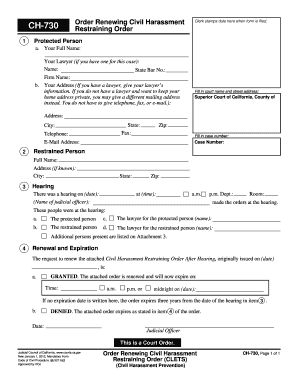
Orm button at the end of the form when finished. Protected Person a. Your Full Name: Your Lawyer (if you have one for this case): Name: State Bar No.: Firm Name: b. Your Address (If you have a lawyer, give your lawyer s information. If you do not have a lawyer and want to keep your home address private, you may give a different mailing address instead. You do not have to give telephone, fax, or e-mail.): Fill in court name and street address: Superior Court of California, County of Address.

How it works

  1. Open form

    Open form follow the instructions

  2. Easily sign form

    Easily sign the form with your finger

  3. Share form

    Send filled & signed form or save

How to fill out the CA CH-730 online

Filling out the CA CH-730 form is an essential step in renewing a civil harassment restraining order. This comprehensive guide provides clear, step-by-step instructions to help users navigate the online form efficiently and effectively.

Follow the steps to complete the CA CH-730 form online.

  1. Press the ‘Get Form’ button to access the CA CH-730 form. This action will allow you to open it in an online editor for filling out.
  2. In the 'Protected Person' section, enter your full name. If you have legal representation, include your lawyer's name and State Bar number, along with the law firm name.
  3. Provide your address. If you prefer to keep this private, you can enter a different mailing address. Note that telephone, fax, and email are optional.
  4. Fill in the court name and street address. Specify ‘Superior Court of California, County of’ and provide the address details including city and zip code.
  5. Enter the case number if applicable. This is usually found on previous documents or correspondence related to your case.
  6. In the section for 'Restrained Person', provide their full name and address if known, including city, state, and zip code.
  7. Indicate the date and time of the hearing, along with the name of the judicial officer who presided over it.
  8. List all individuals who were present at the hearing, including the protected person, the restrained person, and their respective lawyers.
  9. In the 'Renewal and Expiration' section, indicate if the request to renew the restraining order is granted or denied. Specify the expiration date and time for the order.
  10. Once all sections are filled, review your entries for accuracy. After confirming that all information is correct, you can save changes, download, print, or share the completed form.

Complete your CA CH-730 document online today for a smoother process.

Get form

Experience a faster way to fill out and sign forms on the web. Access the most extensive library of templates available.
Get form

Related content

Order Renewing Civil Harassment Restraining ...
Order Renewing Civil Harassment Restraining Order (CLETS) (CH-730) ... Tells you whether a...
Learn more
Spring 2022 CH-730 Resilience for Spiritual...
Instructor: Rev. Tracy Mehr-Muska, D.Min., BCC. Adjunct Instructor in Chaplaincy. Email:...
Learn more
730 BIF para CAD | Converta Burundian Francs em...
Precisa converter Burundian Francs em Canadian Dollars? A Currency.Wiki oferece taxas de...
Learn more

Related links form

NY E-ZPass Individual Application Not For Business Accounts 2011 HI Hawaii Specialty Pharmacy Oral Oncology Referral Form 2018 HI Hawaii Specialty Pharmacy Oral Oncology Referral Form 2019 OR CareOregon Pharmacy Provider Reconsideration Request Form 2016

Questions & Answers

Get answers to your most pressing questions about US Legal Forms API.

Contact support

Filling out a sales tax exemption certificate involves identifying the reason for your exemption, completing the necessary information, including your seller's permit, and signing the document. The CA CH-730 serves as a helpful resource for this process, guiding you in proper completion. Ensure you keep a copy for your records and provide a copy to the seller.

To fill out the GC 210 CA form, first obtain the form from a reliable resource or the court. Fill in your contact information and case details carefully. Make sure to review the form and include all required signatures to maintain its validity and comply with court regulations.

To file for a restraining order in California, you will need several forms, including the Request for Domestic Violence Restraining Order and the list of supporting documents. The CA CH-730 can be useful if you need to address property issues involved in the case. Completing these forms accurately and comprehensively increases your chances of obtaining the necessary legal protection.

Filling out the California resale certificate involves several important steps. You will need to provide your business name, address, and seller's permit number on the CA CH-730. Ensure all information is accurate and complete to facilitate a smooth transaction and to avoid any potential issues with tax authorities.

To fill out the California resale certificate form, first download the CA CH-730 form from the official website or a reliable source. Complete the required fields, including your name, address, and seller's permit number. Be sure to sign and date the form before submitting it to ensure compliance with state requirements.

In California, the burden of proof for a civil harassment restraining order requires the petitioner to demonstrate that harassment has occurred, which typically includes repeated and unlawful behavior. The standard of proof is 'preponderance of the evidence,' meaning that the evidence must show that it is more likely than not that harassment occurred. Understanding this standard can be crucial, especially when navigating the procedures outlined by CA CH-730.

Filing a California corporate disclosure statement online is a straightforward process. Start by visiting the California Secretary of State's website and navigate to the online filing section. Select the Statement of Information form, fill it out with accurate details, and submit it along with your payment. This method ensures that your filing meets the requirements set forth by CA CH-730, making it easier to manage your business compliance.

Yes, you can file the CA Statement of Information online through the California Secretary of State's website. This convenient option allows you to complete the process quickly and efficiently. Ensure that you have all your information ready, including your entity number and the necessary details about your business. Utilizing online filing can simplify your compliance with CA CH-730 requirements.

A stipulation with request for award in California involves a formal agreement between parties to resolve matters of financial support, especially in family law cases. This document can help expedite financial awards without the need for extensive litigation. By addressing the financial aspects directly, parties can agree on terms benefiting everyone involved. Utilizing CA CH-730 can facilitate this process effectively and swiftly.

Evidence Code 730 in California pertains to the appointment of experts to provide independent evaluations in legal cases, especially in family law. The implementation of this code allows courts to obtain objective insights on various issues, which can greatly assist in decision-making. For those involved in cases requiring expert testimony, familiarity with CA CH-730 can enhance your understanding of how evidence is evaluated.

Get This Form Now!

Use professional pre-built templates to fill in and sign documents online faster. Get access to thousands of forms.
Get form
If you believe that this page should be taken down, please follow our DMCA take down processhere.
Get CA CH-730
Get form
  • Adoption
  • Bankruptcy
  • Contractors
  • Divorce
  • Home Sales
  • Employment
  • Identity Theft
  • Incorporation
  • Landlord Tenant
  • Living Trust
  • Name Change
  • Personal Planning
  • Small Business
  • Wills & Estates
  • Packages A-Z
  • Affidavits
  • Bankruptcy
  • Bill of Sale
  • Corporate - LLC
  • Divorce
  • Employment
  • Identity Theft
  • Internet Technology
  • Landlord Tenant
  • Living Wills
  • Name Change
  • Power of Attorney
  • Real Estate
  • Small Estates
  • Wills
  • All Forms
  • Forms A-Z
  • Other Templates
  • Legal Hub
  • About Us
  • Help Portal
  • Legal Resources
  • Blog
  • Affiliates
  • Contact Us
  • Delete My Account
  • Site Map
  • Industries
  • Forms in Spanish
  • Localized Forms
  • State-specific Forms
  • Forms Kit
  • Real Estate Handbook
  • All Guides
  • Notarize
  • Incorporation services
  • For Consumers
  • For Small Business
  • For Attorneys
  • USLegal
  • FormsPass
  • pdfFiller
  • signNow
  • altaFlow
  • DocHub
  • Instapage
Form Packages
  • Adoption
  • Bankruptcy
  • Contractors
  • Divorce
  • Home Sales
  • Employment
  • Identity Theft
  • Incorporation
  • Landlord Tenant
  • Living Trust
  • Name Change
  • Personal Planning
  • Small Business
  • Wills & Estates
  • Packages A-Z
Form Categories
  • Affidavits
  • Bankruptcy
  • Bill of Sale
  • Corporate - LLC
  • Divorce
  • Employment
  • Identity Theft
  • Internet Technology
  • Landlord Tenant
  • Living Wills
  • Name Change
  • Power of Attorney
  • Real Estate
  • Small Estates
  • Wills
  • All Forms
  • Forms A-Z
  • Other Templates
Customer Service
  • Legal Hub
  • About Us
  • Help Portal
  • Legal Resources
  • Blog
  • Affiliates
  • Contact Us
  • Delete My Account
  • Site Map
  • Industries
  • Forms in Spanish
  • Localized Forms
  • State-specific Forms
  • Forms Kit
Legal Guides
  • Real Estate Handbook
  • All Guides
Prepared for you
  • Notarize
  • Incorporation services
Our Customers
  • For Consumers
  • For Small Business
  • For Attorneys
Our Sites
  • USLegal
  • FormsPass
  • pdfFiller
  • signNow
  • altaFlow
  • DocHub
  • Instapage
Social Media
Call us now toll free:
+1 833 426 79 33
As seen in:
© Copyright 1999-2026 airSlate Legal Forms, Inc. 17 Station Street, Suite 303, Brookline, MA 02445
  • Your Privacy Choices
  • Terms of Service
  • Privacy Notice
  • Content Takedown Policy
  • Bug Bounty Program