How it works
  • Open form

    Open form follow the instructions

  • Easily sign form

    Easily sign the form with your finger

  • Share form

    Send filled & signed form or save

How to fill out the online name change in Mahadiscom

Changing your name on your Mahadiscom account is a straightforward process, and this guide will walk you through the necessary steps to complete the online application. By following these instructions, you can ensure your name change is processed efficiently.

Follow the steps to complete your name change application.

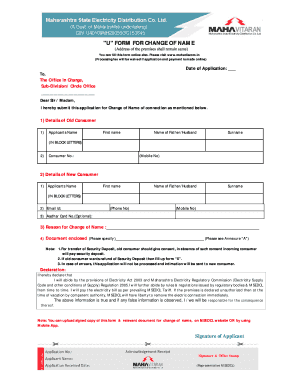
  1. Click ‘Get Form’ button to access the name change application form and open it in your editor.
  2. Enter the date of application in the designated field at the top of the form.
  3. Provide your details as the old consumer. Fill in your name, including your first name, the name of your father or partner, and your surname in block letters. Include your consumer number and mobile number.
  4. Next, enter your new consumer details. Re-enter your name as you wish it to appear, with your first name, the name of your father or partner, and your surname in block letters. Additionally, include your email address and phone number.
  5. If you have an Aadhar Card number, you may enter it in the optional field.
  6. In the specified area, provide the reason for your name change.
  7. Indicate the documents you are submitting as part of your application by specifying them in the document enclosure section. Refer to Annexure ‘A’ for a list of acceptable documents.
  8. Review the declaration statement and ensure you understand the outlined responsibilities and provisions of the Electricity Act 2003 and relevant regulations.
  9. Once all fields are completed, you can save changes, download, print, or share the form as needed.

Take the next step and complete your name change application online.

Get form

Experience a faster way to fill out and sign forms on the web. Access the most extensive library of templates available.

Related content

A peer-and self-group competitive behavior-based...

by GS Ramnath · 2024 — This paper proposes a knowledge-based decision-making system for...

Learn more
Maharashtra State Electricity Distribution Co...

Nov 28, 1986 — You can view and pay bill online at portal...

Learn more
Questions & Answers

Get answers to your most pressing questions about US Legal Forms API.

Contact support

How do I change my name on my power bill?

Changing your name on your power bill involves contacting your electricity provider directly. They will guide you through the steps necessary for the change. By taking advantage of the Online Name Change In Mahadiscom, you can efficiently submit your details and documents online, making the entire process straightforward.

To change your electric bill to another name, contact your utility provider and request the name change. You will need to fulfill certain requirements, such as proving your identity and residency. Utilizing the Online Name Change In Mahadiscom feature can simplify this procedure, allowing for quick updates.

While it is not mandatory for both spouse's names to be on utility bills, it can be beneficial. Including both names can provide clarity regarding shared responsibilities and services. When considering an Online Name Change In Mahadiscom, it may be a good time to add your spouse’s name for easier management of household utilities.

Transferring utilities to a new owner typically involves contacting your utility provider. You need to provide the necessary information about the new owner and the property. During this process, you can also inquire about the Online Name Change In Mahadiscom options, which can streamline the name transfer process.

To change the name on your electricity bill online in UP, start by visiting the official website of your electricity provider. Look for the section regarding customer services or account management. You will find an option for Online Name Change In Mahadiscom. Follow the prompts to submit the necessary documents and details required for the name change.

To change the name on your electricity bill in Maharashtra, reach out to Mahadiscom with the required documents, including proof of identity and ownership. The process can often be streamlined through the Online Name Change In Mahadiscom, allowing you to make these updates conveniently online.

For a new meter connection in Maharashtra, you typically need an application form, a government-issued ID, proof of residency, and possibly additional documents like property ownership certificates. To ensure a smooth process, consider utilizing the Online Name Change In Mahadiscom, which can help manage your details more efficiently.

Transferring your electricity bill from one person to another generally requires submitting a request to the utility company. Ensure you have the necessary identification and proof of residence for both parties. With the Online Name Change In Mahadiscom approach, you can easily update the name associated with your bill, making the process smoother.

To transfer your electricity meter in Maharashtra, you must file a formal application with Mahadiscom. This application usually requires supporting documents like proof of identity and ownership. Utilizing the Online Name Change In Mahadiscom can simplify updating the name associated with your account during this transfer.

Changing the name on a utility bill involves submitting a request to your utility provider, along with relevant identification, and proof of ownership or residency. The Online Name Change In Mahadiscom allows you to easily update your details online, saving you time and effort in the process.

Get This Form Now!

Use professional pre-built templates to fill in and sign documents online faster. Get access to thousands of forms.

If you believe that this page should be taken down, please follow our DMCA take down process here.

Get Online Name Change In Mahadiscom