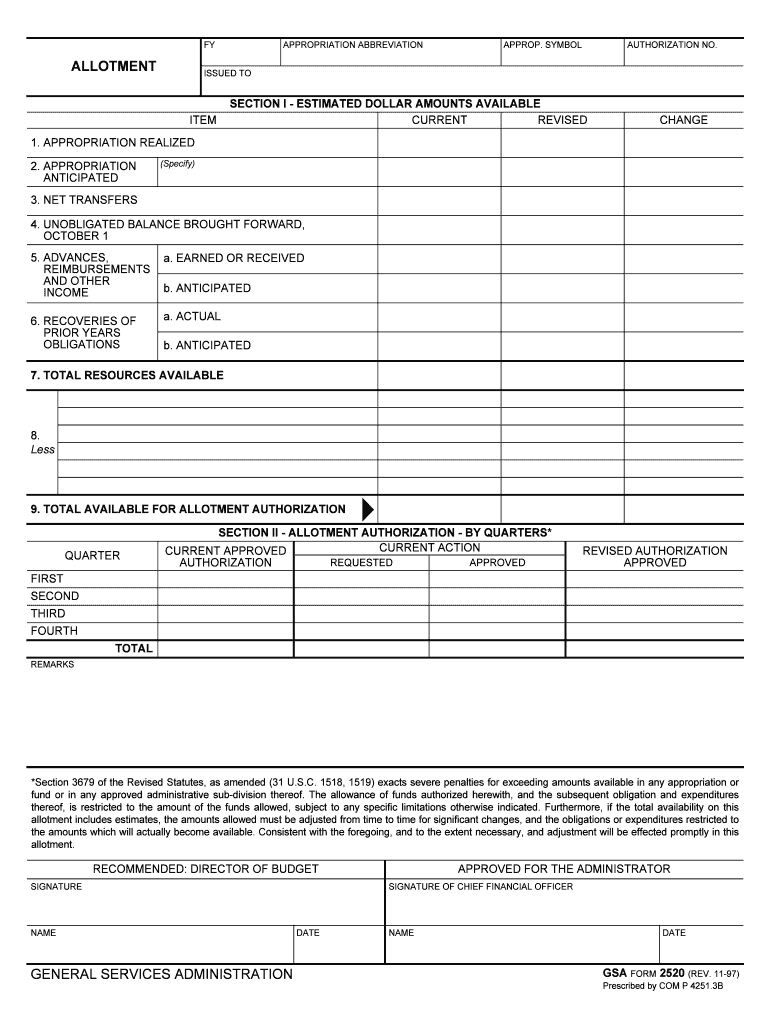
TICIPATED (Specify) 3. NET TRANSFERS 4. UNOBLIGATED BALANCE BROUGHT FORWARD, OCTOBER 1 5. ADVANCES, REIMBURSEMENTS AND OTHER INCOME a. EARNED OR RECEIVED 6. RECOVERIES OF PRIOR YEARS OBLIGATIONS a. ACTUAL b. ANTICIPATED b. ANTICIPATED 7. TOTAL RESOURCES AVAILABLE 8. Less 9. TOTAL AVAILABLE FOR ALLOTMENT AUTHORIZATION QUARTER SECTION II - ALLOTMENT AUTHORIZATION - BY QUARTERS* CURRENT ACTION CURRENT APPROVED REQUESTED APPROVED AUTHORIZATION REVISED AUTHORIZATION APPROVED FIRST SECON.
Loading

Open form follow the instructions

Easily sign the form with your finger

Send filled & signed form or save
How to fill out the GSA Form 2520 online
GSA Form 2520 is essential for managing budget allotments within federal agencies. This guide aims to provide clear, step-by-step instructions for successfully completing the form online, ensuring you understand each component and its significance.
Follow the steps to fill out GSA Form 2520 effectively.
- Click ‘Get Form’ button to access the form and open it in your preferred editor.
- Begin by filling out the allocation details in Section I, where you will provide estimated dollar amounts available for the current and revised budget periods. Ensure you complete each field accurately, including appropriation realized and anticipated amounts.
- Input the details regarding net transfers and the unobligated balance brought forward as of October 1. Make sure to include all earned or received advances, reimbursements, and income.
- Specify any recoveries of prior years' obligations, including both actual and anticipated amounts. This ensures a comprehensive view of the budget resources available.
- Complete the total resources available section, subtracting any adjustments needed to provide the total available for allotment authorization.
- Move to Section II, where you will set forth the allotment authorization by quarters. Fill out the current action, requesting amounts, and any revisions needed for each quarter—first, second, third, and fourth.
- Include any remarks that may be necessary for clarification or additional context regarding the allotment.
- Finally, ensure that the relevant individuals sign the form, including the director of budget and the chief financial officer, along with the respective dates.
- After completing the form, review all fields for accuracy and completeness. You can then save any changes, download a copy for your records, print the form, or share it as needed.
Complete your GSA Form 2520 online today for efficient budget management.
Experience a faster way to fill out and sign forms on the web. Access the most extensive library of templates available.
Related content
DATE. SIGNATURE OF CHIEF FINANCIAL OFFICER. NAME. DATE. GSA FORM 2520 (REV. 11-97)...
GENERAL SERVICES ADMINISTRATION (GSA) Contracts. Contract Number GS-10F-0228P Contact...
Dec 15, 2016 — See What's New in these instructions. THIS BOOKLET DOES NOT CONTAIN...
Get answers to your most pressing questions about US Legal Forms API.
What is GSA for official use only?
The Federal Hierarchy “For Official Use Only” (FOUO) API allows U.S. Government users to obtain federal organization details down to the office level. As part of this API, organization information for all levels (departments/sub-tiers/offices) is provided by default.
What is a GSA form 300?
(a) GSA Form 300 , Order for Supplies and Services, is a multipurpose form that may be used for purchases of supplies or services, orders under existing contracts or agreements, and orders from required sources of supplies and services.
Does GSA offer tuition reimbursement?
Centers managed by the U.S. General Services Administration (GSA) are required to have a tuition-assistance program. Employees of Federal agencies and members of the U.S. military may also qualify for federal tuition subsidies based on income.
What is a GSA schedule contractor?
The GSA Schedule, also known as Federal Supply Schedule, and Multiple Award Schedule (MAS), is a long-term governmentwide contract with commercial companies that provide access to millions of commercial products and services at fair and reasonable prices to the government.
Do DOD employees get education benefits?
Members of the Military Services serving on active duty and members of the Selected Reserve may qualify for tuition assistance to help pay for high school education completion and pursue academic certificates, associates', bachelors', and masters' degree programs to qualify for promotion while in the Service and ...
Does USDA offer tuition reimbursement?
Work/Life specialists provide personalized guidance and pre-screened referrals to meet each employee's specific needs, e.g., child development, gerontology, education, finance, and law. FSIS offers up to $5000.00 per year tuition reimbursement for full-time permanent employees after one year of service.
Does federal government do tuition reimbursement?
If you are a full-time employee of the federal government, you may be eligible for reimbursement of your tuition and course material costs associated with your studies.
What are the benefits of working for gsa?
We offer the standard federal benefits and the fringe benefits of training and career development. We offer a variety of Health, Dental, Vision, Life Insurance & Long Term Care benefits to employees. Learn More. We offer generous vacation and sick leave benefits, as well as 11 paid holidays per year to our employees.
Use professional pre-built templates to fill in and sign documents online faster. Get access to thousands of forms.
If you believe that this page should be taken down, please follow our DMCA take down process here.