Open form follow the instructions
Easily sign the form with your finger
Send filled & signed form or save
How to fill out the Form 15g Download In Word Format online
Filling out the Form 15g can seem daunting, but with clear guidance and a step-by-step approach, you can complete it with confidence. This form is essential for individuals who wish to declare their income and ensure that no tax is deducted at source.
Follow the steps to complete your Form 15g efficiently.
- Click the ‘Get Form’ button to access the Form 15g and open it in the editing tool of your choice.
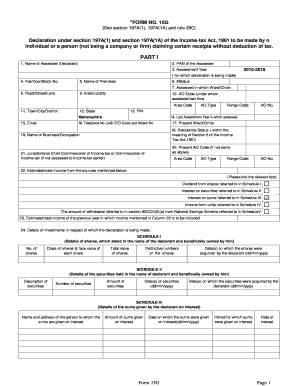
- In Part I of the form, enter the name of the assessee (declarant) in the first field. Then, provide the Permanent Account Number (PAN) in the next section.
- Specify the assessment year for which the declaration is being made. Ensure to use the correct format for this section.
- Fill out the address details, including flat or door number, premises name, status, and the ward or circle where assessed previously. Include the road, area, town, city, district, state, and PIN code.
- Provide contact information such as a telephone number (with STD code), mobile number, and email address.
- Indicate your residential status according to the Income Tax Act and declare your business or occupation details.
- Complete the section on estimated total income from specified sources by ticking the relevant boxes for dividends, interest on securities, or any other applicable income.
- Detail the investments related to your declaration in the corresponding schedules (Schedule-I to Schedule-V). Fill in the relevant fields with accurate information about shares, securities, sums given on interest, mutual fund units, and withdrawals from the National Savings Scheme.
- Sign to verify the declaration, affirming that the information is accurate, complete, and true to the best of your knowledge.
- Finally, review all details for accuracy. Save changes, download the completed form, print it for records, or share it as needed.
Start the process now and complete your Form 15g online with confidence.
Experience a faster way to fill out and sign forms on the web. Access the most extensive library of templates available.
Related content
SECTION 15G OF THE SECURITIES EXCHANGE ACT OF 1934 Name and telephone number...
How to Download Form 15G for PF Withdrawal: A Complete Guide - ClearTax-. How to Download...
Oct 31, 2002 — This document presented a new toxicological approach to characterize and...
Get answers to your most pressing questions about US Legal Forms API.
What is form 15G with an example?
Form 15G is a declaration form used by taxpayers to ensure no tax is deducted from certain income sources when their total income is below the taxable limit. For instance, if an individual's total income from interest is $3,000, they can use Form 15G to instruct the bank not to deduct tax. You can conveniently download Form 15G in Word format from our site, making it simple to process your financial matters.
What is the aggregate amount in form 15G with an example?
The aggregate amount in Form 15G refers to the total income for which the form is submitted to request no tax deduction. For example, if your savings account interest and fixed deposit interest total $4,000 for the financial year, you would declare this amount in the form. Keep in mind to check for the current basic exemption limit while filling. A reliable resource for Form 15G download in Word format can simplify this process.
How to fill up 15G form for fixed deposit pdf?
To fill up the 15G form for fixed deposit in PDF format, start by selecting the appropriate fillable PDF version online. Include essential details such as your name, income source, and PAN. After completion, ensure to attach it with your fixed deposit application to benefit from tax exemption. For greater ease, you might want to opt for the Form 15G download in Word format for flexibility.
How to download upload form 15G?
To download Form 15G, simply visit our user-friendly platform and search for the Form 15G download in Word format. Once downloaded, you can easily fill out the form and upload it back to the concerned bank or financial institution. This efficient process eliminates the hassle of physical paperwork, allowing you to focus on what matters most.
What is the benefit of filing Form 15G?
Filing Form 15G offers significant benefits, particularly in avoiding tax deduction at source on your interest earnings. This is beneficial for those whose total income remains below the taxable limit. Additionally, it helps streamline your tax filings, making your financial management easier. You can easily access a Form 15G download in Word format to facilitate this process.
How to fill form 15G fillable form?
Filling out the Form 15G fillable form is straightforward. Start by entering your personal details, including your name, address, and Pan card number. Next, state the estimated income you expect to earn during the financial year. To simplify the process, download the Form 15G in Word format from our site, allowing you to fill it out electronically.
Who should fill out form 15G?
Individuals who want to ensure that no tax is deducted from their income should fill out Form 15G. This includes senior citizens and those whose total income does not exceed the tax threshold. By submitting the form, you can safeguard your interest earnings from tax deductions. For your convenience, you can find a Form 15G download in Word format on our platform.
What is the estimated total income for Form 15G?
The estimated total income for Form 15G is typically up to the basic exemption limit set by the income tax department. For individuals below this limit, income tax is not applicable. Thus, if your total income falls under this threshold, you can fill out Form 15G to avoid tax deductions. You can easily access the Form 15G download in Word format from our site, making your filing process smoother.
How do I edit Form 15G?
To edit Form 15G, first download it in Word format from the US Legal Forms website. This editable format allows you to make all necessary changes directly on your computer. After editing, you can save it and submit the updated version to your bank.
What happens after submitting form 15G?
After submitting Form 15G, your financial institution will review the document. If approved, the bank will not deduct tax on your interest income for the financial year, provided you meet the eligibility criteria. It's a great way to manage your tax obligations efficiently.
Use professional pre-built templates to fill in and sign documents online faster. Get access to thousands of forms.
If you believe that this page should be taken down, please follow our DMCA take down process here.