Loading
Get Medical Certificate Ei 2020-2026
How it works
-

Open form follow the instructions
-

Easily sign the form with your finger
-

Send filled & signed form or save
How to fill out the Medical Certificate Ei online
Filling out the Medical Certificate Ei online is essential for individuals seeking Employment Insurance sickness benefits. This guide provides detailed instructions to help you complete each section of the form accurately and efficiently.
Follow the steps to complete the Medical Certificate Ei online
- Press the ‘Get Form’ button to access the Medical Certificate Ei and open it in your preferred editor.
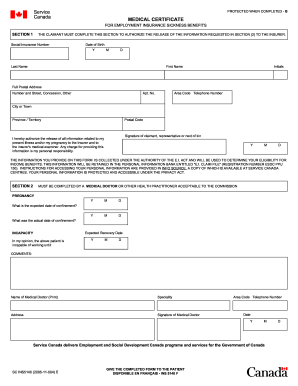
- In Section 1, complete the claimant’s information, including their Social Insurance Number, date of birth, last name, first name, initials, full postal address, and telephone number.
- Sign the authorization statement to permit the release of information regarding the current illness or pregnancy to the insurer.
- In Section 2, the medical professional must fill in details regarding the client’s incapacity. They should provide the expected date of recovery, and if applicable, the expected date of confinement for pregnancy.
- The medical provider should add their name, specialty, address, signature, telephone number, and the date when completing Section 2.
- After completing the necessary sections, save the changes. You may then download, print, or share the completed Medical Certificate Ei as needed.
Complete your Medical Certificate Ei online today for efficient processing of your sickness benefits.
Yes, you can switch from EI sickness benefits to regular benefits in Canada once you are fit to work. The transition requires you to apply for regular EI benefits, providing any necessary documentation, including your Medical Certificate EI if needed. This switch allows you to maintain financial stability as you return to the workforce.