Loading
Get Emergency Contact Form - Archbishop Riordan High School - Riordanhs
How it works
-

Open form follow the instructions
-

Easily sign the form with your finger
-

Send filled & signed form or save
How to fill out the Emergency Contact Form - Archbishop Riordan High School - Riordanhs online
Completing the Emergency Contact Form for Archbishop Riordan High School is an important step in ensuring your child’s safety. This guide provides clear instructions on how to accurately fill out the form online, ensuring all necessary information is provided.
Follow the steps to complete the form effectively.
- Press the ‘Get Form’ button to access the Emergency Contact Form for Archbishop Riordan High School.
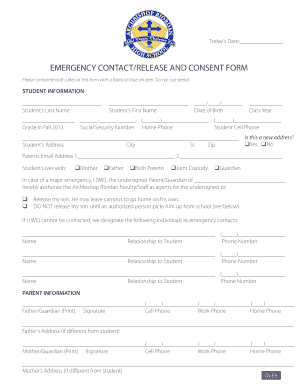
- Begin by filling in the student information section. Include the student's last name, first name, date of birth, class year, grade for the upcoming fall, social security number, home phone, and student cell phone. Ensure that you use either black or blue ink to complete this section.
- In the address section, type the student's home address, including city, state, and zip code. Indicate if this is a new address by checking 'Yes' or 'No'.
- Provide the parents’ email addresses in the designated fields for communication purposes.
- Indicate with which parent or guardian the student lives by checking the appropriate box: Mother, Father, Both Parents, Joint Custody, or Guardian.
- In the emergency release section, specify whether the student is authorized to leave campus on their own or if they require an authorized person to pick them up.
- List emergency contacts by providing their names, relationships to the student, and phone numbers. Ensure that you include multiple contacts if possible.
- Fill out the parent information section for both the father and mother or guardian. Provide the names, signatures, and phone numbers for contact purposes as well as their addresses if different from the student’s.
- Complete the student medical information section by providing the name and contact information for the primary and emergency physicians.
- List any medical conditions, disabilities, allergies, and medications to be self-administered by the child as applicable. If there are no known allergies, ensure to check the appropriate boxes.
- Answer the questions regarding emergency contact with your family doctor and the school's ability to provide non-aspirin pain relievers.
- After completing all sections, ensure all information is accurate. You can now save your changes, download, print, or share the form as needed.
Complete your Emergency Contact Form online to ensure your child's safety and readiness.
Overall, Riordan is a great diverse school with lots of potential for the future. Great programs for various different students, with a wide variety of AP and Honors classes. With a biomedical program, engineering program, and a marching band, there is something for everyone here.
Industry-leading security and compliance
US Legal Forms protects your data by complying with industry-specific security standards.
-
In businnes since 199725+ years providing professional legal documents.
-
Accredited businessGuarantees that a business meets BBB accreditation standards in the US and Canada.
-
Secured by BraintreeValidated Level 1 PCI DSS compliant payment gateway that accepts most major credit and debit card brands from across the globe.