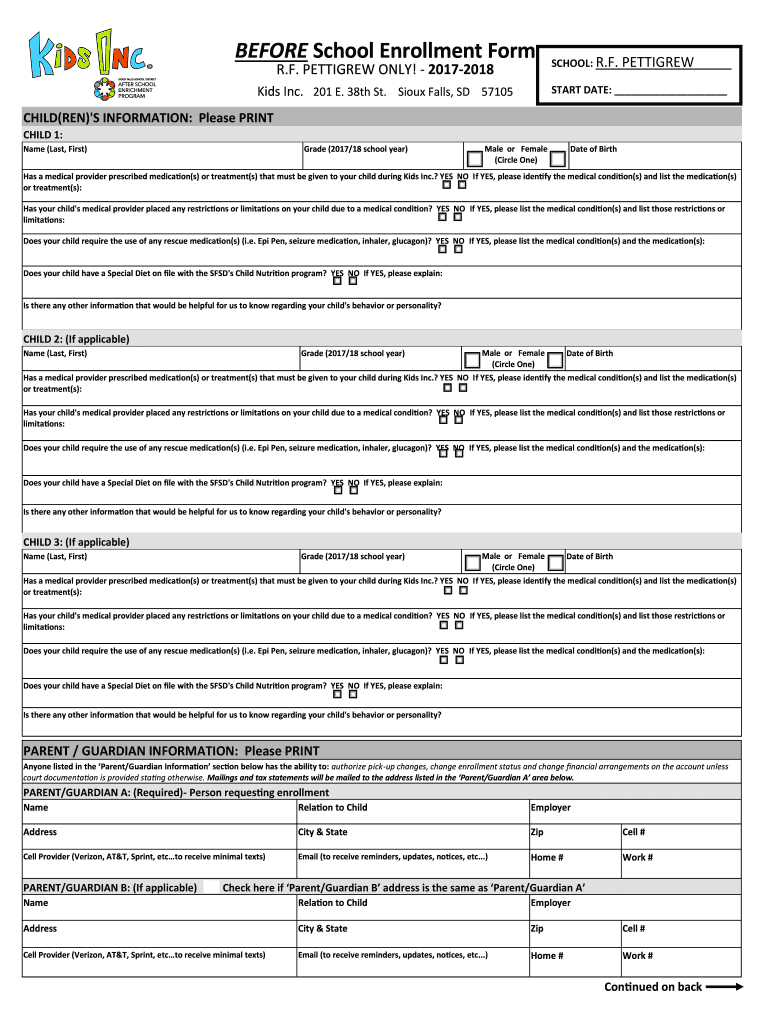
BEFORE School Enrollment Form R.F. PETTIGREW ONLY! 20172018Kids Inc. 201 E. 38th St. Sioux Falls, SD 57105SCHOOL: R.F.PETTIGREW START DATE: CHILD(REN) 'S INFORMATION: Please PRINT CHILD 1: Name (Last,.

Open form follow the instructions

Easily sign the form with your finger

Send filled & signed form or save
How to fill out the SD SFSD Before School Enrollment Form online
Completing the SD SFSD Before School Enrollment Form online is a straightforward process designed to gather necessary information regarding your child's enrollment. This guide provides step-by-step instructions to ensure you fill out the form accurately and efficiently.
Follow the steps to complete the enrollment form seamlessly.
- Click the ‘Get Form’ button to obtain the enrollment form and open it in your document editor.
- Begin by entering the school's information in the designated area. For this form, you will specify the school as R.F. Pettigrew.
- Next, input the start date for your child's enrollment. This is the date on which your child will begin attending the program.
- Provide details for each child you are enrolling. Start with Child 1 by entering their name, grade for the 2017/18 school year, gender, and date of birth.
- If your child requires any medications or treatments prescribed by a medical provider, indicate 'Yes' or 'No' and provide relevant details, including medical conditions and treatments.
- State whether your child's medical provider has placed any restrictions or limitations. If yes, list the conditions and their respective restrictions.
- Indicate if your child needs any rescue medications and specify the conditions associated with those medications.
- Determine if your child has a special diet on file and provide additional information regarding their behavior or personality that may be helpful to the staff.
- Repeat steps 4 to 8 for any additional children you wish to enroll, such as Child 2 and Child 3, ensuring you provide all requested information.
- Fill out the parent/guardian information section for each parent or guardian involved in the child's enrollment. Ensure accuracy in the contact information provided.
- Enter two emergency contacts who are authorized to pick up your child or be contacted in case of an emergency. Minimum of two contacts is required.
- Complete the payment information section by calculating the enrollment and bi-weekly fees. Indicate the method of payment you will use.
- Review the acknowledgment section carefully and provide your initials on each line and your signature at the bottom, indicating your agreement to the terms.
- Finally, ensure that you have included the total payment amount and return the completed form according to the provided instructions. You may save the document, download it for printing, or share it as needed.
Complete your child's enrollment by filling out the form online today.
Experience a faster way to fill out and sign forms on the web. Access the most extensive library of templates available.
Related content
Home · How Do I... Apply for... Become a... Find... File... Behavioral Health · General...
San Francisco Unified School District (SFUSD) is the seventh largest school district in...
Get answers to your most pressing questions about US Legal Forms API.
How do I prove residency for in-state tuition in California?
Proving residency for in-state tuition in California often requires documents that demonstrate your living situation for at least a year prior to enrollment. You may need to present utility bills, lease agreements, or tax returns showing your California address. The SD SFSD Before School Enrollment Form may need to be completed as part of your residency verification process. Consult your educational institution for specific guidelines.
What can you use for proof of school enrollment?
For proof of school enrollment, you can use a combination of official letters, report cards, or a student ID card. Each of these documents serves as confirmation that you are actively enrolled in a school. When applying for benefits, providing the necessary documents along with the SD SFSD Before School Enrollment Form is important. Verify the specific requirements with your school to avoid any issues.
What is proof of residency for school enrollment in California?
To enroll in school in California, proof of residency can include documents like utility bills, rental agreements, or tax returns. Schools may accept any official document that contains your name and current address. It's essential to prepare these documents for the SD SFSD Before School Enrollment Form to meet the school's requirements. Accurate documentation ensures a smooth enrollment process.
What is proof of enrollment for high school?
Proof of enrollment for high school usually includes a verification letter or a schedule showing your registered classes. Schools may also issue an enrollment certificate, which is an official document confirming your status as a student. When applying for programs or benefits, ensure you have the proper documentation ready. The SD SFSD Before School Enrollment Form can help streamline this process.
Is South Dakota k12 enrollment declining?
Enrollment data in South Dakota's K-12 education system shows fluctuations, with some years experiencing declines. Factors such as population changes and choices in education have contributed to this trend. However, many schools are implementing programs to attract students and boost enrollment. Stay informed about the SD SFSD Before School Enrollment Form for the latest enrollment practices.
What is a valid proof of residency in California?
Valid proof of residency in California can include several types of documentation. Options often include a rental or lease agreement, bank statements, or recent utility bills showing your name and address. When filling out the SD SFSD Before School Enrollment Form, make sure to provide one of these recognized forms. This helps schools confirm your residency status for enrollment.
What is proof of residency for school in California?
Proof of residency for school in California typically includes documents that show your name and address. Commonly accepted documents are utility bills, lease agreements, and government-issued IDs. The SD SFSD Before School Enrollment Form may require these documents for verification purposes. Ensure your documents are updated and reflect your current residence.
Can my child skip pre-K and go to kindergarten?
Yes, your child can skip pre-K and go directly to kindergarten if they meet the age requirement and demonstrate readiness. Keep in mind that while some children thrive in kindergarten, others may benefit from the additional skills learned in pre-K. When you're ready, you can submit the SD SFSD Before School Enrollment Form to indicate your preference. Consulting with educators can help you make a more informed decision.
What age do kids start kindergarten in South Dakota?
Children in South Dakota typically start kindergarten at five years old, as long as they meet the age requirement by September 1. This age helps ensure a standardized starting point for education. If you're interested, you can complete the SD SFSD Before School Enrollment Form to enroll your child at this age. Many parents begin planning for this milestone well in advance.
What is the biggest high school in Sioux Falls?
The biggest high school in Sioux Falls is Roosevelt High School, known for its comprehensive programs and large student body. Families often research this high school when considering enrollment options. If you are looking to enroll your child, using the SD SFSD Before School Enrollment Form can help facilitate a smooth application process. Engaging with the school community will provide insight into the programs available.
Use professional pre-built templates to fill in and sign documents online faster. Get access to thousands of forms.
If you believe that this page should be taken down, please follow our DMCA take down process here.