Loading
Get Co Dr 2468 2010
How it works
-

Open form follow the instructions
-

Easily sign the form with your finger
-

Send filled & signed form or save
How to fill out the CO DR 2468 online
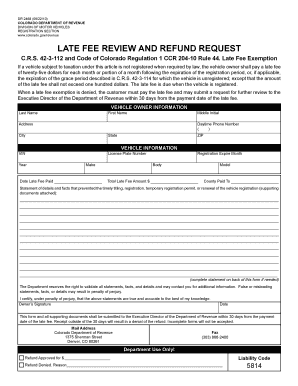
The CO DR 2468 form is used to request a late fee review and refund from the Colorado Department of Revenue. This guide provides a clear, step-by-step approach to help you navigate the online process of filling out this form.
Follow the steps to complete the CO DR 2468 online effectively.
- Press the ‘Get Form’ button to access the form electronically and open it in the required editor.
- Enter the vehicle owner information. Complete the fields for last name, first name, middle initial, address, city, state, ZIP, and daytime phone number.
- Input the vehicle information, including the Vehicle Identification Number (VIN), license plate number, make, model, body type, registration expiration month, year of the vehicle, and the total late fee amount.
- Provide the date the late fee was paid and the county where payment was made.
- Describe the details and facts that prevented timely registration or renewal. Attach supporting documents if necessary and include additional statements on the back if needed.
- Review the form for completeness and accuracy. Ensure all required fields are filled in and supporting documents are attached.
- Certify the statements by signing and dating the form, confirming that the information provided is true and accurate.
- Submit the completed form to the Executive Director of the Department of Revenue within 30 days from the payment date of the late fee to avoid denial.
- Choose to save changes, download, print, or share the completed form for your records.
Don't wait—complete your CO DR 2468 form online today!
Get form
Experience a faster way to fill out and sign forms on the web. Access the most extensive library of templates available.
When filling out a Colorado title, you need to include details such as the buyer's and seller's names, addresses, and signatures. Additionally, you'll need the vehicle's make, model, year, and VIN. To ensure everything aligns correctly, refer to the CO DR 2468 form, which provides guidelines for completing your title properly.
Get This Form Now!
Use professional pre-built templates to fill in and sign documents online faster. Get access to thousands of forms.