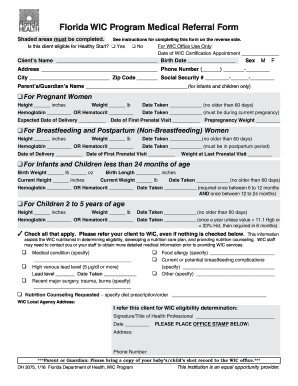
❑ No For WIC Office Use Only: Date of WIC Certification Appointment ______________ Client’s Name ___________________________________ Birth Date ________________ Sex M F Address ________________________________________ Phone Number (______) _______-________ City ___________________________ Zip Code________ Social Security # ________-______-________ Parent’s/Guardian’s Name ___________________________________ (for infants and children only) ❑ For Pregnant Women Height ______ in.
Open form follow the instructions
Easily sign the form with your finger
Send filled & signed form or save
How to fill out the FL DH 3075 online
Filling out the FL DH 3075 online is a crucial step for individuals seeking assistance through the Florida WIC Program. This guide will provide clear and concise instructions on how to complete the form accurately and efficiently.
Follow the steps to complete the FL DH 3075 online.
- Click ‘Get Form’ button to obtain the form and open it in the editor.
- Indicate whether the client is eligible for Healthy Start by checking ✓ 'Yes' or 'No'. Leave blank if they have not been screened, noting that this does not affect WIC eligibility.
- Complete the client’s name and birth date in the designated fields.
- Input optional information such as sex, mailing address, phone number, city, zip code, and the social security number when applicable. Include the parent’s or guardian’s name for infants and children.
- Select the appropriate section based on the client type: Pregnant Women, Breastfeeding Women, Postpartum Women, Infants, or Children. Fill in height, weight, and health metrics based on the category selected.
- Check any medical conditions or dietary requirements that apply to the client. Even if none are checked, refer the client to WIC.
- If nutrition counseling is required, check the box and specify the diet prescription or order.
- Complete the shaded area with the signature of the health professional, their title, and the office details including the stamp.
- Once all information is accurately completed, save changes. You may then download, print, or share the form as needed for the WIC certification appointment.
Take the first step in accessing vital health services by completing your documents online today.
Experience a faster way to fill out and sign forms on the web. Access the most extensive library of templates available.
Related content
DH 3075, 6/22 (Replaces previous editions.) This institution is an equal opportunity...
Also, the WIC encourages breastfeeding and will provide WIC contract formula. Local...
This report presents the results of a treatibility study (TS) performed by Parsons...
Get answers to your most pressing questions about US Legal Forms API.
What is the maximum income to qualify for WIC in Florida?
The maximum income to qualify for WIC in Florida is determined by family size and changes each year. Typically, families must earn less than 185% of the federal poverty level to be eligible. Reviewing your income against these guidelines, alongside your FL DH 3075 form, will help clarify your situation. If you're looking for help with this process, US Legal Forms is an excellent resource for documentation.
How do I get approved for WIC in Florida?
To get approved for WIC in Florida, you must meet income eligibility requirements and demonstrate a nutritional need. Bring necessary documents, including the FL DH 3075 form, to your appointment at the local WIC office. The staff will guide you through the approval process, ensuring you understand every step. Using platforms like US Legal Forms can help you prepare all required documents effectively.
What is the highest income to qualify for WIC?
The highest income to qualify for WIC varies by family size and is updated annually. Generally, your household income must be at or below 185% of the federal poverty level. To ensure you meet the criteria, have your financial information ready, including the details from your FL DH 3075 form. If you are uncertain, check with your local WIC office for the most current guidelines.
How do I apply for WIC in Florida?
Applying for WIC in Florida is straightforward. You will need to complete the application form and gather required documents, including the FL DH 3075 form. Afterward, schedule an appointment with your local WIC office to submit your application and receive guidance. Utilizing resources like US Legal Forms can ensure you have all necessary paperwork completed accurately.
How do I upload documents to WIC in Florida?
To upload documents to WIC in Florida, first, visit the official WIC website. You'll find the upload portal where you can securely submit your documents. Make sure you have your FL DH 3075 form ready, as it provides necessary information to process your application efficiently. If you need assistance, consider using the US Legal Forms platform to simplify the document preparation process.
How do I upload documents to my Access Florida account?
To upload documents to your Access Florida account, you should log in to the MyACCESS account online. Once logged in, you can navigate to the document upload section and follow the instructions provided. The FL DH 3075 may assist you in identifying the specific documents needed for your case to ensure successful submission.
How do I upload documents to Florida Unemployment?
To upload documents to Florida Unemployment, visit the Employ Florida system and log into your account. From there, you can easily follow the directions to submit the required documents. If you're unsure what to upload, referring to the FL DH 3075 can help clarify your documentation requirements.
How do I upload documents to MQA Florida?
Uploading documents to MQA Florida requires you to access the MQA online portal first. Once logged in, you can follow the instructions provided to upload your necessary documents related to your application or renewal. If you encounter any issues, the FL DH 3075 can serve as a useful reference for documentation procedures.
How to prove no income for WIC?
To prove no income when applying for WIC, you may provide documentation such as a zero-income verification or an affidavit explaining your financial situation. It is essential to be clear and honest in your submission. Using the FL DH 3075, you can ensure that you fulfill all necessary requirements effectively.
How do I upload documents to my Snap account?
To upload documents to your Snap account, log in to the MyACCESS website or use the mobile app. You can follow the prompts to upload your documents securely. For further guidance, you can explore resources related to the FL DH 3075, which can help clarify the types of documents needed and their proper submission.
Use professional pre-built templates to fill in and sign documents online faster. Get access to thousands of forms.
If you believe that this page should be taken down, please follow our DMCA take down process here.
This form is available in several versions. Select the version you need from the drop-down list below.