Loading
Form preview
  • US Legal Forms
  • Other Templates
  • Executive Forms
  • Executive Department DOD Forms
  • Epsq Sf86 Worksheet 2005

Get Epsq Sf86 Worksheet 2005-2026

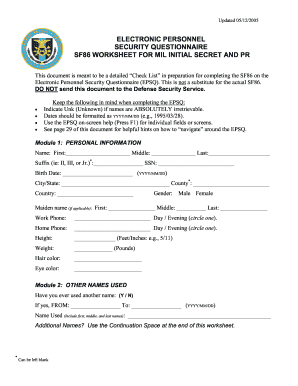
E SF86 on the Electronic Personnel Security Questionnaire (EPSQ). This is not a substitute for the actual SF86. DO NOT send this document to the Defense Security Service. • • • • Keep the following in mind when completing the EPSQ: Indicate Unk (Unknown) if names are ABSOLUTELY irretrievable. Dates should be formatted as YYYY/MM/DD (e.g., 1995/03/28). Use the EPSQ on-screen help (Press F1) for individual fields or screens. See page 29 of this document for helpful hints on how to “nav.

How it works

  1. Open form

    Open form follow the instructions

  2. Easily sign form

    Easily sign the form with your finger

  3. Share form

    Send filled & signed form or save

How to fill out the EPSQ SF86 Worksheet online

Completing the EPSQ SF86 Worksheet is a crucial step in the personnel security clearance application process. This guide will provide comprehensive and user-friendly instructions on how to effectively fill out the EPSQ SF86 Worksheet online.

Follow the steps to fill out the EPSQ SF86 Worksheet correctly.

  1. Click the ‘Get Form’ button to obtain the EPSQ SF86 Worksheet and open it in your preferred editor.
  2. Begin by filling out Module 1: Personal Information. Ensure you provide your first, middle, and last name, suffix (if applicable), Social Security Number, date of birth in the format YYYY/MM/DD, and current city/state/country of residence.
  3. Proceed to Module 2: Other Names Used. Indicate whether you have ever used another name, and if applicable, provide the range of dates and the name used.
  4. Complete Module 3: Citizenship. Select your current citizenship status and provide relevant details such as your mother's maiden name and whether you hold any US citizenship certificates.
  5. Move to Module 4: Where You Have Lived. List your residences for the last seven years, specifying dates and providing the necessary information for each address.
  6. Continue to Module 5: Where You Went to School. Answer whether you have attended school within the last five years and provide details, including the type of education and institution.
  7. In Module 6: Your Employment Activities, detail your employment history for the past seven years, covering all relevant positions, military service, and periods of unemployment.
  8. Follow the structured guidelines in the subsequent modules, detailing relationships, military history, foreign activities, and your financial record as applicable.
  9. Conclude with Modules 41 to 43, where you will provide information regarding associations, general remarks, and any additional comments.
  10. Once all sections are filled out, ensure to save your changes, and use the provided options to download, print, or share the EPSQ SF86 Worksheet.

Start filling out your EPSQ SF86 Worksheet online today to ensure your security clearance application is complete and accurate.

Get form

Experience a faster way to fill out and sign forms on the web. Access the most extensive library of templates available.
Get form

Related content

Standard Form 86 - Questionnaire for National...
This form will be used by the United States (U.S.) Government in conducting background...
Learn more
ELECTRONIC PERSONNEL SECURITY ...
Sep 24, 2002 — Use the Continuation Space at the end of this worksheet. Page 24. EPSQ...
Learn more

Related links form

Usda 502 Prequalification Information Instructions Sba Success Story Form 7j Eligibility Form Form 216 B

Questions & Answers

Get answers to your most pressing questions about US Legal Forms API.

Contact support

On the EPSQ SF86 Worksheet, you should list immediate family members such as parents, siblings, and spouses. Depending on the section instructions you might also need to include step-siblings and half-siblings. The key is to be transparent and provide accurate information about your family background to assist the clearance process. When in doubt, check resources like US Legal Forms for clarity.

To effectively answer questions on the EPSQ SF86 Worksheet, approach each section systematically and truthfully. Be thorough in providing details about your personal history, employment, and relationships. Avoid vague responses; instead, provide specific information. Relying on templates or guidance from trusted sources like US Legal Forms can also help you navigate the process smoothly.

When filling out the EPSQ SF86 Worksheet, you typically need to provide at least three references. These references should be individuals who know you well and can attest to your character and reliability. It is important to choose people whom you trust and who can provide honest and supportive information. Remember to inform them beforehand that they may be contacted during the clearance process.

Yes, you must complete the EPSQ SF86 Worksheet to obtain a secret clearance. This form collects detailed information about your background to help determine your eligibility. Filling out the worksheet accurately is crucial, as it forms the basis of your background check. Take your time to ensure all information is complete and correct.

If you forget to list something on the EPSQ SF86 Worksheet, it can lead to complications during your security clearance process. Omissions may be seen as discrepancies, which could raise questions about your integrity and compliance. It is important to correct any errors or omissions as soon as you realize them. You might consider consulting with a professional or using platforms like US Legal Forms to help ensure your submission is accurate.

Yes, when you apply for a security clearance using the EPSQ SF86 Worksheet, the investigation may include a review of your family members. This includes gathering information about their background and potential influence over you. The purpose is to ensure that you do not pose a risk due to any connections with family members. Therefore, being honest and thorough is essential when completing the worksheet.

The e-QIP (Electronic Questionnaires for Investigations Processing) is a platform used to submit the EPSQ SF86 Worksheet electronically. While they are not identical, e-QIP allows you to fill out and submit the SF-86 efficiently. Understanding this distinction can streamline your security clearance application process.

You can download the SF-86 form from the official government websites dedicated to security clearance applications. Additionally, platforms like US Legal Forms provide easy access to the EPSQ SF86 Worksheet, allowing you to fill it out digitally. This access makes it simpler for you to ensure accuracy and completeness when submitting your application.

The SF-86 form is typically associated with positions requiring access to Top Secret and Secret level clearances. These clearances are vital for national security roles and sensitive governmental functions. Completing the EPSQ SF86 Worksheet correctly is essential to move through the clearance process smoothly.

Filling out the e-QIP can vary based on your personal background and experience, but on average, it can take several hours to complete. The EPSQ SF86 Worksheet is comprehensive, requiring detailed information that may take time to gather. However, you can save your progress and return later, making the process more manageable.

Get This Form Now!

Use professional pre-built templates to fill in and sign documents online faster. Get access to thousands of forms.
Get form
If you believe that this page should be taken down, please follow our DMCA take down processhere.
Get EPSQ SF86 Worksheet
Get form
  • Adoption
  • Bankruptcy
  • Contractors
  • Divorce
  • Home Sales
  • Employment
  • Identity Theft
  • Incorporation
  • Landlord Tenant
  • Living Trust
  • Name Change
  • Personal Planning
  • Small Business
  • Wills & Estates
  • Packages A-Z
  • Affidavits
  • Bankruptcy
  • Bill of Sale
  • Corporate - LLC
  • Divorce
  • Employment
  • Identity Theft
  • Internet Technology
  • Landlord Tenant
  • Living Wills
  • Name Change
  • Power of Attorney
  • Real Estate
  • Small Estates
  • Wills
  • All Forms
  • Forms A-Z
  • Other Templates
  • Legal Hub
  • About Us
  • Help Portal
  • Legal Resources
  • Blog
  • Affiliates
  • Contact Us
  • Delete My Account
  • Site Map
  • Industries
  • Forms in Spanish
  • Localized Forms
  • State-specific Forms
  • Forms Kit
  • Real Estate Handbook
  • All Guides
  • Notarize
  • Incorporation services
  • For Consumers
  • For Small Business
  • For Attorneys
  • USLegal
  • FormsPass
  • pdfFiller
  • signNow
  • altaFlow
  • DocHub
  • Instapage
Form Packages
  • Adoption
  • Bankruptcy
  • Contractors
  • Divorce
  • Home Sales
  • Employment
  • Identity Theft
  • Incorporation
  • Landlord Tenant
  • Living Trust
  • Name Change
  • Personal Planning
  • Small Business
  • Wills & Estates
  • Packages A-Z
Form Categories
  • Affidavits
  • Bankruptcy
  • Bill of Sale
  • Corporate - LLC
  • Divorce
  • Employment
  • Identity Theft
  • Internet Technology
  • Landlord Tenant
  • Living Wills
  • Name Change
  • Power of Attorney
  • Real Estate
  • Small Estates
  • Wills
  • All Forms
  • Forms A-Z
  • Other Templates
Customer Service
  • Legal Hub
  • About Us
  • Help Portal
  • Legal Resources
  • Blog
  • Affiliates
  • Contact Us
  • Delete My Account
  • Site Map
  • Industries
  • Forms in Spanish
  • Localized Forms
  • State-specific Forms
  • Forms Kit
Legal Guides
  • Real Estate Handbook
  • All Guides
Prepared for you
  • Notarize
  • Incorporation services
Our Customers
  • For Consumers
  • For Small Business
  • For Attorneys
Our Sites
  • USLegal
  • FormsPass
  • pdfFiller
  • signNow
  • altaFlow
  • DocHub
  • Instapage
Social Media
Call us now toll free:
+1 833 426 79 33
As seen in:
© Copyright 1999-2026 airSlate Legal Forms, Inc. 17 Station Street, Suite 303, Brookline, MA 02445
  • Your Privacy Choices
  • Terms of Service
  • Privacy Notice
  • Content Takedown Policy
  • Bug Bounty Program