Loading
Get Midland Memorial Hospital Policy Tech Ref 5059 2016-2026
How it works
-

Open form follow the instructions
-

Easily sign the form with your finger
-

Send filled & signed form or save
How to fill out the Midland Memorial Hospital Policy Tech Ref 5059 online
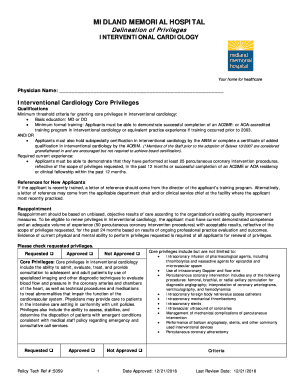
Filling out the Midland Memorial Hospital Policy Tech Ref 5059 is a critical step for physicians seeking interventional cardiology privileges. This guide provides clear and supportive instructions to help users complete the form accurately and efficiently.
Follow the steps to successfully complete the form.
- Click the ‘Get Form’ button to obtain the form and open it in the designated online editor.
- Enter your name in the 'Physician Name' section at the top of the form. Ensure that you provide your full legal name.
- Review the qualifications section. Confirm that you meet the minimum threshold criteria, including educational background and required training.
- For new applicants, provide a letter of reference from the director of your training program or relevant department chair. Make sure to include this as an attachment if required.
- In the reappointment section, indicate your practice experience in percutaneous coronary interventions by checking the appropriate box and providing supporting documents.
- Check the requested privileges box, which includes core privileges, and any non-core privileges you wish to request. Be sure to assess your qualifications as stated in the criteria.
- If you wish to exclude any privileges, strike through the relevant items and initial beside them to confirm your decision.
- Read the statement regarding the understanding of privileges, then provide your signature and the date at the end of the form.
- Once you have completed all sections, you may save the changes, download a copy, print the form, or share it as necessary.
Complete the Midland Memorial Hospital Policy Tech Ref 5059 online today to ensure timely processing of your privileges.