Loading
Get Pakistan Data Entry Form Smart Nicop
How it works
-

Open form follow the instructions
-

Easily sign the form with your finger
-

Send filled & signed form or save
How to fill out the Pakistan Data Entry Form Smart NICOP online
Filling out the Pakistan Data Entry Form for the Smart NICOP is a straightforward process that requires careful attention to detail. This guide offers a comprehensive step-by-step approach to assist you in accurately completing the form online.
Follow the steps to successfully complete the Pakistan Data Entry Form Smart NICOP.
- Click ‘Get Form’ button to obtain the form and open it in the editor.
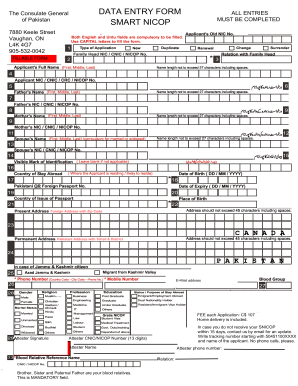
- Carefully read the instructions provided on the form before filling it out. Ensure all fields are filled completely, as any marked fields left blank can result in rejection.
- Paste a recent photograph in the designated area, ensuring it complies with the specified dimensions of 1.5” x 2”.
- Select the type of application you are submitting by marking the appropriate box: New, Duplicate, Change, Renewal, or Surrender.
- Fill in the Family Head NIC or CNIC or NICOP number accurately.
- Enter the applicant's full name in the required fields (First, Middle, Last), ensuring it does not exceed 27 characters including spaces.
- Provide the applicant's NIC or CNIC or CRC or NICOP number as requested.
- Complete the fields for the father's name and NIC/CNIC/NICOP number, paying attention to character limits.
- Repeat the process for the mother's name and NIC/CNIC/NICOP number.
- If applicable, enter the spouse’s name and their corresponding NIC/CNIC/NICOP number.
- Indicate any visible mark of identification, leaving the field blank if not applicable.
- Fill out the country of stay abroad, date of birth, and passport details including number and expiry date.
- Input the present and permanent addresses with Pakistani details included where necessary.
- Include the phone and mobile numbers, ensuring proper formatting with country codes.
- Complete the sections concerning gender, religion, profession, education, and purpose of stay abroad.
- Apply for a thumb impression if requested and sign the application as it appears on your legal documents.
- Ensure all mandatory documents are prepared and included with the application.
- Review the entire form for accuracy before proceeding. If errors are found, make corrections immediately.
- At the end, save changes, download a copy of the form, print it if necessary, or share it as required.
Complete your Pakistan Data Entry Form Smart NICOP online today for a seamless application process.
Related links form
To verify your NADRA documents, visit the official NADRA verification website and select the appropriate verification option. By entering your document details, you can quickly confirm their legitimacy. Utilizing the Pakistan Data Entry Form Smart NICOP can offer added clarity during this process, guiding you through every necessary step efficiently.