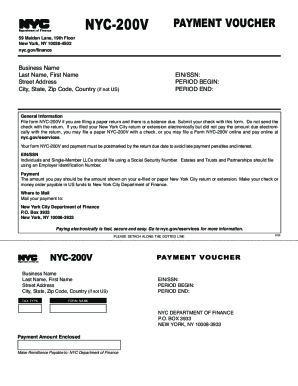
Your form nYc-200V and payment must be postmarked by the return due date to avoid late payment penalties and interest. TM Department of Finance 59 maiden lane 19th Floor new York nY 10038-4502 nyc.gov/finance NYC-200V Business name last name First name street address city state Zip code country if not Us PAYMENT VOUCHER ein/ssn period Begin period end General Information File form nYc-200V if you are filing a paper return and there is a balance due. Submit your check with this form. do not send the check with the return. if you filed your new York city return or extension electronically but did not pay the amount due electronically with the return you may file a paper nYc-200V with a check or you may file a Form nYc-200V online and pay online at nyc.gov/eservices. EIN/SSN individuals and single-member llcs should file using a social security number. estates and trusts and partnerships should file using an employer identification number. Payment the amount you pay should be the amount s....

How it works
  • Open form

    Open form follow the instructions

  • Easily sign form

    Easily sign the form with your finger

  • Share form

    Send filled & signed form or save

How to fill out the NY NYC-200V online

Filling out the NY NYC-200V payment voucher online is a straightforward process that allows you to submit payments for your New York City tax obligations. This guide provides a step-by-step approach to ensure you complete the form accurately.

Follow the steps to complete and submit your NY NYC-200V online.

  1. To obtain the form, click the ‘Get Form’ button. This will enable you to access the NYC-200V payment voucher online.
  2. Begin filling out the form starting with the 'Business Name' field. Enter the legal name of your business as it appears on your registration documents.
  3. Next, provide your 'Last Name' and 'First Name' if applicable. This information is necessary to identify the individual responsible for the payment.
  4. Fill in your 'Street Address,' 'City,' 'State,' and 'Zip Code.' If your address is outside of the United States, include 'Country' as well.
  5. In the 'EIN/SSN' field, enter either your Employer Identification Number or Social Security Number, depending on your filing status. Individuals and Single-Member LLCs should use their SSN, while Estates, Trusts, and Partnerships should provide their EIN.
  6. Indicate the 'Period Begin' and 'Period End' dates relevant to the payment being made. These dates should reflect the tax period for which you are submitting this voucher.
  7. Specify the 'Payment Amount Enclosed' ensuring it matches the amount due as shown on your previously filed New York City return or extension.
  8. Once all fields are filled out accurately, review the information for completeness. Make sure all details are correct to avoid delays or issues with your payment.
  9. Finally, choose to either save the changes in the online system, download a copy for your records, print the voucher for mailing, or share it as needed.

Complete your NY NYC-200V payment voucher online today for a quick and secure submission.

Get form

Experience a faster way to fill out and sign forms on the web. Access the most extensive library of templates available.

Related content

Business & Excise Tax Forms - NYC.gov

Documents on this page are provided in pdf format. NOTE: If a legal ... NYC-200V - Payment...

Learn more
2007 News archive | Division of Jazz Studies - UNT...

At the 2007 conference of The International Association for Jazz Education in ...... the...

Learn more
#VOLTAG Hashtag on Instagram Posts about Photos...

To know more such stuff please follow @weknownothing.in . ..... ACCIÓN EN RRSS...

Learn more
Questions & Answers

Get answers to your most pressing questions about US Legal Forms API.

Contact support

What is form NYC 1127?

The NYC-1127 is the personal income tax return for non-residents of NYC who are employees of the City of New York. ... Section 1127 of the New York City Charter does not apply to you if you work for the Department of Education, City University of New York, District Attorneys' Offices, or New York City Housing Authority.

Paying taxes with a credit card qualify as a purchase, which means you'll earn rewards. However, the fees you'll have to pay will most likely wipe out any value on those rewards. Do the math first.

Paying for property taxes and most other things, really can be done with a debit or credit card. ... If you'd like to pay direct, many municipalities have their own sites that allow homeowners to pay property taxes online with a debit or credit card for a fee, usually around 2-3 percent of the tax.

You can put just about anything on a credit card these days, including your sales taxes in most states. ... However, in those states that do allow you to pay sales taxes with plastic, the convenience comes with a price, usually in the form of a small fee that is charged by a third-party payments processor.

You can also pay your taxes online or by phone either by a direct transfer from your bank account or by credit or debit card. ... For more information, go to www.irs.gov/e-pay. How To Fill In Form 1040-V. Line 1.

Step 1: Select Challan 280. Go to the tax information network of the Income Tax Department and click on 'Proceed' under Challan 280 option. Step 2: Enter Personal Information. For individuals paying tax: ... Step 3: Double check Information. ... Step 4: Check Receipt (Challan 280)

Order Online. The fastest way to get a Tax Return or Account transcript is through the 'Get Transcript' tool available on IRS.gov. ... Order by phone. You can also order by phone at 800-908-9946 and follow the prompts. Order by mail.

Direct Pay. Taxpayers can pay tax bills directly from a checking or savings account free with IRS Direct Pay. ... Credit or debit cards. Taxpayers can also pay their taxes by debit or credit card online, by phone or with a mobile device. ... Installment agreement.

Login to e-Filing website with User ID, Password, Date of Birth /Date of Incorporation and Captcha. Go to e-File and click on "Prepare and Submit ITR Online". Select the Income Tax Return Form ITR 1/ITR 4S and the Assessment Year. Fill in the details and click the "Submit" button.

Make payable to NYS Income Tax. Mail voucher and payment to: NYS Estimated Income Tax, Processing Center, PO Box 4122, Binghamton NY 13902-4122.

Get This Form Now!

Use professional pre-built templates to fill in and sign documents online faster. Get access to thousands of forms.

If you believe that this page should be taken down, please follow our DMCA take down process here.

Get NY NYC-200V