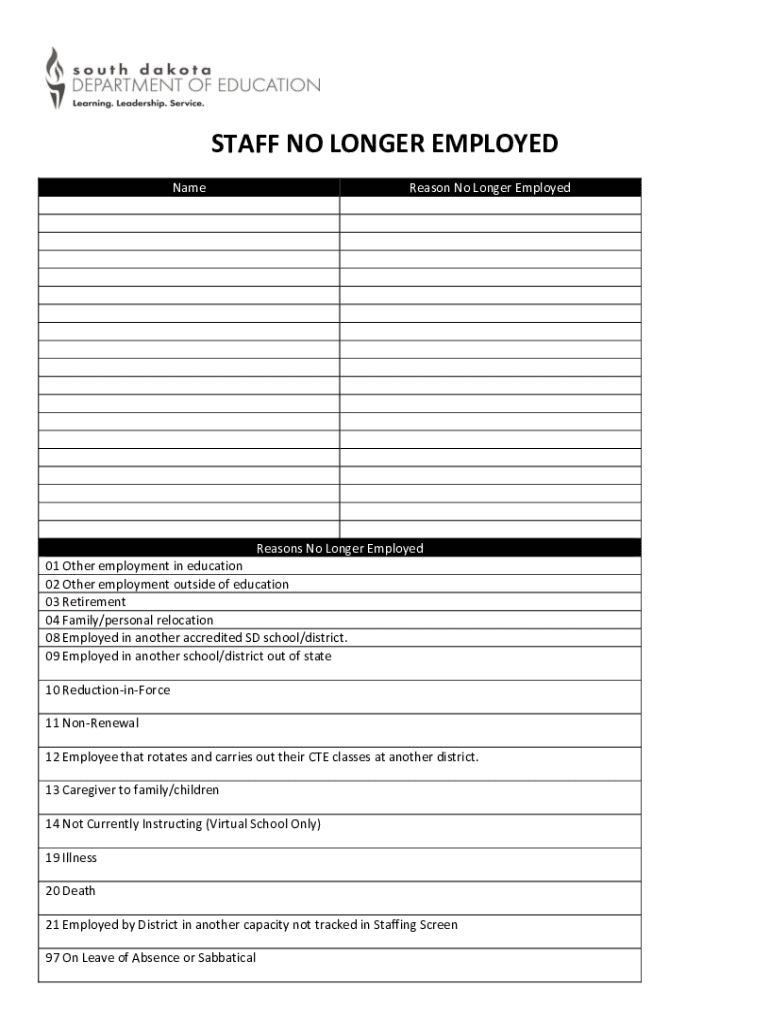
This document serves as a notification form for staff members who are no longer employed, detailing various reasons for their departure.
Loading

Open form follow the instructions

Easily sign the form with your finger

Send filled & signed form or save
How to fill out the SD Staff No Longer Employed online
Filling out the SD Staff No Longer Employed form is essential for updating employment records accurately. This guide provides clear instructions to help you complete the online form efficiently.
Follow the steps to complete the form with ease.
- Press the ‘Get Form’ button to access the form. This will allow you to open it in your chosen online editor without any modifications.
- Begin by entering the full name of the staff member who is no longer employed in the designated field. Ensure the spelling is accurate as this information is vital for record-keeping.
- Select the reason for the staff member's departure from the dropdown menu. Options include alternatives such as retirement, relocation, or employment elsewhere. Choose the most appropriate reason to ensure accurate record-keeping.
- If selecting 'Other employment in education' or another specified reason, provide additional details in the text box if prompted, to give further context for the staff member's departure.
- Review all entered information carefully to ensure it is accurate and complete. Make any necessary corrections before proceeding to the next step.
- Once all fields are filled out correctly, you can choose to save changes, download the completed form, or print it. Additionally, consider sharing the document as necessary within your organization.
Complete your SD Staff No Longer Employed document online today for efficient record management.
Experience a faster way to fill out and sign forms on the web. Access the most extensive library of templates available.
Related content
08 Employed in another accredited SD school/district. 09 Employed in another...
Classified employees shall have no expectation of continued employment, unless so...
On this wiki you can find information about the Transport Tycoon servers, including player...
Get answers to your most pressing questions about US Legal Forms API.
How do I announce an employee is no longer with the company?
Announcing that an employee is no longer with the company should be done with tact and consideration. Begin with a clear statement regarding the departure, then acknowledge the employee’s contributions to the team. To maintain a positive atmosphere, you may also share future plans or how the team will adjust, reassuring everyone of continued support and stability.
How to professionally say someone no longer works here?
To professionally communicate that an SD staff member no longer works here, focus on clarity and transparency. Use straightforward language, such as 'We want to inform you that Employee's Name is no longer with the company as of Date.' It's also helpful to outline how responsibilities will be managed moving forward, ensuring coworkers feel supported during this change.
How to tell an employee they are no longer employed?
When conveying the message to an employee about their employment status, maintain a respectful and compassionate tone. Be direct yet sensitive, explaining the reasons for the decision while allowing space for the employee to express their feelings. Always remind them that their contributions were valued, and encourage them to ask questions or seek support during this transition.
How do I write an email stating that an employee no longer works there?
To write an effective email stating that an SD staff member is no longer employed, start with a clear subject line such as 'Staff Update'. In the body, briefly mention the employee's name, their role, and the effective date of their departure. Conclude with a note on how the company appreciates their contributions and redirect any inquiries about their responsibilities to another team member.
What is considered part-time in South Dakota?
In South Dakota, part-time employment typically means working less than 30 hours per week. However, definitions may vary depending on the employer’s policies. If you are SD staff no longer employed and seeking new opportunities, consider various job classifications. Understanding these distinctions can help you navigate your next steps effectively.
What is wrongful termination in South Dakota?
Wrongful termination in South Dakota refers to a situation where an employee is fired in violation of the law or contractual agreements. This includes dismissals based on discrimination, retaliation for whistleblowing, or breaching a contract. If you believe you are among the SD staff no longer employed unjustly, it's crucial to understand the circumstances behind your termination. Legal resources can help clarify your situation.
Can you sue for wrongful termination in South Dakota?
Yes, you can sue for wrongful termination in South Dakota if your dismissal violates state or federal laws. Employees who are SD staff no longer employed due to discrimination or retaliation may have grounds for a lawsuit. It's important to gather evidence supporting your claim. Consulting with a qualified attorney can help you understand your options.
How to get a toxic employee to quit?
Encouraging a toxic employee to quit starts with open communication. Address their behavior clearly and express how it impacts the team. If they understand the gravity of their actions and see no improvement, they may choose to resign. Ultimately, if this does not work, reaffirming that SD staff no longer employed could be the outcome for a healthier workplace.
How to get rid of unwanted staff?
When dealing with unwanted staff, it is crucial to approach the situation with transparency. Assess their role and performance against your business needs. After having open discussions, and if needed, pursuing the option of having SD staff no longer employed may allow for a more harmonious work environment. Clear processes can guide you through this difficult decision.
How to get rid of unwanted employees?
To address unwanted employees, first identify the specific concerns leading to this decision. Engage in one-on-one discussions to express your concerns and outline expectations. If issues persist despite attempts to correct them, transitioning to having SD staff no longer employed may be your next step. Always ensure you follow proper procedures to maintain fairness.
Use professional pre-built templates to fill in and sign documents online faster. Get access to thousands of forms.
If you believe that this page should be taken down, please follow our DMCA take down process here.