Loading
Get Au Nsw Retail Bond Lodgement 2020
How it works
-

Open form follow the instructions
-

Easily sign the form with your finger
-

Send filled & signed form or save
How to fill out the AU NSW Retail Bond Lodgement online
This guide provides clear and comprehensive instructions on how to fill out the AU NSW Retail Bond Lodgement form online. Whether you are lodging a new bond or making a top-up, this step-by-step approach will simplify the process for all users.
Follow the steps to complete your Retail Bond Lodgement efficiently.
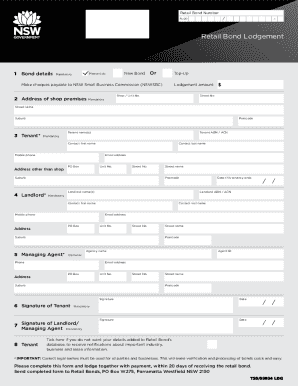
- Click ‘Get Form’ button to access the AU NSW Retail Bond Lodgement form for completion.
- In the Bond details section, indicate whether you are lodging a new bond or making a top-up by ticking the appropriate box. If it is a top-up, ensure to provide the existing Bond Number.
- Enter the address of the shop premises. This includes the Shop/Unit number, Street number, Street name, Suburb, and Postcode. Note that the shop address must be complete and accurate.
- In the Tenant section, fill in the tenant name(s), Tenant ABN/ACN, contact first and last names, mobile phone number, email address, and address details if it differs from the shop. These are mandatory fields.
- Complete the Landlord section by providing the name(s) of the landlord, Landlord ABN/ACN, contact last name, mobile phone number, email address, and complete address details. This information is also mandatory.
- If there is a managing agent, include their agency name, Agent ID, phone number, and email address in the Managing Agent section. This section is optional.
- Both the tenant and landlord/managing agent must provide their signatures in the Signature section, along with the relevant dates. Ensure all individuals are correctly signing as their legal names.
- Fill in the statistical data section, noting that providing this information is voluntary. Indicate if you do not wish for your details to be added to the Retail Bond’s database.
- Once all sections are completed, review your provided information for accuracy. After confirming all details, you can save the changes, download, print, or share the completed form as needed.
Complete your AU NSW Retail Bond Lodgement online today to ensure timely processing.
Get form
Experience a faster way to fill out and sign forms on the web. Access the most extensive library of templates available.
Related links form
Get This Form Now!
Use professional pre-built templates to fill in and sign documents online faster. Get access to thousands of forms.