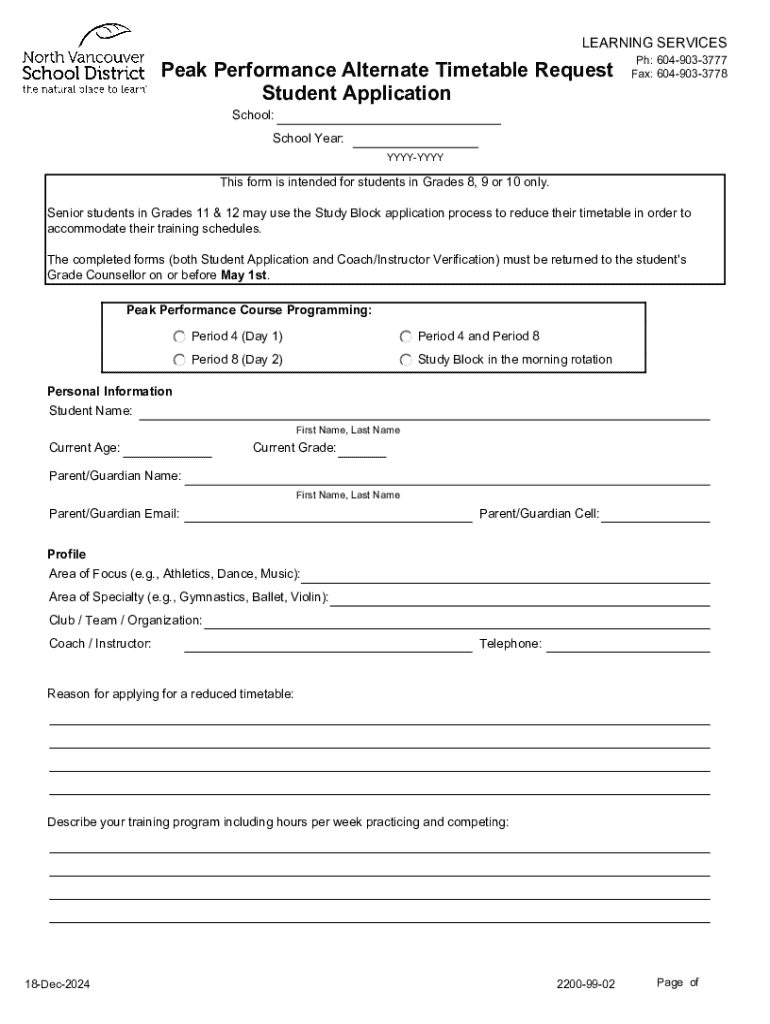
R: YYYY-YYYY This form is intended for students in Grades 8, 9 or 10 only. Senior students in Grades 11 & 12 may use the Study Block application process to reduce their timetable in order to accommodate their training schedules. The completed forms (both Student Application and Coach/Instructor Verification) must be returned to the student's Grade Counsellor on or before May 1st. Peak Performance Course Programming: Period 4 (Day 1) Period 4 and Period 8 Period 8 (Day 2) Study Block in the m.
Loading

Open form follow the instructions

Easily sign the form with your finger

Send filled & signed form or save
How to fill out the Canada North Vancouver School District Peak Performance Alternate Timetable Request Student online
Filling out the Canada North Vancouver School District Peak Performance Alternate Timetable Request Student form is essential for students in Grades 8, 9, or 10 who wish to adjust their timetables to accommodate their training schedules. This guide provides clear and supportive instructions to ensure you complete the form accurately and efficiently.
Follow the steps to complete your request effectively.
- Click ‘Get Form’ button to obtain the form and open it in the editor.
- Fill in your personal information, including your full name, current age, grade, and the contact details of your parent or guardian.
- Indicate your area of focus, such as athletics, dance, or music, and provide details about your area of specialty.
- List the club, team, or organization you are affiliated with, along with your coach or instructor's name and their contact number.
- Provide a reason for applying for a reduced timetable, and describe your training program by detailing the number of hours per week you practice and compete.
- Outline your long-term goals related to your area of specialty.
- List any additional activities you are involved in outside your primary area of focus, highlighting both school and community clubs.
- Attach the completed Coach/Instructor Verification Form as required.
- Sign the form, including the date, and ensure your parent or guardian signs as well.
- Once all sections are completed, save your changes, and if necessary, download, print, or share the form with your grade counsellor by the given deadline.
Complete your Peak Performance Alternate Timetable Request Student form online today!
Experience a faster way to fill out and sign forms on the web. Access the most extensive library of templates available.
Related content
Current school board practices for recryitment and retention of teachers in Canada are...
Sep 4, 2024 — Students with disabilities may request this catalog in other formats by...
models progressed within a short period of time from having poor performance to surpassing...
Use professional pre-built templates to fill in and sign documents online faster. Get access to thousands of forms.
If you believe that this page should be taken down, please follow our DMCA take down process here.