Loading
Get Ca San Diego Housing Commission Loan Management Occupancy Declaration Form 2015-2026
How it works
-

Open form follow the instructions
-

Easily sign the form with your finger
-

Send filled & signed form or save
How to fill out the CA San Diego Housing Commission Loan Management Occupancy Declaration Form online
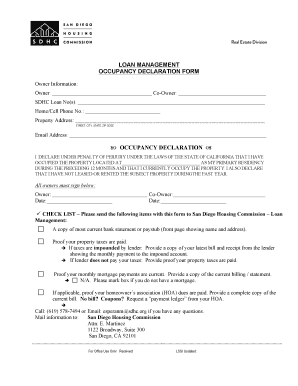
This guide provides comprehensive instructions on how to fill out the CA San Diego Housing Commission Loan Management Occupancy Declaration Form online. Users can easily navigate each component of the form for a successful submission.
Follow the steps to complete your occupancy declaration form online.
- Press the ‘Get Form’ button to access the form and open it in your preferred editor.
- Fill in the owner information section. Enter the name of the owner and co-owner, if applicable, along with the SDHC loan number. It is important to provide accurate data in these fields.
- Input your home or cell phone number and property address. Ensure all details such as street, city, state, and ZIP code are correct for effective communication.
- Provide your email address for any correspondence related to the form.
- Complete the occupancy declaration statement by declaring that you have occupied the property as your primary residency during the past 12 months and affirm that you currently occupy the property. Make sure to acknowledge that you have not leased or rented the property over the last year.
- All owners must sign the form. Ensure the owner’s and co-owner’s signatures and dates are included as required.
- Attach the necessary documentation as outlined in the checklist. This includes a current bank statement or paystub, proof of paid property taxes, current mortgage payment proof, and HOA dues, if applicable.
- Once all sections are filled out and required documents attached, you can save the changes made to the form, download it, print it, or share it as needed for submission.
Complete your occupancy declaration form online today for a smooth filing experience.