Loading
Get Virtual Vein Center Venous Insufficiency Worksheet 2015-2026
How it works
-

Open form follow the instructions
-

Easily sign the form with your finger
-

Send filled & signed form or save
How to fill out the Virtual Vein Center Venous Insufficiency Worksheet online
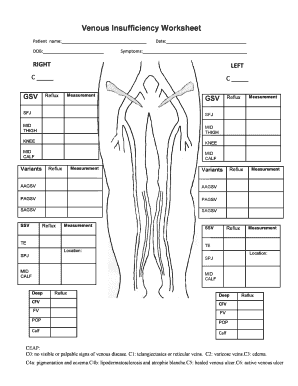
Filling out the Virtual Vein Center Venous Insufficiency Worksheet online can help streamline the process of assessing venous health. This guide will walk you through each section of the worksheet, ensuring you have the information needed to complete it accurately.
Follow the steps to complete your venous insufficiency worksheet.
- Press the ‘Get Form’ button to access the worksheet and open it in the editor.
- Begin by filling in your personal information, including your name and date of birth in the designated fields.
- Record the current date in the appropriate field provided on the worksheet.
- In the symptoms section, describe any symptoms you are experiencing. Use the boxes to mark the relevant options for the right and left legs.
- Provide detailed measurements and reflux information for veins in both the right and left legs, including GSV, SFJ, mid-thigh, and knee, as prompted.
- Continue filling in details for any variants and their corresponding measurements and reflux status as outlined in the worksheet.
- Utilize the CEAP classification section to indicate the severity of your condition by selecting the appropriate category.
- Once you have completed all fields, review your entries for accuracy.
- Save your changes, and from there, you can download, print, or share the completed worksheet as needed.
Complete your Virtual Vein Center Venous Insufficiency Worksheet online today for a thorough assessment.
To help strengthen your vein walls and keep blood pumping effectively, adopt a healthy diet rich in vitamins C, E, B6 and B12, plus copper, fiber and bioflavonoids.