Loading
Get Va Brhf Horse Show Entry Form 2018-2026
How it works
-

Open form follow the instructions
-

Easily sign the form with your finger
-

Send filled & signed form or save
How to fill out the VA BRHF Horse Show Entry Form online
Filling out the VA BRHF Horse Show Entry Form online is a straightforward process that allows you to register your horse entries efficiently. This guide provides clear, step-by-step instructions to help you complete the form accurately.
Follow the steps to complete your entry form with ease.
- Click the ‘Get Form’ button to access the form and open it in your preferred editor.
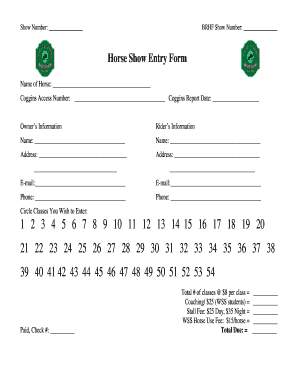
- Enter the show number and BRHF show number in the designated fields at the top of the form.
- In the 'Name of Horse' section, provide the horse’s name, followed by the Coggins access number and the Coggins report date.
- Fill in your information in the 'Owner’s Information' section, including your name, address, email, and phone number.
- Next, complete the 'Rider’s Information' section with the rider's personal details, mirroring the format used for the owner.
- Indicate the classes you wish to enter by circling the corresponding numbers from one to fifty-four.
- Provide payment information, including the check number and calculation of total costs based on the number of classes entered and additional fees.
- Review all entries to ensure accuracy and completeness before finalizing.
- Once completed, save your changes, then download, print, or share the form as needed.
Start filling out your VA BRHF Horse Show Entry Form online today!