Loading
Get Co Bid Sheet - Weld County 2022-2026
How it works
-

Open form follow the instructions
-

Easily sign the form with your finger
-

Send filled & signed form or save
How to fill out the CO Bid Sheet - Weld County online
Filling out the CO Bid Sheet for Weld County is a critical process for individuals participating in foreclosure sales. This guide will walk you through each section of the bid sheet, ensuring that you complete it accurately and efficiently.
Follow the steps to complete the CO Bid Sheet online.
- Click ‘Get Form’ button to obtain the form and open it in the editor.
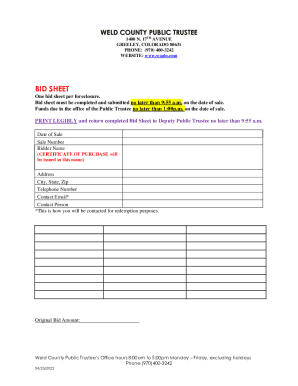
- Begin by entering the date of sale. This is the specific date on which the property will be auctioned.
- Next, provide the sale number associated with the property. This number is typically assigned by the Public Trustee's office and is essential for identifying the specific sale.
- Fill in the bidder name. Ensure that the name you provide is accurate, as the Certificate of Purchase will be issued in this name.
- Enter your complete address, including city, state, and zip code. This information is necessary for any official communication regarding the bid.
- Provide your telephone number for contact purposes. Make sure to include the area code.
- Input your contact email. This email address will be used to reach you for redemption purposes, so double-check for accuracy.
- Include the name of the contact person, if different from the bidder name, to ensure proper communication regarding the bid.
- Finally, enter the original bid amount that you are proposing for the property. This figure should reflect your intended bid.
- Once all sections are complete, print legibly the bid sheet. Ensure that it is signed and dated as required.
- Return the completed bid sheet to the Deputy Public Trustee no later than 9:55 a.m. on the date of sale. You can print, save, or share the form as necessary for your records.
Act now and complete your CO Bid Sheet online for a seamless submission process.