Loading
Get Co Bid Sheet - Weld County 2020-2026
How it works
-

Open form follow the instructions
-

Easily sign the form with your finger
-

Send filled & signed form or save
How to fill out the CO Bid Sheet - Weld County online
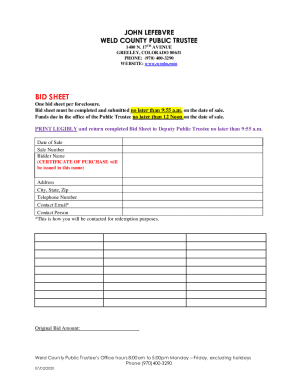
The CO Bid Sheet for Weld County is an essential document required for participating in foreclosure sales. This guide will provide step-by-step instructions to help users complete the bid sheet accurately and efficiently.
Follow the steps to complete the bid sheet online effectively.
- Press the ‘Get Form’ button to access the CO Bid Sheet and open it in your chosen online platform.
- Fill in the 'Date of Sale' field, inputting the specific date when the sale will occur.
- Enter the 'Sale Number,' which is essential for identifying the auction in the public trustee's records.
- Provide the 'Bidder Name,' ensuring that it matches exactly as this will be used to issue the Certificate of Purchase.
- Complete the 'Address,' 'City, State, Zip' fields, making sure to include accurate information to avoid any issues.
- Fill out the 'Contact Email' field; this email is crucial for receiving redemption information.
- Indicate the 'Original Bid Amount,' which reflects the monetary offer you are making to acquire the property.
- Review all entries to ensure accuracy and legibility, as these details are critical for timely processing.
- After confirming the information is correct, proceed to save your changes, download the document, print it, or share it as needed.
Complete your bid sheet online and ensure timely submission for the foreclosure sale.