Loading
Get Au Form 4c - Queensland 2009-2026
How it works
-

Open form follow the instructions
-

Easily sign the form with your finger
-

Send filled & signed form or save
How to fill out the AU Form 4C - Queensland online
Filling out the AU Form 4C is an essential step for individuals looking to change business particulars or representatives under the Weapons Act 1990 in Queensland. This guide provides a clear, step-by-step approach to help you navigate the online form with ease.
Follow the steps to complete the form accurately and efficiently.
- Click ‘Get Form’ button to obtain the form and open it in the editor.
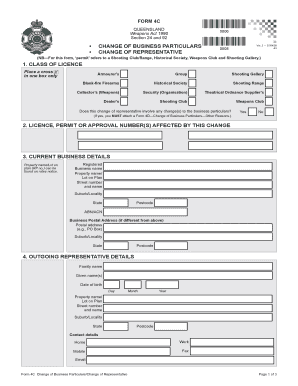
- Begin by selecting the appropriate class of licence by placing a cross in one box only, such as Armourer’s or Shooting Gallery.
- Indicate whether the change of representative involves changes to business particulars by selecting yes or no. If yes, prepare to attach Form 4D.
- Provide the licence, permit, or approval number(s) that are affected by this change.
- Fill in your current business details, including property name, registered business name, address, and postal address, if different.
- Enter outgoing representative details, including their family name, given names, date of birth, and contact details.
- In the outgoing representative certification section, have the outgoing representative sign and date their request for removal.
- Complete the proposed incoming representative details by entering their family name, given names, date of birth, and necessary proof of their identity.
- Fill in the proposed incoming representative's address and contact details. Ensure proof of Queensland residency is provided.
- Complete the medical history section, indicating if treatment has been required for listed medical conditions.
- Provide further information if applicable, specifically addressing any legal history or prior charges.
- Ensure all required documentation is attached as specified in the instructions.
- Complete the proposed incoming representative certification section, confirming all information is true and correct.
- Review all entries for accuracy before saving the changes of the filled form.
- Once verified, download, print, or share the form as needed.
Start filling out the AU Form 4C online today to manage your business particulars efficiently.