Loading
Get 2013 Es Atc S23 (spain)
How it works
-

Open form follow the instructions
-

Easily sign the form with your finger
-

Send filled & signed form or save
How to fill out the 2013 ES ATC S23 (Spain) online
Filling out the 2013 ES ATC S23 form is an essential process for users seeking to submit a request for expert appraisal. This guide provides a streamlined approach to assist users in completing the form accurately and efficiently online.
Follow the steps to successfully complete the form.
- Press the ‘Get Form’ button to acquire the form and display it for editing.
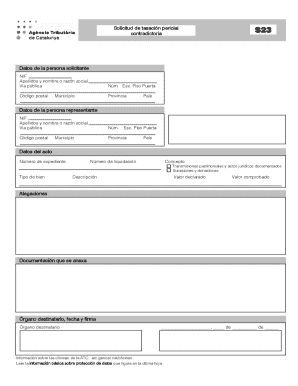
- In the section labeled 'Datos de la persona solicitante' (Data of the applicant), fill in your NIF (Tax Identification Number), surname, and name or business name as applicable. Provide your public address, including the street number, floor, and door, along with the postal code, province, municipality, and country.
- Next, move to 'Datos de la persona representante' (Data of the representative) if applicable. Repeat the process, entering the representative's NIF, surname and name or business name, public address details, including street number, postal code, province, municipality, and country.
- Proceed to the 'Datos del acto' (Data of the act) section. Enter the expediente number, type of asset, liquidation number, and relevant concept. Specify if this pertains to property transactions or legal documented acts, as well as inheritances and donations. Describe the content clearly.
- Indicate the declared value and the verified value of the asset. This is important for the assessment process.
- Write any allegations or explanations in the designated area. This is where you can provide further details or context related to your request.
- Attach any relevant documentation that supports your request in the area labeled 'Documentación que se anexa' (Attached documentation). Make sure to gather all necessary files beforehand.
- Finally, in the 'Órgano destinatario, fecha y firma' section, fill out the recipient's agency details, the date, and your signature.
- Once all sections are completed, review your entries for accuracy. You may then save changes, download the completed form, print it for your records, or share it as needed.
Start filling out your 2013 ES ATC S23 form online today for a hassle-free submission experience!