Loading
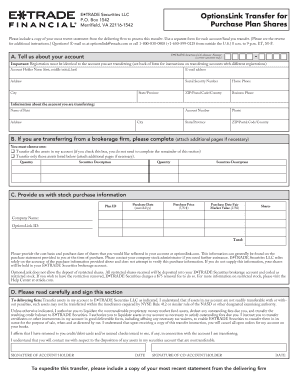
Get 7_purchase_form_0804.indd. Restricted Stock On Optionslink
How it works
-

Open form follow the instructions
-

Easily sign the form with your finger
-

Send filled & signed form or save
How to fill out the 7_purchase_form_0804.indd. Restricted Stock On OptionsLink online
The 7_purchase_form_0804.indd is essential for transferring restricted stock options into your E*TRADE account. This guide provides clear, step-by-step instructions tailored for users at all experience levels, ensuring an efficient online filing process.
Follow the steps to complete your Restricted Stock Options transfer form.
- Click the ‘Get Form’ button to access the form and open it in your online editor.
- Complete the 'Tell us about your account' section by entering your account holder name, email address, social security number, and relevant contact information accurately. Ensure that this information matches the account you are transferring from.
- For the transfer instructions, indicate whether you want to transfer all assets or only specific assets. If transferring specific assets, list the quantity and description of each security.
- In the 'Provide us with stock purchase information' section, fill in the plan ID, purchase date, purchase price, fair market value, shares, company name, and options link ID accurately. Be mindful to provide the cost basis and purchase date information as this will reflect in your account.
- Read the signing section carefully. Sign and date the form as the account holder, and if applicable, ensure the co-account holder also signs. This step is crucial for processing the asset transfer.
- Prepare to submit the form. Make sure to attach a copy of your most recent statement from the delivering firm, then save your changes. You can choose to download, print, or share the completed form before submission.
Complete your transfer form online today for a smooth transition to your E*TRADE account.
Stock options are typically reported on Form 1099-MISC or Form 1099-NEC, depending on the situation. The amounts reported will detail compensation from the exercise of options, which is essential for income tax calculation. Using the 7_purchase_form_0804.indd. Restricted Stock On OptionsLink, you can make sure all components are reported properly and in compliance with tax regulations.
Industry-leading security and compliance
US Legal Forms protects your data by complying with industry-specific security standards.
-
In businnes since 199725+ years providing professional legal documents.
-
Accredited businessGuarantees that a business meets BBB accreditation standards in the US and Canada.
-
Secured by BraintreeValidated Level 1 PCI DSS compliant payment gateway that accepts most major credit and debit card brands from across the globe.