Loading
Get Ca Tlr 3 2011-2026
How it works
-

Open form follow the instructions
-

Easily sign the form with your finger
-

Send filled & signed form or save
How to fill out the CA TLR 3 online
Filling out the CA TLR 3 form is a necessary step for individuals seeking to transfer their criminal background clearance request. This guide will walk you through the online process of completing the form with clarity and ease.
Follow the steps to successfully complete the CA TLR 3 form online.
- Press the ‘Get Form’ button to access the CA TLR 3 form and open it in your preferred editor.
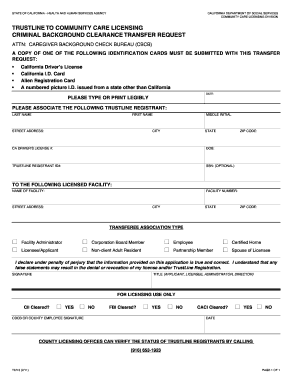
- Begin filling out the form by providing your personal identification information. Ensure to enter your last name, middle initial, and first name clearly.
- Next, input your street address, city, state, and ZIP code accurately to establish your current residence.
- Proceed to fill in your California driver’s license number and date of birth. These details help in identifying your records.
- Enter your TrustLine registrant ID number. If you do not have this information, ensure to leave this field blank.
- Optionally, you may include your Social Security Number. This field is not mandatory but can assist in further verification.
- Indicate the facility you are transferring to by entering the facility number, name, street address, city, state, and ZIP code.
- Select your transferee association type from the provided options, ensuring that the selected role accurately reflects your relationship with the facility.
- As the applicant, you will need to confirm the truthfulness of the information by signing in the designated area. Make sure to include your title and date of signing.
- Finally, after reviewing all your information, you can save your changes. Ensure to download, print, or share the filled-out CA TLR 3 form as required.
Complete your forms online for a smoother submission process.