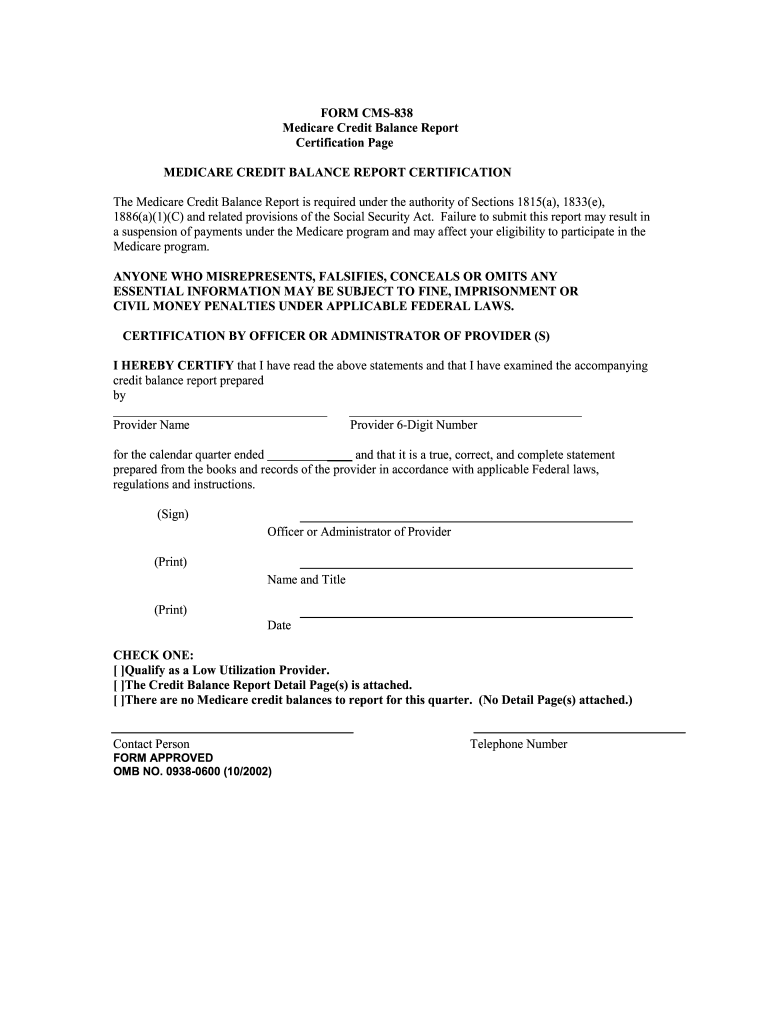
1833(e), 1886(a)(1)(C) and related provisions of the Social Security Act. Failure to submit this report may result in a suspension of payments under the Medicare program and may affect your eligibility to participate in the Medicare program. ANYONE WHO MISREPRESENTS, FALSIFIES, CONCEALS OR OMITS ANY ESSENTIAL INFORMATION MAY BE SUBJECT TO FINE, IMPRISONMENT OR CIVIL MONEY PENALTIES UNDER APPLICABLE FEDERAL LAWS. CERTIFICATION BY OFFICER OR ADMINISTRATOR OF PROVIDER (S) I HEREBY CERTIFY that I h.
Loading

Open form follow the instructions

Easily sign the form with your finger

Send filled & signed form or save
How to fill out the Medicare CMS-838 online
The Medicare CMS-838 form, also known as the Medicare Credit Balance Report, is essential for reporting any credit balances associated with Medicare. Proper completion of this form is vital to ensure compliance with Medicare regulations and avoid potential penalties.
Follow the steps to accurately complete the Medicare CMS-838 online.
- Press the ‘Get Form’ button to access the Medicare CMS-838 form and open it in your editing tool.
- Begin by filling in the provider's name and the 6-digit number assigned to them. This information is essential for identifying the reporting entity.
- Indicate the calendar quarter for which you are reporting credit balances. Input the relevant dates accurately.
- In the certification section, have the officer or administrator of the provider sign and print their name and title below the certification statement. Ensure this is done with clear and legible handwriting.
- Select one of the checkboxes provided to indicate whether the provider qualifies as a low utilization provider, whether the Credit Balance Report Detail Page(s) is attached, or if there are no Medicare credit balances to report for this quarter.
- Complete the contact person's information by entering their name and telephone number to ensure that any follow-up can be made efficiently.
- Once all required fields are filled out correctly, review the form for completeness and accuracy. This step is crucial to avoid any submission errors.
- Finally, save the completed form to your device. You can also download it, print it, or share it as needed.
Take the next step in managing your Medicare documentation by completing the CMS-838 form online today.
Experience a faster way to fill out and sign forms on the web. Access the most extensive library of templates available.
Related content
The CMS-838 is a Medicare Credit Balance Report required to monitor and recover improper...
Mar 4, 2025 — Beginning in December 2024, the reporting is done only when credit...
Oct 2, 2004 — New code assignments are the result of year-long efforts of the ICD-9-CM...
Get answers to your most pressing questions about US Legal Forms API.
Which Medicare program does CMS reimburse inpatient claims using?
CMS reimburses inpatient claims primarily through the Hospital Insurance program under Part A. This program employs various payment systems, including the Inpatient Prospective Payment System (IPPS) and others. Understanding how these systems work can enhance your facility's financial planning and performance. The Medicare CMS-838 details can serve as a helpful guide in navigating these reimbursement programs.
What is the Medicare system for reimbursing Part A inpatient hospital costs called?
The system for reimbursing Part A inpatient hospital costs is known as the Inpatient Prospective Payment System (IPPS). This system involves predetermined payments made based on a patient's diagnosis and treatment needs. By utilizing this structured approach, Medicare aims to ensure that hospitals receive fair compensation for the care they provide. Gaining insights from the Medicare CMS-838 can further aid in optimizing your reimbursement processes.
Are credit balance reports no longer required?
Credit balance reports are still required under Medicare regulations, but their submission process may vary based on updates and policy changes. Failing to comply with credit balance report requirements can lead to significant penalties. Staying informed about the latest regulations can keep your facility compliant. Using the US Legal Forms platform can help simplify the process of preparing and submitting these reports.
How are inpatient stays reimbursed?
Inpatient stays are reimbursed through the Diagnosis-Related Group (DRG) payment system. Medicare assigns a payment rate based on the patient's principal diagnosis upon admission. This system groups cases with similar needs, allowing for a standardized payment that reflects the care provided. Understanding the implications of the Medicare CMS-838 can aid facilities in managing their reimbursement strategies effectively.
Where do I send my Medicare credit balance report?
You should send your Medicare credit balance report to the designated Medicare Administrative Contractor (MAC) for your state. This contractor oversees the processing of these reports and ensures proper handling. Submitting your report accurately and on time is crucial for maintaining compliance. Leveraging tools on the US Legal Forms platform can assist in ensuring your reports are correctly formatted.
What payment system does Medicare use for inpatient reimbursement?
Medicare employs the Inpatient Prospective Payment System (IPPS) for inpatient reimbursement. This system determines payment amounts based on the Diagnosis-Related Groups (DRGs), which classify hospital cases into categories. By relying on this system, facilities can better predict their expected revenue. Familiarity with the Medicare CMS-838 can further clarify the nuances of these payments.
What payment methodology is used to reimburse inpatient rehabilitation groups?
The payment methodology for inpatient rehabilitation groups typically relies on the Prospective Payment System (PPS). Under this system, Medicare assigns a predetermined payment rate based on various factors, including diagnosis and patient characteristics. This efficiency ensures that facilities receive consistent reimbursement for their services. Thus, understanding the Medicare CMS-838 details can help navigate this process.
What are the 5 steps of the Medicare appeal process?
The Medicare appeal process typically includes five vital steps: initial determination, redetermination, hearing before an administrative law judge, review by the Medicare Appeals Council, and judicial review. Each step requires clear documentation and a detailed presentation of your case. Familiarizing yourself with the Medicare CMS-838 can enhance your understanding of these phases.
What is the purpose of the CMS?
The Centers for Medicare & Medicaid Services (CMS) oversees the Medicare program, ensuring beneficiaries receive appropriate healthcare services. The CMS develops policies and regulations that govern program operations, including appeal processes. Understanding the role of CMS can empower you to navigate the Medicare system more effectively.
How do I fill out an appeal form?
Filling out an appeal form requires you to provide your Medicare number, contact information, and a detailed description of your disagreement with the original decision. Be sure to include supporting documents, which can strengthen your argument. Reference the Medicare CMS-838 for a thorough example of how to effectively structure your appeal.
Use professional pre-built templates to fill in and sign documents online faster. Get access to thousands of forms.
If you believe that this page should be taken down, please follow our DMCA take down process here.
This form is available in several versions. Select the version you need from the drop-down list below.