We use cookies to improve security, personalize the user experience, enhance our marketing activities (including cooperating with our marketing partners) and for other business use.
Click "here" to read our Cookie Policy. By clicking "Accept" you agree to the use of cookies. Read less
Read more
Accept
Loading
Form preview
  • US Legal Forms
  • Form Library
  • More Forms
  • More Uncategorized Forms
  • Reactivation Application Form - Plymouth State University - Plymouth

Get Reactivation Application Form - Plymouth State University - Plymouth

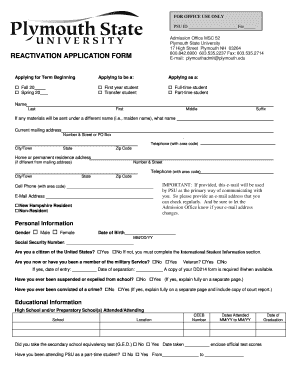
FOR OFFICE USE ONLY PSU ID Fee Admission Office MSC 52 Plymouth State University 17 High Street Plymouth NH 03264 800.842.6900 603.535.2237 Fax: 603.535.2714 E-mail: plymouthadmit plymouth.edu REACTIVATION.

How it works

  1. Open form

    Open form follow the instructions

  2. Easily sign form

    Easily sign the form with your finger

  3. Share form

    Send filled & signed form or save

How to fill out the REACTIVATION APPLICATION FORM - Plymouth State University - Plymouth online

This guide provides a comprehensive overview of how to fill out the Reactivation Application Form for Plymouth State University. It is designed to assist users in navigating each section of the form clearly and effectively.

Follow the steps to complete the Reactivation Application Form accurately.

  1. Use the 'Get Form' button to access the REACTIVATION APPLICATION FORM online and open it for editing. This will allow you to begin filling out the application efficiently.
  2. Indicate the term for which you are applying by selecting either 'Fall 20' or 'Spring 20.' Choose the appropriate category for your application status as either a first-year or transfer student, and specify whether you plan to enroll as a full-time or part-time student.
  3. Enter your personal details, including your name (last, first, middle, suffix) and any other names under which you may have application materials sent. Fill in your current mailing address and home or permanent address, if different.
  4. Provide your contact information, including telephone and cell phone numbers, as well as a valid email address. Remember that this email will be used for all communications, so choose one you check regularly.
  5. Complete the personal information section by selecting your gender and indicating your U.S. citizen status. If applicable, provide your military service details, including dates of entry and separation.
  6. Fill in your educational information, listing all high schools and colleges attended, including locations and dates. Document whether you took the secondary school equivalency test (GED) and any previous attendance at Plymouth State University.
  7. In the family information section, indicate who you live with, and provide information about your parents' educational backgrounds. This includes whether they graduated from a four-year college or from Plymouth State University.
  8. Provide background information detailing the semester you originally applied for, reasons for not attending, and any activities you engaged in since your last application.
  9. If applicable, complete the international student section by naming your country of citizenship and documenting your visa status. Enclose relevant documentation if necessary.
  10. Sign and date the application. This certifies that the information provided is accurate and complete.
  11. Review the application for completeness, then save changes, download a copy for your records, and print if needed. Follow the submission instructions to return the completed form to the Admission Office at Plymouth State University.

Complete your Reactivation Application Form online today to ensure a smooth application process.

Get form

Experience a faster way to fill out and sign forms on the web. Access the most extensive library of templates available.
Get form

Related content

Forms | Board of Mental Health Practice | Office...
Applications for Licensure. Pastoral Psychotherapist pdf file; Independent Clinical Social...
Learn more
University Policies and Procedures < Plymouth...
Plymouth State University (PSU) maintains email accounts for all students. ... The...
Learn more
KCPQ - Wikipedia
KCPQ, virtual and VHF digital channel 13, is a Fox owned-and-operated television station...
Learn more

Related links form

SweetStudy Amy Tan Mother Tongue 2009 NAVFAC Adak Dig Permit Request 2015 Sound City Reading Spelling Worksheets 2008 UK ACRO Police Certificate Application Form 2014

Questions & Answers

Get answers to your most pressing questions about US Legal Forms API.

Contact support

Withdrawing from Plymouth State University is a straightforward process. To start, you need to complete the necessary paperwork, which may include a REACTIVATION APPLICATION FORM - Plymouth State University - Plymouth, depending on your situation. It’s recommended to discuss your decision with an academic advisor as they can help guide you through the withdrawal process and address any concerns you might have.

The application deadline for Plymouth State University varies each year, so it's essential to verify the specific dates. Typically, deadlines for fall admission are set in the winter or early spring. If you plan to enroll, consider completing your REACTIVATION APPLICATION FORM - Plymouth State University - Plymouth well ahead of the deadline to ensure that all necessary materials are submitted on time. Staying informed helps facilitate a smooth admissions process.

Graduating with an incomplete on your transcript at Plymouth State University is generally not allowed unless specific conditions are met. An incomplete grade indicates that all required coursework has not been completed, and students must resolve these outstanding requirements. If you're contemplating reactivation, ensure that you clarify any incomplete grades when filling out the REACTIVATION APPLICATION FORM - Plymouth State University - Plymouth. This proactive approach can help you stay on track for graduation.

Requesting transcripts from Plymouth State University is a straightforward process. Students can submit a request online through the university's official website or by contacting the registrar’s office. If you're looking to reactivate your enrollment, be sure to check any related requirements with the REACTIVATION APPLICATION FORM - Plymouth State University - Plymouth. It’s important to allow sufficient time for processing your request.

Getting into Plymouth State University is generally considered attainable for many students. The university seeks well-rounded applicants who demonstrate academic potential and a passion for their fields of interest. By submitting the REACTIVATION APPLICATION FORM - Plymouth State University - Plymouth, you can showcase your unique qualifications. The admissions team reviews applications holistically, so presenting your best self is key.

Plymouth State admissions is somewhat selective with an acceptance rate of 89%. Students that get into Plymouth State have an average SAT score between 860-1070 or an average ACT score of 17-23. The regular admissions application deadline for Plymouth State is April 1.

With a GPA of 2.95, Plymouth State University accepts students with below-average GPAs. You might have a mix of B's and C's in your high school record. You might not have taken AP or IB classes, but if you did, this will be a boost to your academic record.

Overall GPA of 3.0 or greater.

The application deadline is April 1 and the application fee at Plymouth State University is $50.

Prior to leaving, students must inform the academic student advocate of their intention to withdraw from the University and complete an online a withdrawal form. To access the survey and form please go to the Frost House webpage.

Get This Form Now!

Use professional pre-built templates to fill in and sign documents online faster. Get access to thousands of forms.
Get form
If you believe that this page should be taken down, please follow our DMCA take down processhere.

Industry-leading security and compliance

US Legal Forms protects your data by complying with industry-specific security standards.
  • In businnes since 1997
    25+ years providing professional legal documents.
  • Accredited business
    Guarantees that a business meets BBB accreditation standards in the US and Canada.
  • Secured by Braintree
    Validated Level 1 PCI DSS compliant payment gateway that accepts most major credit and debit card brands from across the globe.
Get REACTIVATION APPLICATION FORM - Plymouth State University - Plymouth
Get form
Form Packages
Adoption
Bankruptcy
Contractors
Divorce
Home Sales
Employment
Identity Theft
Incorporation
Landlord Tenant
Living Trust
Name Change
Personal Planning
Small Business
Wills & Estates
Packages A-Z
Form Categories
Affidavits
Bankruptcy
Bill of Sale
Corporate - LLC
Divorce
Employment
Identity Theft
Internet Technology
Landlord Tenant
Living Wills
Name Change
Power of Attorney
Real Estate
Small Estates
Wills
All Forms
Forms A-Z
Form Library
Customer Service
Terms of Service
Privacy Notice
Legal Hub
Content Takedown Policy
Bug Bounty Program
About Us
Help Portal
Legal Resources
Blog
Affiliates
Contact Us
Delete My Account
Site Map
Industries
Forms in Spanish
Localized Forms
State-specific Forms
Forms Kit
Legal Guides
Real Estate Handbook
All Guides
Prepared for You
Notarize
Incorporation services
Our Customers
For Consumers
For Small Business
For Attorneys
Our Sites
US Legal Forms
USLegal
FormsPass
pdfFiller
signNow
airSlate WorkFlow
DocHub
Instapage
Social Media
Call us now toll free:
+1 833 426 79 33
As seen in:
  • USA Today logo picture
  • CBC News logo picture
  • LA Times logo picture
  • The Washington Post logo picture
  • AP logo picture
  • Forbes logo picture
© Copyright 1997-2025
airSlate Legal Forms, Inc.
3720 Flowood Dr, Flowood, Mississippi 39232
Form Packages
Adoption
Bankruptcy
Contractors
Divorce
Home Sales
Employment
Identity Theft
Incorporation
Landlord Tenant
Living Trust
Name Change
Personal Planning
Small Business
Wills & Estates
Packages A-Z
Form Categories
Affidavits
Bankruptcy
Bill of Sale
Corporate - LLC
Divorce
Employment
Identity Theft
Internet Technology
Landlord Tenant
Living Wills
Name Change
Power of Attorney
Real Estate
Small Estates
Wills
All Forms
Forms A-Z
Form Library
Customer Service
Terms of Service
Privacy Notice
Legal Hub
Content Takedown Policy
Bug Bounty Program
About Us
Help Portal
Legal Resources
Blog
Affiliates
Contact Us
Delete My Account
Site Map
Industries
Forms in Spanish
Localized Forms
State-specific Forms
Forms Kit
Legal Guides
Real Estate Handbook
All Guides
Prepared for You
Notarize
Incorporation services
Our Customers
For Consumers
For Small Business
For Attorneys
Our Sites
US Legal Forms
USLegal
FormsPass
pdfFiller
signNow
airSlate WorkFlow
DocHub
Instapage
Social Media
Call us now toll free:
+1 833 426 79 33
As seen in:
  • USA Today logo picture
  • CBC News logo picture
  • LA Times logo picture
  • The Washington Post logo picture
  • AP logo picture
  • Forbes logo picture
© Copyright 1997-2025
airSlate Legal Forms, Inc.
3720 Flowood Dr, Flowood, Mississippi 39232