Loading
Form preview
  • US Legal Forms
  • Other Templates
  • More Forms
  • More Uncategorized Forms
  • Wisconsin Snowmobile Registration Form

Get Wisconsin Snowmobile Registration Form

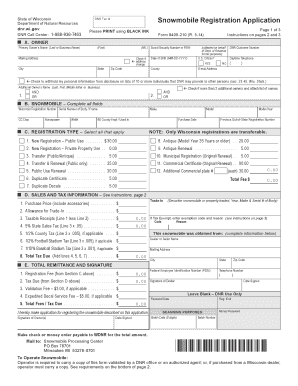
To Instructions Please PRINT using BLACK INK A. OWNER Primary Owner s Name (Last or Business Name) Mailing Address City State Zip Code Check if address change Page 1 of 3 Instructions on pages 2 and 3 Form 9400 210 (R. 5-14) (M.I.) Social Security Number or FEIN (First) Clear Date of Birth (MM-DD-YYYY) (collected on behalf of Dept. of Revenue for tax purposes) U.S. Citizen? County DNR Customer Number E-mail Address Daytime Telephone YES NO ( ) Check to withho.

How it works

  1. Open form

    Open form follow the instructions

  2. Easily sign form

    Easily sign the form with your finger

  3. Share form

    Send filled & signed form or save

How to fill out the Wisconsin Snowmobile Registration Form online

Registering your snowmobile in Wisconsin is a straightforward process that can be completed online. This guide provides you with clear, step-by-step instructions on how to successfully fill out the Wisconsin Snowmobile Registration Form, ensuring that you have all necessary information ready.

Follow the steps to complete the registration form efficiently.

  1. Click ‘Get Form’ button to obtain the form and open it in the editor.
  2. Begin by entering the primary owner’s name in the designated field. This should be the last name or business name of the owner. Ensure that you enter all information clearly.
  3. Next, fill in the mailing address, including the city, state, and zip code. If your address has changed, check the address change box.
  4. Provide the owner’s social security number or federal employer identification number, ensuring this information is collected for tax purposes. Follow with the date of birth in the specified format (MM-DD-YYYY).
  5. Indicate whether the owner is a U.S. citizen by checking 'Yes' or 'No'. Fill in the county and, if applicable, the DNR customer number.
  6. Input the owner’s email address and daytime telephone number to facilitate contact and communication throughout the registration process.
  7. If there is an additional owner, complete their name in the additional owner section, following the same format as the primary owner.
  8. In the snowmobile section, provide the specific details of the snowmobile, including make, model, Wisconsin registration number, and serial number. Ensure that the horsepower and width are accurately documented.
  9. Select the appropriate registration type by checking all applicable boxes. This may include new registrations, renewals, and antique registrations.
  10. Fill in the sales and tax information. Provide details on the purchase price and any trade-in value, ensuring you compute the taxable receipts correctly.
  11. Review the total remittance section and calculate the total fees and tax due, entering the appropriate amounts based on previous sections.
  12. Finally, sign and date the application in the designated area before saving your changes. You can then download, print, or share the completed form as needed.

Complete your Wisconsin Snowmobile Registration Form online today to ensure you are ready for the snow season.

Get form

Experience a faster way to fill out and sign forms on the web. Access the most extensive library of templates available.
Get form

Related content

April 2020 Wisconsin Snowmobile Application (Form...
Apr 1, 2020 — Tape previous owner's registration card here, if available. Notice: This...
Learn more
Snowmobile Safety - University of Vermont
and inexperience. In states where snowmobiling is a popular form of winter recreation...
Learn more
guide to oregon driving records 2018 - State of...
format is an example of an accident occurring in Oregon. The second ... Failure to...
Learn more

Related links form

MI DoT 4580 2023 5122 Instructions For Form 5122 City Income Tax - State Of ... SE Arbetsmiljoverket Rivning Av Asbesthaltigt Material Utanfor Inneslutning Inomhus 2015 FamilyFarmed Farm Safety Plan (Template) For You 2008

Questions & Answers

Get answers to your most pressing questions about US Legal Forms API.

Contact support

While Wisconsin does not require snowmobile insurance, it is highly advisable to consider obtaining coverage. Insurance can protect you from financial loss in case of theft, accidents, or liability claims. Using the Wisconsin Snowmobile Registration Form, you may look into different insurance options to secure yourself while enjoying your rides.

To obtain a Wisconsin DNR number, you can register your snowmobile using the Wisconsin Snowmobile Registration Form. When you complete your registration, the DNR will issue you a unique number that identifies your vehicle. This number is vital for trail use and can help authorities verify your snowmobile's registration status.

Wisconsin law requires riders born on or after January 1, 1985, to complete a snowmobile safety course to operate a snowmobile. After completing the course, you will receive a certification, which acts as a license. Make sure to carry this certification along with the Wisconsin Snowmobile Registration Form while you ride for compliance with state regulations.

In Wisconsin, snowmobiles do not have titles like motor vehicles. Instead, when you register your snowmobile, you will receive a registration certificate. This certificate serves as proof of ownership and is essential when operating your snowmobile or when you sell it. Ensure you keep this document safe, as it may be requested by authorities.

As of recent statistics, thousands of snowmobiles are registered in Wisconsin, making it a popular state for snowmobile enthusiasts. The exact figures may vary seasonally, but this number reflects the thriving snowmobiling community. For up-to-date information, local authorities provide insights and statistics when you inquire about the Wisconsin Snowmobile Registration Form.

Yes, in Wisconsin, a trail pass is required to operate a snowmobile on designated trails. Purchasing a trail pass ensures maintenance and upkeep of the trails you enjoy. Make sure to check the current regulations and obtain your pass when completing your Wisconsin Snowmobile Registration Form to avoid any fines.

To register your snowmobile in Wisconsin, you need to complete the Wisconsin Snowmobile Registration Form, which is available online or at designated locations. After filling out the form, submit it along with the required fees to your local Department of Natural Resources office. Once processed, you will receive a registration sticker for your snowmobile.

Snowmobiles in Wisconsin do not have titles primarily because they are considered off-road vehicles. The regulations governing these vehicles are different from those for cars and trucks. By focusing on registration through the Wisconsin Snowmobile Registration Form, the state streamlines the process and ensures easier access for snowmobile owners.

In Wisconsin, the registration sticker on a snowmobile is typically placed on the rear of the snowmobile. It's important to ensure that the sticker is visible and correctly affixed to avoid any potential fines. When completing the Wisconsin Snowmobile Registration Form, make sure to follow the instructions regarding sticker placement for compliance with state regulations.

Registering your snowmobile in Wisconsin involves filling out the Wisconsin Snowmobile Registration Form. You can complete this form online or through a paper application. Ensure you have all necessary documentation, such as proof of ownership and identification. After processing, you will receive your registration, allowing you to ride legally across the state.

Get This Form Now!

Use professional pre-built templates to fill in and sign documents online faster. Get access to thousands of forms.
Get form
If you believe that this page should be taken down, please follow our DMCA take down processhere.
Get Wisconsin Snowmobile Registration Form
Get form
  • Adoption
  • Bankruptcy
  • Contractors
  • Divorce
  • Home Sales
  • Employment
  • Identity Theft
  • Incorporation
  • Landlord Tenant
  • Living Trust
  • Name Change
  • Personal Planning
  • Small Business
  • Wills & Estates
  • Packages A-Z
  • Affidavits
  • Bankruptcy
  • Bill of Sale
  • Corporate - LLC
  • Divorce
  • Employment
  • Identity Theft
  • Internet Technology
  • Landlord Tenant
  • Living Wills
  • Name Change
  • Power of Attorney
  • Real Estate
  • Small Estates
  • Wills
  • All Forms
  • Forms A-Z
  • Other Templates
  • Legal Hub
  • About Us
  • Help Portal
  • Legal Resources
  • Blog
  • Affiliates
  • Contact Us
  • Delete My Account
  • Site Map
  • Industries
  • Forms in Spanish
  • Localized Forms
  • State-specific Forms
  • Forms Kit
  • Real Estate Handbook
  • All Guides
  • Notarize
  • Incorporation services
  • For Consumers
  • For Small Business
  • For Attorneys
  • USLegal
  • FormsPass
  • pdfFiller
  • signNow
  • altaFlow
  • DocHub
  • Instapage
Form Packages
  • Adoption
  • Bankruptcy
  • Contractors
  • Divorce
  • Home Sales
  • Employment
  • Identity Theft
  • Incorporation
  • Landlord Tenant
  • Living Trust
  • Name Change
  • Personal Planning
  • Small Business
  • Wills & Estates
  • Packages A-Z
Form Categories
  • Affidavits
  • Bankruptcy
  • Bill of Sale
  • Corporate - LLC
  • Divorce
  • Employment
  • Identity Theft
  • Internet Technology
  • Landlord Tenant
  • Living Wills
  • Name Change
  • Power of Attorney
  • Real Estate
  • Small Estates
  • Wills
  • All Forms
  • Forms A-Z
  • Other Templates
Customer Service
  • Legal Hub
  • About Us
  • Help Portal
  • Legal Resources
  • Blog
  • Affiliates
  • Contact Us
  • Delete My Account
  • Site Map
  • Industries
  • Forms in Spanish
  • Localized Forms
  • State-specific Forms
  • Forms Kit
Legal Guides
  • Real Estate Handbook
  • All Guides
Prepared for you
  • Notarize
  • Incorporation services
Our Customers
  • For Consumers
  • For Small Business
  • For Attorneys
Our Sites
  • USLegal
  • FormsPass
  • pdfFiller
  • signNow
  • altaFlow
  • DocHub
  • Instapage
Social Media
Call us now toll free:
+1 833 426 79 33
As seen in:
© Copyright 1999-2026 airSlate Legal Forms, Inc. 17 Station Street, Suite 303, Brookline, MA 02445
  • Your Privacy Choices
  • Terms of Service
  • Privacy Notice
  • Content Takedown Policy
  • Bug Bounty Program