Loading
Get On-call And Call-back Form
How it works
-

Open form follow the instructions
-

Easily sign the form with your finger
-

Send filled & signed form or save
How to fill out the On-Call And Call-Back Form online
This guide provides step-by-step instructions on how to accurately complete the On-Call And Call-Back Form online. Ensuring proper filling of this form is vital for requesting appropriate compensation for on-call and call-back duties.
Follow the steps to fill out the On-Call And Call-Back Form effectively.
- Click the ‘Get Form’ button to obtain the On-Call And Call-Back Form and open it in your preferred online editor.
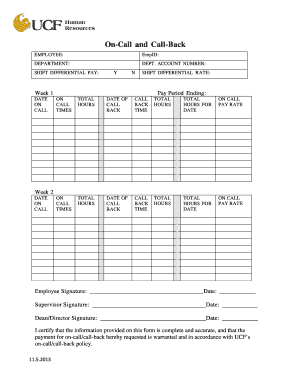
- Enter your employee information, including your name, employee ID, and department in the designated fields. Make sure all details are correct to avoid processing delays.
- Indicate whether you qualify for shift differential pay by selecting 'Y' for Yes or 'N' for No. If applicable, specify the shift differential rate next to the appropriate section.
- Fill out the sections for week 1 and week 2. For each week, provide the dates you were on-call, the total hours you were on call, the date of call back, the call back time, and the total hours worked during those call backs.
- Review the on-call pay rate for each respective week and ensure it reflects correctly based on the hours indicated in previous steps.
- Sign the form in the 'Employee Signature' field and enter the date. Ensure accuracy as signatures are required for processing.
- Obtain the necessary signatures from your supervisor and dean/director in the designated areas, along with the respective dates.
- After completing all sections, save your changes, and choose to download, print, or share the completed form as needed.
Complete your On-Call And Call-Back Form online today to ensure timely processing of your request.
You can get an automatic call back by using our On-Call And Call-Back Form configured for automatic responses. After filling out the form, our system will automatically schedule the call based on your preferences. This feature saves you time and reduces the chances of missing important calls. It's an efficient way to ensure you connect with our support team seamlessly.
Industry-leading security and compliance
US Legal Forms protects your data by complying with industry-specific security standards.
-
In businnes since 199725+ years providing professional legal documents.
-
Accredited businessGuarantees that a business meets BBB accreditation standards in the US and Canada.
-
Secured by BraintreeValidated Level 1 PCI DSS compliant payment gateway that accepts most major credit and debit card brands from across the globe.