Get Utah State University Acquired Vehicle Worksheet - Parking ...
How it works
-

Open form follow the instructions
-

Easily sign the form with your finger
-

Send filled & signed form or save
How to fill out the Utah State University Acquired Vehicle Worksheet - Parking online
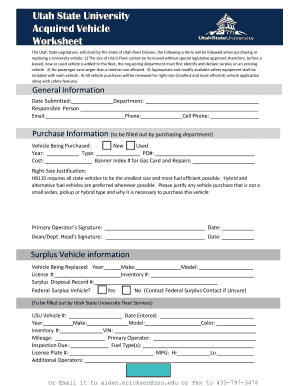
The Utah State University Acquired Vehicle Worksheet is essential for departments looking to purchase or replace university vehicles. This guide will help you navigate the online form, providing step-by-step instructions for each section to ensure a smooth completion process.
Follow the steps to fill out the form accurately and efficiently.
- Press the ‘Get Form’ button to obtain the document and open it in your online editor.
- Enter the date submitted at the top of the form. Ensure you select the current date to maintain clarity in your submission.
- Fill in the department name responsible for the vehicle acquisition. This is crucial for tracking purposes.
- Provide the name of the responsible person along with their email address and phone numbers. This information helps in establishing a point of contact.
- In the purchase information section, indicate whether the vehicle being purchased is new or used by selecting the appropriate option.
- Fill out the year, type, purchase order number (PO#), and cost of the vehicle. Make sure each entry is accurate to avoid delays.
- Include the Banner Index number for gas card and repairs, as this is necessary for funding allocation.
- Provide a justification for the vehicle size under the right-size justification section. Ensure to explain why a larger vehicle is necessary if applicable.
- Once the primary operator’s signature is acquired, date it appropriately to validate the submission.
- Make sure to include the signature and date from the dean or department head as required to finalize the approval process.
- In the surplus vehicle information section, accurately fill in details about the vehicle being replaced, including year, make, model, license number, and inventory number.
- For the federal surplus vehicle question, select 'Yes' or 'No' as appropriate, and ensure you have contacted Federal Surplus if unsure.
- Provide all details in the USU Vehicle section, including vehicle number, mileage, inspection due date, license plate number, and any additional operators.
- Finally, review all the entered information for accuracy. After ensuring everything is correct, save your changes and proceed to download, print, or share the form.
Start completing the Utah State University Acquired Vehicle Worksheet online today to streamline your vehicle purchasing process.
When disputing a parking ticket, the best approach is to present clear evidence that supports your claim. Common reasons include having a valid permit that was not displayed properly or being parked in a spot due to an unclear sign. Utilize the Utah State University Acquired Vehicle Worksheet - Parking guidelines to frame your argument effectively. Having the correct documentation can significantly strengthen your case.
Industry-leading security and compliance
-
In businnes since 199725+ years providing professional legal documents.
-
Accredited businessGuarantees that a business meets BBB accreditation standards in the US and Canada.
-
Secured by BraintreeValidated Level 1 PCI DSS compliant payment gateway that accepts most major credit and debit card brands from across the globe.