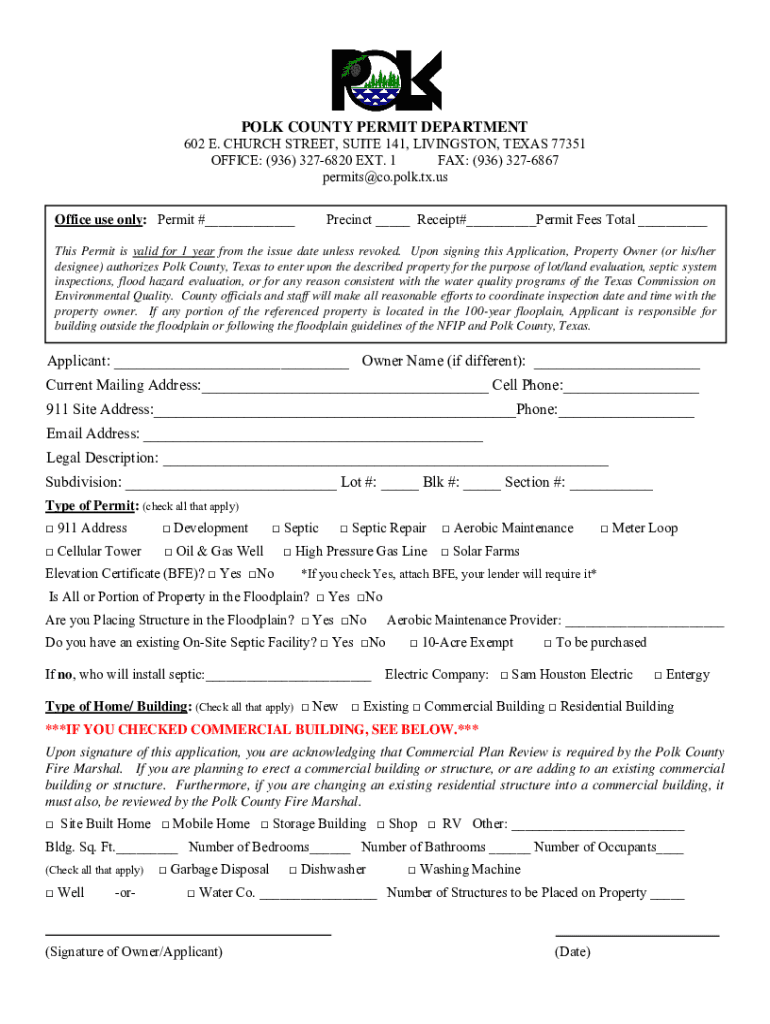
POLK COUNTY PERMIT DEPARTMENT602 E. CHURCH STREET, SUITE 141, LIVINGSTON, TEXAS 77351 OFFICE: (936) 3276820 EXT. 1 FAX: (936) 3276867 permits co.polk.tx.us Office use only: Permit # Precinct.

Open form follow the instructions

Easily sign the form with your finger

Send filled & signed form or save
How to fill out the TX Permit Application - Polk County online
Filling out the TX Permit Application for Polk County online can streamline your permit process. This guide provides comprehensive instructions to assist you in accurately completing the application to ensure a smooth submission.
Follow the steps to successfully fill out the TX Permit Application online.
- Press the ‘Get Form’ button to access the TX Permit Application - Polk County and open it in the editor.
- Begin by entering your name in the 'Applicant' field. If the property owner is different, fill in their name in the 'Owner Name' section.
- Provide your current mailing address in the designated section along with your cell phone number for contact purposes.
- Fill in the '911 Site Address' where the permit is applicable, and include a contact phone number.
- Enter your email address in the specified field to ensure you receive any notices or correspondence regarding your application.
- In the 'Legal Description' section, provide a detailed description of the property.
- Indicate the subdivision name, lot number, block number, and section number, where applicable.
- Select the type of permit by checking the appropriate boxes for '911 Address', 'Development', 'Cellular Tower', etc.
- If you are seeking an elevation certificate, check 'Yes' or 'No' in the corresponding box.
- If any portion of your property is in the floodplain, answer the related questions regarding the floodplain status.
- Fill in the name of your aerobic maintenance provider if applicable, and indicate if you have an existing on-site septic facility.
- Indicate the electric company serving your property by checking 'Sam Houston Electric' or 'Entergy'.
- Identify the type of home or building by checking all relevant boxes such as 'New', 'Existing', 'Commercial Building', etc.
- If applicable, provide additional information regarding the structure, such as square footage, number of bedrooms, and number of bathrooms.
- Review all entered information for accuracy, then proceed to save your changes, download, print, or share the completed form as needed.
Start your application online today to facilitate the permit process!
Experience a faster way to fill out and sign forms on the web. Access the most extensive library of templates available.
Related content
County tax assessor-collector offices provide most vehicle title and registration...
Only the following materials are to be submitted to the Department along with this fully...
Their decisions are not subject to any form of approval by other interests or...
Get answers to your most pressing questions about US Legal Forms API.
How do I get my permit in Polk County?
Permitting online through the Accela Citizen Portal at https://aca-prod.accela.com/POLKCO/Default.aspx. Submittal of digitally signed and sealed plans uploaded through the Accela permitting System. Customer assistance with permitting questions by phone at (863) 534-6080 or by email at BuildingDivision@polk-county.net.
What happens if you build without a permit in Florida?
There is no provision in the Florida Building Code regarding the inspection of a completed structure. When someone is cited for construction without a permit, a double permit fee will be imposed. If a stop-work order was issued, there is a $100 fee imposed as well.
Where can I get my build permit in Texas?
Building permits are usually issued by the city in Texas in which you will be doing the construction.
Do I need a permit for a shed in Polk County?
Section 105.1 of the Florida Building Code states that a permit is required to construct, enlarge, alter, repair, move, demolish or change the occupancy or occupant content of a building or structure or to erect, , enlarge, alter, repair, remove, convert or replace any electrical, gas, mechanical or plumbing ...
What size shed can I build without a permit in Polk County Florida?
Per the Florida Building Code, sheds 200 square feet or less and used exclusively for storage purposes are exempt from permitting requirements. However, the above location requirements must be adhered to.
What's the biggest size shed without permit?
What size shed can you build without a permit in Los Angeles? In the City of Los Angeles, if the size of floor space exceeds 120 sq. ft. or the structure is over 12 feet in height, you need a permit.
How much is a building permit in Bartow County?
Schedule of Residential Permit Fees If dwelling ins 1500 square feet or less - $35.00; if over 1500 square feet- $35.00 plus $5.00 for each additional 500 sq feet or fraction therof exceeding 1500 sq feet.
What size shed requires a permit in Florida?
No license is required for the sale, delivery, assembly, or tie-down of lawn storage buildings and storage buildings not exceeding 400 square feet and bearing the insignia of approval from the State showing compliance with the Florida Building Code.
Use professional pre-built templates to fill in and sign documents online faster. Get access to thousands of forms.
If you believe that this page should be taken down, please follow our DMCA take down process here.