Loading
Get Cumbria Clinical Care Home Communication Form
How it works
-

Open form follow the instructions
-

Easily sign the form with your finger
-

Send filled & signed form or save
How to fill out the Cumbria Clinical Care Home Communication Form online
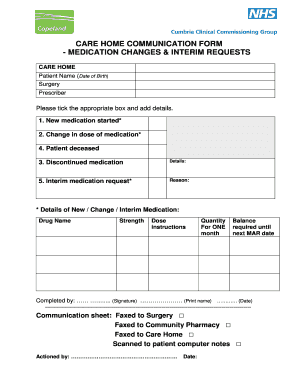
This guide will help you understand how to fill out the Cumbria Clinical Care Home Communication Form online. Each section will be explained clearly and concisely to ensure you can complete the form accurately and effectively.
Follow the steps to fill out the form correctly.
- Press the ‘Get Form’ button to access the communication form and open it in your preferred digital editor.
- Begin by entering the patient's name and date of birth in the designated fields. This information is crucial to ensure accurate documentation.
- In the prescriber section, input the name of the person responsible for prescribing medications. This is important for tracking and accountability.
- Tick the appropriate box based on the changes in medication. You have options for 'New medication started,' 'Change in dose of medication,' 'Discontinued medication,' or indicate if the patient is deceased.
- Explain the reason for any interim medication request clearly in the provided section. This helps healthcare providers understand the need for immediate intervention.
- Complete the form by signing and printing your name in the designated fields. Also, include the date of completion to ensure that the information is time-stamped.
Complete your documents online today!
Related links form
Deciding who goes into a care home involves collaboration between the individual, their family, and care professionals. Typically, the local authority conducts assessments to determine eligibility and needs before making recommendations. The Cumbria Clinical Care Home Communication Form plays a vital role in capturing the necessary details for this decision-making process.