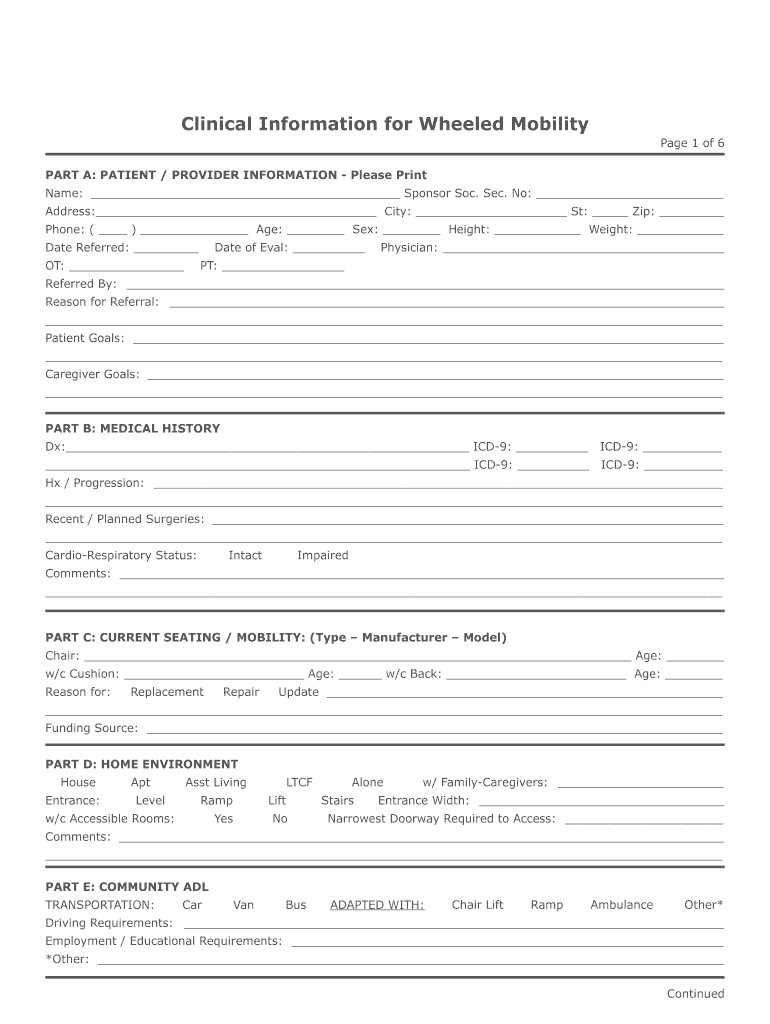
____________ Address:_______________________________________ City: _____________________ St: _____ Zip: _________ Phone: ( ____ ) _______________ Age: ________ Sex: ________ Height: ____________ Weight: ____________ Date Referred: _________ OT: ________________ Date of Eval: __________ Physician: _______________________________________ PT: _________________ Referred By: ___________________________________________________________________________________ Reason for Referral: __________________.
Loading

Open form follow the instructions

Easily sign the form with your finger

Send filled & signed form or save
How to fill out the Clinical Information for Wheeled Mobility online
Filling out the Clinical Information for Wheeled Mobility form online is an essential step in ensuring that users receive the appropriate mobility assistance they require. This guide will provide you with clear, step-by-step instructions to navigate the form effectively and accurately.
Follow the steps to complete the form accurately and efficiently.
- Press the ‘Get Form’ button to access the Clinical Information for Wheeled Mobility document, opening it in the online editor.
- Begin by completing Part A, which includes the patient and provider information. Ensure all fields are filled accurately, including the patient's name, address, phone number, age, sex, height, and weight. Don’t forget to provide the information of the referring physician and occupational therapist.
- Move to Part B to document the patient's medical history. Input the diagnosis information, including the ICD-9 codes for each condition, along with details of any recent or planned surgeries and the cardiovascular status.
- In Part C, provide details about the current seating and mobility devices being used, including the type, manufacturer, and model of wheelchairs and cushions. Indicate the reason for any changes requested, such as replacement or repair.
- Complete Part D by assessing the home environment. Indicate whether the entrance is wheelchair accessible and if there are any stairs. Include the width of entrances and any comments about the living situation.
- In Part E, specify the transportation methods available to the user and any adaptations made for mobility devices. Address any specific driving, employment, or educational requirements.
- Fill out Part F regarding cognitive and visual status by selecting the appropriate options and providing comments if necessary.
- Proceed to Part G to assess activities of daily living (ADLs). Indicate independence levels for various activities and any adaptive equipment required.
- In Part H, evaluate the user's mobility skills. Check the appropriate boxes to confirm abilities related to wheelchair transfers and ambulation.
- Part I requires information on sensation. Complete this by indicating whether sensation is intact, impaired, or absent, along with comments about any history of pressure sores.
- Fill out Part J by answering the clinical criteria questions. Each ‘yes’ or ‘no’ response should be explained accordingly.
- Document recommendations in Part K, noting any specific equipment or personal goals that the assessments have identified.
- Finalize any additional assessment sections as needed, including measurements and neuro-muscular status.
- Once all sections are complete, review the form for accuracy. You may save changes, download, print, or share the completed document as necessary.
Start filling out the Clinical Information for Wheeled Mobility online today to ensure accurate and timely access to necessary mobility assistance.
Experience a faster way to fill out and sign forms on the web. Access the most extensive library of templates available.
Related content
by K Mendoza · 2024 — The current review aims to systematically identify high-quality...
Seating and Wheeled Mobility: A Clinical Resource Guide presents clinical assessment...
Jul 2, 2007 — The purpose of these guidelines is to provide detailed coverage criteria...
Get answers to your most pressing questions about US Legal Forms API.
What is wheeled mobility?
Wheeled mobility refers to the use of devices like wheelchairs or scooters that provide assistance for individuals with mobility challenges. These devices help users navigate their environments more easily, promoting independence and participation in daily activities. Clinical information for wheeled mobility plays a crucial role in selecting the right device and understanding its benefits. By utilizing these devices, individuals can experience improved access to their communities and enhanced quality of life.
What is it called when you use a wheelchair but can still walk?
When someone uses a wheelchair but can still walk, it is often referred to as being a 'partial mobility user' or 'ambulatory wheelchair user.' This condition allows individuals to alternate between using their wheelchair and walking, depending on their energy levels and context. Understanding clinical information for wheeled mobility is essential in these situations, as it can help determine when and how to use each mode of mobility effectively. The right resources can support both users and caregivers in managing their mobility needs.
What is a wheeled mobility device?
A wheeled mobility device is any product designed to assist individuals in moving around, typically including wheelchairs, scooters, and walkers. These devices provide support for those with mobility impairments, ensuring independence and increased access to their environment. Understanding clinical information for wheeled mobility helps people choose the right device based on individual needs. They can enhance quality of life by promoting greater mobility and engagement in daily activities.
How to write a letter of medical necessity for a wheelchair?
To write a letter of medical necessity for a wheelchair, begin by collecting relevant clinical information for wheeled mobility. Clearly state the medical reasons for the wheelchair, including the patient’s needs and benefits. Be sure to include details about how the device will improve the patient's quality of life. The letter should be signed by a licensed healthcare professional who can validate the need for the device.
What is a category 2 wheelchair?
A category 2 wheelchair is designed for users with limited mobility who need assistance for more than basic activities of daily living but do not require specialized support. These wheelchairs often provide adjustable features to enhance comfort and accessibility. Exploring Clinical Information for Wheeled Mobility further clarifies the benefits and specifications of various wheelchair categories.
How long does a wheelchair assessment take?
A wheelchair assessment typically takes between 30 minutes to two hours, depending on the complexity of the user's needs. During this assessment, professionals will gather comprehensive information about medical history and mobility challenges. Being familiar with Clinical Information for Wheeled Mobility allows you to prepare adequately for this important evaluation.
How do you get evaluated for a wheelchair?
Getting evaluated for a wheelchair usually involves a consultation with a healthcare provider who understands your mobility needs. They will conduct a physical assessment and, if necessary, refer you to an occupational or physical therapist. For the best outcomes, access Clinical Information for Wheeled Mobility to guide you through the evaluation process.
What are the three basic types of wheelchairs?
The three basic types of wheelchairs are manual wheelchairs, powered wheelchairs, and specialized wheelchairs. Manual wheelchairs require user propulsion, powered wheelchairs offer motorized movement, and specialized wheelchairs cater to specific physical needs. Gaining insight from Clinical Information for Wheeled Mobility ensures you choose the right type for your lifestyle and requirements.
What are the three types of power wheelchairs?
The three types of power wheelchairs include front-wheel drive, rear-wheel drive, and mid-wheel drive. Each type offers distinct maneuverability and handling characteristics tailored to different user preferences and environments. Understanding Clinical Information for Wheeled Mobility will help you weigh these options effectively when selecting a power wheelchair.
What are the three broad categories of wheeled mobility systems?
The three broad categories of wheeled mobility systems are manual wheelchairs, power wheelchairs, and scooters. Manual wheelchairs rely on the user for propulsion, while power wheelchairs and scooters are designed for motorized movement, offering different levels of ease and convenience. Being knowledgeable about Clinical Information for Wheeled Mobility assists in identifying the most suitable category for individual needs.
Use professional pre-built templates to fill in and sign documents online faster. Get access to thousands of forms.
If you believe that this page should be taken down, please follow our DMCA take down process here.