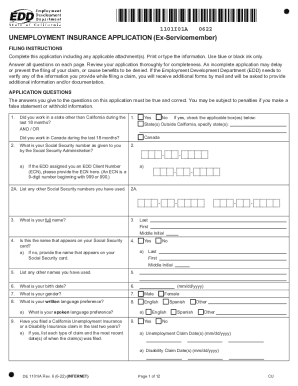
Black ink only. Answer all questions on each page. Review your application thoroughly for completeness. An incomplete application may delay or prevent the filing of your claim, or cause benefits to be denied. If the Employment Development Department (EDD) needs to verify any of the information you provide while filing a claim, you will receive additional forms by mail and will be asked to provide additional information and/or documentation. APPLICATION QUESTIONS The answers you give to the quest.
Open form follow the instructions
Easily sign the form with your finger
Send filled & signed form or save
How to use or fill out the CA DE 1101IA (Formerly DE 1101IABD) online
Completing the CA DE 1101IA form online can be a straightforward process with the right guidance. This guide provides clear instructions on how to accurately fill out each section of the form, ensuring a smooth submission for your unemployment insurance claim.
Follow the steps to fill out your CA DE 1101IA form online.
- Click ‘Get Form’ button to obtain the form and open it in the editor.
- Carefully read the filing instructions at the beginning of the form. Begin entering your personal information, including your full name and Social Security number as prompted.
- Provide details regarding your work history over the past 18 months. Include employer names, addresses, and wages earned while employed. Make sure to specify if you worked full-time or part-time.
- Fill out questions regarding your employment status, including any claims filed previously and personal information such as your mailing address and contact number.
- Indicate any disabilities, educational background, and military service if applicable, while ensuring you answer all questions truthfully.
- Review all entered information for accuracy and completeness. Incomplete applications may delay the processing of your claim.
- Once satisfied with your responses, save your changes. Depending on your needs, download, print, or share the completed form for your records.
Complete your CA DE 1101IA form online today to streamline your unemployment insurance claim process.
Experience a faster way to fill out and sign forms on the web. Access the most extensive library of templates available.
Get answers to your most pressing questions about US Legal Forms API.
Can you download EDD forms?
Yes, you can download EDD forms easily from the EDD website. The CA DE 1101IA (Formerly DE 1101IABD) is available for download, allowing you to fill it out at your convenience. If you prefer a guided experience, uslegalforms offers an excellent platform to access and download these forms efficiently.
How can I speak to a live person at EDD?
To speak to a live person at EDD, call their customer service line during business hours. Be prepared with your identification details, including information related to the CA DE 1101IA (Formerly DE 1101IABD) if necessary. A representative can assist you with your inquiries effectively.
Can I submit EDD forms online?
Yes, you can submit EDD forms online. This includes filing the CA DE 1101IA (Formerly DE 1101IABD) online through your secure EDD account. Submitting forms online saves time and ensures that your documents reach EDD immediately.
Can I print the DE 2501 form pdf?
Absolutely, you can print the DE 2501 form as a PDF. Simply download it from the EDD website, and make sure you have the latest version. If you require the CA DE 1101IA (Formerly DE 1101IABD) form as well, make sure to download both forms for seamless processing.
How to get CA EDD tax form?
You can access the CA EDD tax form by visiting the EDD website. After navigating to the appropriate section, look for the CA DE 1101IA (Formerly DE 1101IABD) form specifically. Alternatively, you can use uslegalforms to easily download the form and ensure your tax filing is accurate.
How do I get my EDD documents?
To obtain your EDD documents, you can log in to your online EDD account. You can also request copies by contacting EDD directly. The CA DE 1101IA (Formerly DE 1101IABD) is among the important documents you may need, so be sure to specify it when making your request.
Can I fax my EDD claim form?
Yes, you can fax your EDD claim form. Simply fill out the CA DE 1101IA (Formerly DE 1101IABD) and then send it to the appropriate EDD office. Make sure to include any required documents and keep a record of your fax transmission for your records.
How long does EDD pending processing mean?
EDD pending processing refers to the period when your claim is under review, and the status is not yet determined. This processing time can vary, but it typically means your application for the CA DE 1101IA (Formerly DE 1101IABD) is being evaluated for eligibility. Staying informed through regular checks on your claim status can help alleviate anxiety during this wait. If you need assistance, consider using US Legal Forms for guidance on navigating the EDD process.
What happens when your claim balance runs out in EDD?
When your claim balance runs out in the Employment Development Department (EDD), your benefits will discontinue. However, you may become eligible for additional benefits through the CA DE 1101IA (Formerly DE 1101IABD) program. To take advantage of this opportunity, you must apply and demonstrate your ongoing need for unemployment assistance. Remember, US Legal Forms can help you with the application process, ensuring you get the support you require.
What if I exhausted my unemployment benefits in California?
If you have exhausted your unemployment benefits in California, you may still qualify for the CA DE 1101IA (Formerly DE 1101IABD) program. This program helps individuals who have run out of benefits by providing additional financial support. To explore your options, submit an application detailing your circumstances, work history, and job search efforts. US Legal Forms offers resources to help you navigate this process and ensure you receive the assistance you need.
Use professional pre-built templates to fill in and sign documents online faster. Get access to thousands of forms.
If you believe that this page should be taken down, please follow our DMCA take down process here.