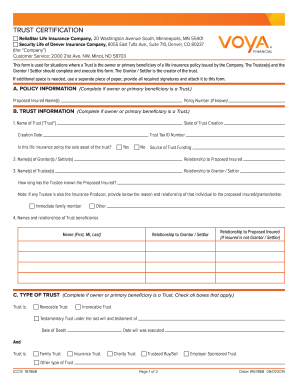
ICC13 167868 Page 1 of 2 Order #167868 09/01/2014 Proposed Insured Name(s) Policy Number (if known) B. TRUST INFORMATION (Complete if owner or primary beneficiary.
Open form follow the instructions
Easily sign the form with your finger
Send filled & signed form or save
How to fill out the Voya ICC13 167868 online
Filling out the Voya ICC13 167868 form accurately is essential for situations where a trust serves as the owner or primary beneficiary of a life insurance policy. This guide will provide you with step-by-step instructions aimed at simplifying the online completion of the form.
Follow the steps to fill out the Voya ICC13 167868 form online.
- Click the ‘Get Form’ button to access the Voya ICC13 167868 form and open it for completion.
- In section A, POLICY INFORMATION, enter the policy number if known and provide the proposed insured names.
- Section B covers TRUST INFORMATION. First, fill in the name of the trust, state of trust creation, creation date, and trust tax ID number. Indicate if this life insurance policy is the sole asset of the trust by selecting yes or no and providing the source of trust funding.
- Continue in section B by entering the names and relationships of the grantors or settlors and trustees. Be sure to detail how long the trustee has known the proposed insured.
- Section C requires you to specify the type of trust. Check all applicable boxes for revocable, irrevocable, testamentary, and other types of trusts.
- In section D, CERTIFICATION AND AFFIRMATION, indicate signature requirements by selecting the appropriate option regarding trustee authority. Each trustee will need to certify the listed statements to confirm accuracy and authority.
- Finally, in section E, ensure all required signatures are obtained from trustees and grantors, along with their printed names and addresses. Date the form accurately.
- Once the form is completed, you can save your changes, download, print, or share the Voya ICC13 167868 form as needed.
Complete your Voya ICC13 167868 form online today to ensure proper management of your trust-related life insurance policies.
Experience a faster way to fill out and sign forms on the web. Access the most extensive library of templates available.
Get answers to your most pressing questions about US Legal Forms API.
How do I file a hospital indemnity claim?
Filing a hospital indemnity claim involves a few simple steps. First, collect all relevant documentation, including bills and medical records. Then, choose to file online through the Voya portal or by mailing a physical claim form. Ensure you include any pertinent information such as your Voya ICC13 167868 for proper processing.
How do I contribute to my VOYA account?
Contributing to your Voya account is easy and can be done through various methods. You can set up direct payroll deductions, make one-time payments, or transfer funds from other accounts. Staying informed about your Voya ICC13 167868 plan details will help you make the best financial decisions. Consider reviewing your contributions regularly.
How do I check the status of my VOYA short term disability claim?
To check the status of your Voya short term disability claim, log into your Voya account online or use their mobile app. Navigate to the claims section to view updates on your claim's progress. You may also contact Voya customer service directly for assistance. Always have your Voya ICC13 167868 handy when inquiring about your claim.
How to file a hospital indemnity claim with Voya?
To file a hospital indemnity claim with Voya, start by accessing their online portal. You can complete your claim form online, upload your documents, and review your entries before submission. This streamlined process helps you manage your claim more efficiently. Don’t forget to include your Voya ICC13 167868 information for improved tracking.
How do I file a Voya hospital indemnity claim?
To file a Voya hospital indemnity claim, gather all necessary documentation, including medical records and hospital bills. Visit the Voya website or use their mobile app to submit your claim electronically. You may also choose to print a claim form and send it by mail. Ensure that you reference Voya ICC13 167868 in your submission for accurate processing.
How do I file a claim with Voya?
Filing a claim with Voya involves providing the necessary documentation through their claims portal. You must submit all required forms and evidence related to your claim. If you have a Voya ICC13 167868 policy, ensure you follow the specific instructions provided to expedite your claim process.
What company took over Voya?
Some of Voya’s insurance products have been acquired by Venerable Holdings. This transition may involve changes to the policies you hold, including the Voya ICC13 167868. It’s advisable to review your policy documents and stay informed about any updates from Voya or Venerable.
How do I contribute to an individual 401k?
Contributing to an individual 401k typically involves setting up your contributions through your employer or an investment platform. You can designate a specific amount or percentage of your earnings to be deposited into your 401k account. If you are managing your Voya ICC13 167868 account, ensure you follow the guidelines set by Voya for seamless contributions.
What is the new name for Voya life insurance?
Voya's life insurance products may carry different branding now. While some policies may be under the Venerable brand, others still operate under Voya’s name. It’s crucial to review your Voya ICC13 167868 policy documentation to understand any changes that may affect your coverage.
How do I change the contribution amount in Voya?
To change your contribution amount in Voya, log into your account on their website and navigate to the contributions section. You can adjust the amounts according to your financial goals. If you need additional help, consider reaching out to Voya customer support for guidance on your Voya ICC13 167868 contributions.
Use professional pre-built templates to fill in and sign documents online faster. Get access to thousands of forms.
If you believe that this page should be taken down, please follow our DMCA take down process here.