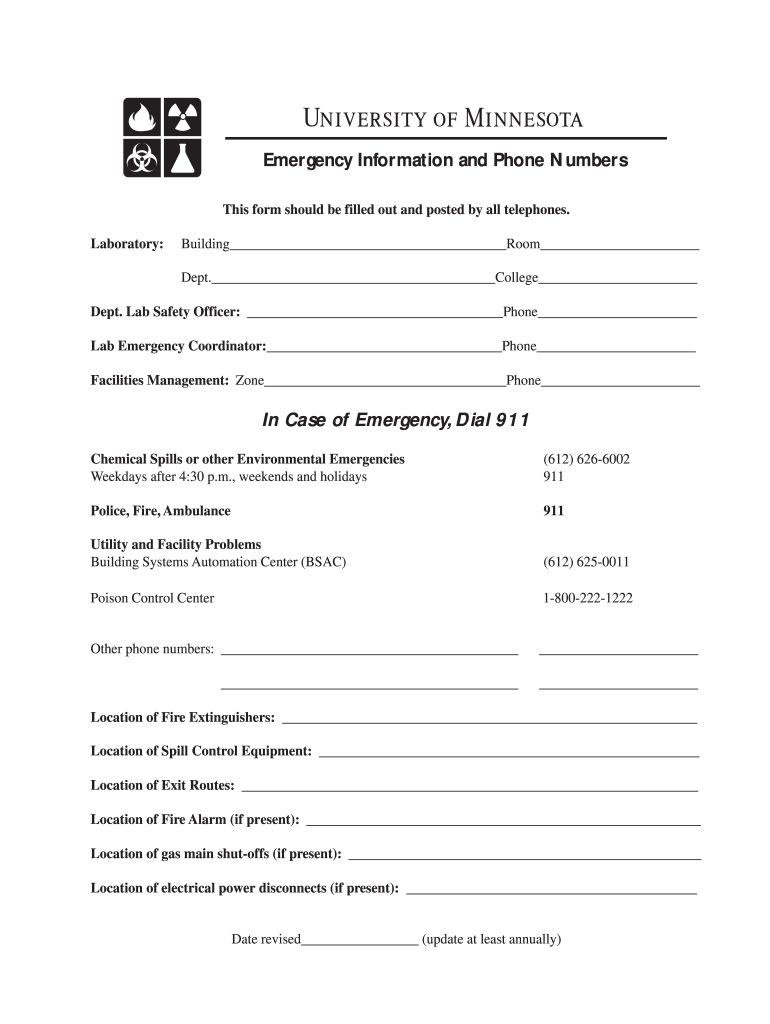
Facilities Management: Zone Phone . In Case of Emergency, Dial 911. Chemical Spills.
Loading

Open form follow the instructions

Easily sign the form with your finger

Send filled & signed form or save
How to fill out the UMN Emergency Information and Phone Numbers online
This guide provides clear and supportive instructions on how to fill out the UMN Emergency Information and Phone Numbers form online. Ensuring accurate emergency contact information is crucial for safety and prompt action during emergencies.
Follow the steps to complete the emergency information form correctly.
- Press the ‘Get Form’ button to access the emergency information form and open it for editing.
- In the ‘Laboratory’ section, fill in the building name where the lab is located, followed by the specific room number.
- Complete the ‘Dept.’ field with the name of the department affiliated with the laboratory and fill in the ‘College’ field with the appropriate college name.
- Enter the name and phone number of the Department Lab Safety Officer in the designated fields for quick access during emergencies.
- Provide the name and phone number of the Lab Emergency Coordinator, ensuring this information is accurate and up to date.
- Fill in the Zone for Facilities Management along with the corresponding phone number to contact in case of facility-related emergencies.
- List other important phone numbers in the section labeled ‘Other phone numbers’ as needed for your specific emergency contacts.
- Indicate the locations of crucial safety equipment, including fire extinguishers, spill control equipment, exit routes, and fire alarms to enhance preparedness.
- If applicable, provide locations for gas main shut-offs and electrical power disconnects to ensure swift action during emergencies.
- Record the date of the last revision to the form, ensuring that it is updated at least annually for accuracy.
- Once all necessary fields are completed, save your changes. You may also download, print, or share the completed form as needed.
Complete your UMN Emergency Information and Phone Numbers form online today for enhanced safety.
Experience a faster way to fill out and sign forms on the web. Access the most extensive library of templates available.
Related content
Contact information for Disaster Distress Helpline and the 998 Suicide & Crisis Lifeline...
Health, Safety, and Risk Management · Department of Public Safety · Emergency...
Get answers to your most pressing questions about US Legal Forms API.
How do I access my American University email?
To access your American University email, go to the AU email portal. After entering your credentials, you’ll gain access to your email. This is useful for staying informed, especially regarding any urgent notifications or updates similar to UMN Emergency Information and Phone Numbers.
What is the University of Minnesota International Emergency Number?
The University of Minnesota International Emergency Number is designed for immediate assistance during emergencies. You can find this number listed under the UMN Emergency Information and Phone Numbers section on the university's website. It’s critical to note this number for safety while you study or work at UMN.
How do I access my University of Pittsburgh email?
For University of Pittsburgh email access, navigate to the Pitt email login site. Enter your credentials to access your email account. While this service differs from UMN, having your email handy is essential for sharing important updates and UMN Emergency Information and Phone Numbers.
How do I access my UMN email?
To access your UMN email, go to the official UMN email login page. Input your username and password to log in securely. This access is crucial, especially when you need UMN Emergency Information and Phone Numbers during critical situations.
How do I access my University of Minnesota email?
You can access your University of Minnesota email by visiting the UMN email portal. Simply enter your student or staff credentials, and you will gain access to your inbox. This is part of the UMN Emergency Information and Phone Numbers resources, which ensure you stay connected during emergencies.
How do I email the admissions office at UMN?
To reach the admissions office at the University of Minnesota, you can send an email to admissions@umn. Include your full name and any specific questions you have about the admissions process in your email. The admissions team is committed to assisting prospective students in their journey. For further guidance, you may also look for UMN emergency information and phone numbers provided on their official channels.
How do I email University of Minnesota help?
You can email the University of Minnesota help by reaching out to help@umn. This email address is dedicated to answering various questions related to university services, including academic and administrative support. Providing clear details in your message will help the response team assist you more effectively. For any inquiries regarding UMN emergency information and phone numbers, be sure to visit their dedicated emergency page.
How do I email UWM help desk?
To contact the UWM help desk via email, send your inquiries to help@uwm. They are ready to assist you with technical issues, account problems, and other support functions. Make sure to provide all relevant information in your email to expedite your request. For UMN emergency information and phone numbers, check out the resources provided on the university's site.
What is the phone number for the University of Minnesota International Emergency Assistance Provider?
In case of emergencies, the University of Minnesota has established a dedicated phone line for international assistance. You can reach the International Emergency Assistance Provider at +1-612-626-1111. This service is available for urgent situations requiring immediate support. For complete UMN emergency information and phone numbers, you can refer to the university’s official emergency contacts page.
What is the UMN email?
The UMN email is your official communication channel with the University of Minnesota. It provides updates, notifications, and important information related to your studies and campus life. To access your UMN email, visit the university’s website and sign in with your credentials. For further inquiries about UMN emergency information and phone numbers, refer to the university's emergency resources.
Use professional pre-built templates to fill in and sign documents online faster. Get access to thousands of forms.
If you believe that this page should be taken down, please follow our DMCA take down process here.