Loading
Form preview
  • US Legal Forms
  • Form Library
  • More Forms
  • More Multi-State Forms
  • Irs 8879-pe 2024

Get Irs 8879-pe 2024-2026

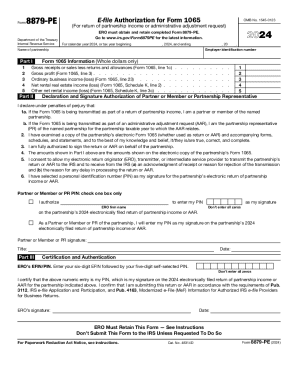
Form8879PEDepartment of the Treasury Internal Revenue ServiceEfile Authorization for Form 1065OMB No. 15450123ERO must obtain and retain completed Form 8879PE. Go to www.irs.gov/Form8879PE for the.

How it works

  1. Open form

    Open form follow the instructions

  2. Easily sign form

    Easily sign the form with your finger

  3. Share form

    Send filled & signed form or save

How to fill out the IRS 8879-PE online

Filling out the IRS 8879-PE form online is essential for partnerships wishing to authorize e-filing of their tax returns. This guide provides comprehensive instructions on how to complete each section of the form to ensure accurate submission.

Follow the steps to successfully complete the IRS 8879-PE form online.

  1. Click the ‘Get Form’ button to access the IRS 8879-PE form. This will open the form in your browser for editing.
  2. In Part I, enter the gross receipts or sales, gross profit, ordinary business income or loss, net rental real estate income or loss, and other net rental income or loss. Ensure that all amounts are reported in whole dollars only as specified.
  3. In Part II, fill in the employer identification number and the name of the partnership. This section is crucial for accurately identifying your partnership.
  4. Read through the declaration and signature authorization section carefully. Ensure you check the correct box to indicate your role (partner, member, or partnership representative) and provide your personal identification number (PIN) as your electronic signature.
  5. Complete Part III by entering your ERO’s EFIN followed by your five-digit self-selected PIN. Enter your signature and the date of submission.
  6. Once all sections are completed, review the form for accuracy. Save your changes, and ensure that you take necessary actions to keep a copy of the completed form for your records or share it as required.

Start filling out your IRS 8879-PE form online today to ensure timely submission of your partnership’s tax return.

Get form

Experience a faster way to fill out and sign forms on the web. Access the most extensive library of templates available.
Get form

Related content

About Form 8879-PE, IRS e-file Signature...
Sep 11, 2024 — Use this form when the general partner or limited liability company...
Learn more
Signing an Electronic Tax Return
Taxpayers and the ERO representative must always complete and sign Form 8879 or Form 8878...
Learn more
ANNUAL REPORT PURSUANT TO SECTION 13 OR 15(d) ...
Feb 23, 2021 — The company is structured as a real estate investment trust, or REIT...
Learn more

Related links form

Low Frequency Vowel And Consonant Spellings Word List Muscolino Illustrations By Giovanni Rimasti FITNESS FLOOR GYM ETIQUETTE GUIDELINES EARL SASSER

Questions & Answers

Get answers to your most pressing questions about US Legal Forms API.

Contact support

0:52 7:12 As a as I said the purpose of the form is to uh. Allow a tax practitioner to use a pin method to toMoreAs a as I said the purpose of the form is to uh. Allow a tax practitioner to use a pin method to to generate the personal ID number for you to sign your tax return. So part of this allows the tax

A corporate officer and an electronic return originator (ERO) use Form 8879-CORP when the corporate officer wants to use a personal identification number (PIN) to electronically sign a corporation's electronic income tax return and, if applicable, consent to electronic funds withdrawal.

After completing either Form 8879 or Form 8878, the ERO must give it to the taxpayer for review. This can be done in person or by using the U.S. mail, a private delivery service, fax, email or an Internet website.

As soon as Form 8879 is signed, the ERO has all information for origination. The IRS requires Form 8879 to be signed within 3 calendar days of the return being transmitted to the IRS. The IRS doesn't allow EROs to stockpile returns.

Form 8879 is the declaration document and signature authorization for an e-filed return filed by an electronic return originator (ERO).

A partner or member or partnership representative (PR) and an electronic return originator (ERO) use Form 8879-PE when the partner or member or PR wants to use a personal identification number (PIN) to electronically sign a partnership's electronic return of partnership income or AAR.

Your tax professional will enter their own ERO Practitioner PIN, complete the remaining sections of the form, and file your tax return electronically with the IRS. You and your tax professional should keep copies of Form 8879 for your records for at least three years, as recommended by the IRS.

If the taxpayer is signing the e-filed return using a PIN, use Form 8879, California e-file Signature Authorization for Individuals. If by handwritten signature, use Form 8453, California e-file Return Authorization for Individuals.

Get This Form Now!

Use professional pre-built templates to fill in and sign documents online faster. Get access to thousands of forms.
Get form
If you believe that this page should be taken down, please follow our DMCA take down processhere.
Get IRS 8879-PE
Get form
  • Adoption
  • Bankruptcy
  • Contractors
  • Divorce
  • Home Sales
  • Employment
  • Identity Theft
  • Incorporation
  • Landlord Tenant
  • Living Trust
  • Name Change
  • Personal Planning
  • Small Business
  • Wills & Estates
  • Packages A-Z
  • Affidavits
  • Bankruptcy
  • Bill of Sale
  • Corporate - LLC
  • Divorce
  • Employment
  • Identity Theft
  • Internet Technology
  • Landlord Tenant
  • Living Wills
  • Name Change
  • Power of Attorney
  • Real Estate
  • Small Estates
  • Wills
  • All Forms
  • Forms A-Z
  • Form Library
  • Legal Hub
  • About Us
  • Help Portal
  • Legal Resources
  • Blog
  • Affiliates
  • Contact Us
  • Delete My Account
  • Site Map
  • Industries
  • Forms in Spanish
  • Localized Forms
  • State-specific Forms
  • Forms Kit
  • Real Estate Handbook
  • All Guides
  • Notarize
  • Incorporation services
  • For Consumers
  • For Small Business
  • For Attorneys
  • USLegal
  • FormsPass
  • pdfFiller
  • signNow
  • altaFlow
  • DocHub
  • Instapage
Form Packages
  • Adoption
  • Bankruptcy
  • Contractors
  • Divorce
  • Home Sales
  • Employment
  • Identity Theft
  • Incorporation
  • Landlord Tenant
  • Living Trust
  • Name Change
  • Personal Planning
  • Small Business
  • Wills & Estates
  • Packages A-Z
Form Categories
  • Affidavits
  • Bankruptcy
  • Bill of Sale
  • Corporate - LLC
  • Divorce
  • Employment
  • Identity Theft
  • Internet Technology
  • Landlord Tenant
  • Living Wills
  • Name Change
  • Power of Attorney
  • Real Estate
  • Small Estates
  • Wills
  • All Forms
  • Forms A-Z
  • Form Library
Customer Service
  • Legal Hub
  • About Us
  • Help Portal
  • Legal Resources
  • Blog
  • Affiliates
  • Contact Us
  • Delete My Account
  • Site Map
  • Industries
  • Forms in Spanish
  • Localized Forms
  • State-specific Forms
  • Forms Kit
Legal Guides
  • Real Estate Handbook
  • All Guides
Prepared for you
  • Notarize
  • Incorporation services
Our Customers
  • For Consumers
  • For Small Business
  • For Attorneys
Our Sites
  • USLegal
  • FormsPass
  • pdfFiller
  • signNow
  • altaFlow
  • DocHub
  • Instapage
Social Media
Call us now toll free:
+1 833 426 79 33
As seen in:
© Copyright 1999-2026 airSlate Legal Forms, Inc. 3720 Flowood Dr, Flowood, Mississippi 39232
  • Your Privacy Choices
  • Terms of Service
  • Privacy Notice
  • Content Takedown Policy
  • Bug Bounty Program