Loading
Get Hri Uc Davis
How it works
-

Open form follow the instructions
-

Easily sign the form with your finger
-

Send filled & signed form or save
How to fill out the Hri Uc Davis online
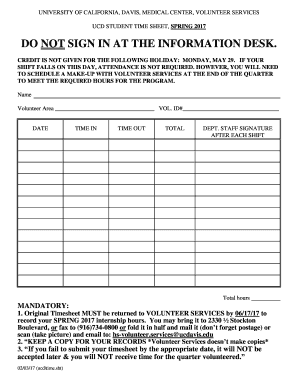
Completing the Hri Uc Davis form is an essential step for volunteers at the University of California, Davis, Medical Center. This guide provides clear instructions on how to accurately fill out the form online, ensuring that your volunteer hours are properly recorded.
Follow the steps to accurately complete the Hri Uc Davis form online.
- Click ‘Get Form’ button to obtain the form and open it in the editor.
- Begin by entering your name in the designated field at the top of the form. Make sure to print clearly to avoid any confusion.
- Fill in the 'Volunteer Area' section by specifying the area where you are volunteering. Use the exact name as listed by Volunteer Services.
- Enter your volunteer ID number in the provided field to ensure proper identification within the system.
- Record the date of each shift worked in the 'Date' column, ensuring the format is consistent and clear.
- Document your 'Time In' and 'Time Out' for each shift to accurately reflect the hours volunteered.
- Calculate the total hours worked for each entry and write it in the 'Total' column.
- Make sure to obtain the necessary signature from a department staff member after each shift to validate your hours.
- Once all shifts are recorded, review the form for accuracy and completeness to ensure that all sections are filled out properly.
- Submit the original timesheet to Volunteer Services by the specified deadline, which includes options to fax, mail, or email a scanned copy. Remember to keep a copy for your own records.
Start completing your documentation online today to ensure your volunteer hours are recognized.
Transcript notation includes the internship title, organization, and the specific quarter(s) that you participated. Transcript notation is free and: • Helps you determine internship goals, duties, expectations.
Industry-leading security and compliance
US Legal Forms protects your data by complying with industry-specific security standards.
-
In businnes since 199725+ years providing professional legal documents.
-
Accredited businessGuarantees that a business meets BBB accreditation standards in the US and Canada.
-
Secured by BraintreeValidated Level 1 PCI DSS compliant payment gateway that accepts most major credit and debit card brands from across the globe.