Loading
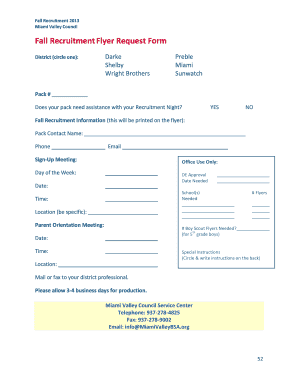
Get Oh Miami Valley Council Fall Recruitment Flyer Request Form 2013-2026
How it works
-

Open form follow the instructions
-

Easily sign the form with your finger
-

Send filled & signed form or save
How to fill out the OH Miami Valley Council Fall Recruitment Flyer Request Form online
Filling out the OH Miami Valley Council Fall Recruitment Flyer Request Form online is a straightforward process designed to assist packs in promoting their recruitment events. This guide will provide you with clear steps to ensure that you complete the form accurately and efficiently.
Follow the steps to successfully complete the recruitment flyer request form.
- Click ‘Get Form’ button to obtain the form and open it in the online editor.
- Select your district by circling one of the options: Darke, Shelby, Wright Brothers, Preble, Miami, or Sunwatch.
- Enter your pack number in the designated field.
- Indicate if your pack requires assistance with your Recruitment Night by selecting YES or NO.
- Provide the fall recruitment information that will be printed on the flyer: fill in the Pack Contact Name, Phone number, and Email.
- Enter the details for the Sign-Up Meeting, including Day of the Week, Date Needed, and Time.
- Specify the number of flyers needed and the location clearly.
- If applicable, indicate the number of Boy Scout flyers needed for 5th grade boys, along with the Date and Time.
- Fill out any special instructions, circling and writing additional details on the back, if necessary.
- Review all entered information for accuracy before saving, downloading, printing, or sharing the form.
Complete your recruitment flyer request form online today to ensure your event is well-promoted.