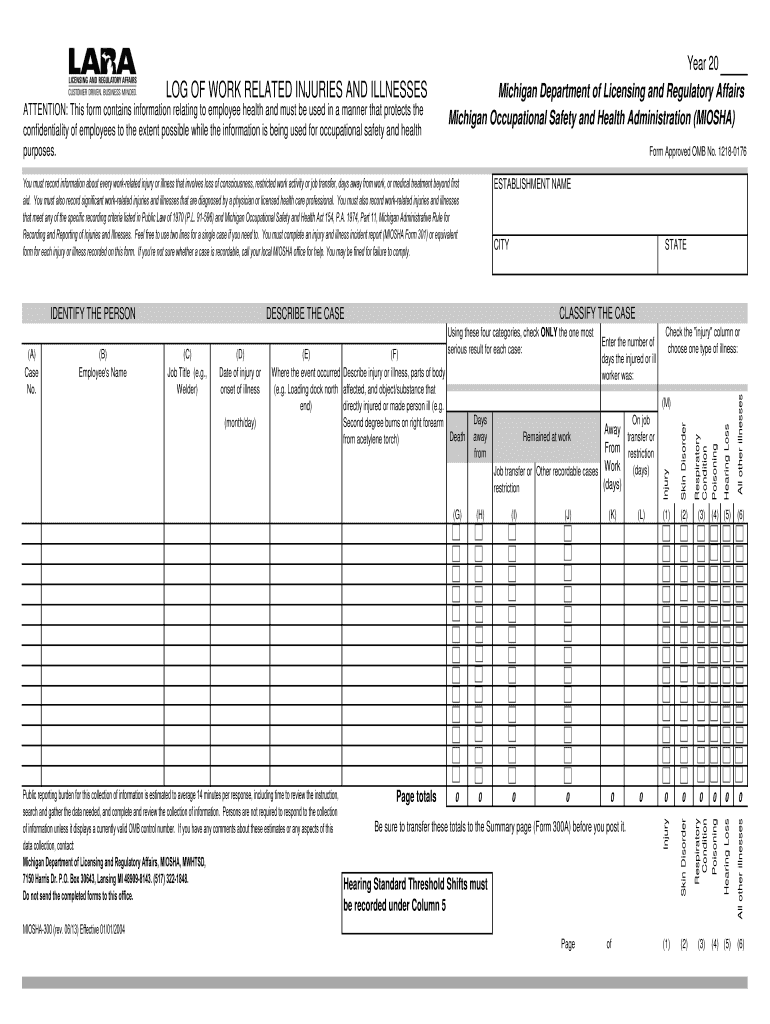
Feel free to use two lines for a single case if you need to. You must complete an injury and illness incident report MIOSHA Form 301 or equivalent form for each injury or illness recorded on this form. If you re not sure whether a case is recordable call your local MIOSHA office for help. You may be fined for failure to comply. CLASSIFY THE CASE FALSE FALSE All other illnesses K L Poisoning I J FALSE Be sure to transfer these totals to the Su.
Loading

Open form follow the instructions

Easily sign the form with your finger

Send filled & signed form or save
How to fill out the MI MIOSHA-300 online
This guide provides step-by-step instructions on how to fill out the MI MIOSHA-300 form online. It is essential for employers to accurately record work-related injuries and illnesses to ensure compliance with Michigan occupational safety regulations.
Follow the steps to complete the MI MIOSHA-300 form effectively.
- Click the ‘Get Form’ button to obtain the MI MIOSHA-300 form and open it in your preferred online editor.
- Identify the person involved by filling in the employee's name, job title, and the details of their establishment, including the city and state.
- Specify the case number for tracking purposes. Record the date of injury or the onset of illness accurately to ensure timely documentation.
- In the ‘Describe the case’ section, provide a detailed description of the injury or illness, including the affected body parts and the object or substance that caused the injury.
- Classify the case by checking the appropriate box under the injury or illness type. Choose the most serious result from the options provided: Death, Days away from work, Job transfer or restriction, or Remained at work.
- Enter the total number of days away from work, on job transfer or restriction, as applicable, in the designated fields.
- At the end of the form, ensure all totals are transferred to the Summary page (Form 300A) before completion.
- Finally, review all entered information for accuracy. You can save changes, download, print, or share the completed form as needed.
Complete your MI MIOSHA-300 form online today to ensure compliance with occupational safety regulations.
Experience a faster way to fill out and sign forms on the web. Access the most extensive library of templates available.
Related content
The forms are set-up as Microsoft Excel 2000 spreadsheets and have been formatted to a...
You must complete an injury and illness incident report (MIOSHA Form 301) or equivalent...
The first member to collaborate with after the collaboration was lifted. In early 2022...
Get answers to your most pressing questions about US Legal Forms API.
What is MIOSHA Michigan safety and health protection on the job?
MIOSHA Michigan safety and health protection encompasses a framework of regulations designed to prevent workplace injuries and illnesses. It provides guidelines for safe practices and requires employers to address any identified hazards. By following MI MIOSHA-300 regulations, companies not only comply with the law but also demonstrate their commitment to workforce safety.
What is the Michigan safety and health protection on the job?
Michigan’s safety and health protection includes various laws and regulations designed to safeguard workers from hazards. This protection covers everything from equipment safety to exposure limits for harmful substances. MI MIOSHA-300 regulations play a crucial role in enforcing these protections, ensuring a safe working atmosphere for all employees.
What is one health and safety protection your employer must provide?
Employers are mandated to provide a safe working environment, which includes proper safety equipment and training. This commitment to safety not only adheres to MI MIOSHA-300 standards but also enhances employee morale and productivity. When you feel safe at work, you can perform your best.
How much is the MIOSHA penalty?
MIOSHA penalties vary based on the severity of the violation. Generally, serious violations can incur penalties reaching thousands of dollars. Recent adjustments have set maximum fines to align with federal standards, reinforcing the importance of compliance with MI MIOSHA-300 regulations.
What is the difference between OSHA and MIOSHA?
OSHA is the Occupational Safety and Health Administration at the federal level, while MIOSHA is Michigan's state-level equivalent. Both organizations aim to ensure worker safety, but MIOSHA often has more specific regulations tailored to the state’s needs. It's essential to understand these differences, as MI MIOSHA-300 regulations may offer more localized protections.
What is the workplace health safety and security policy?
The workplace health safety and security policy outlines the measures that organizations must implement to protect their employees. It focuses on identifying hazards, assessing risks, and providing safety training. Adhering to this policy ensures compliance with MI MIOSHA-300 standards, fostering a safer work environment for everyone involved.
How to file a MIOSHA complaint?
Filing a MIOSHA complaint is straightforward. Start by visiting the MIOSHA website to access the complaint form. You can submit your complaint online, or you may choose to send it via mail or in person to your local MIOSHA office. Remember, your complaint should clearly outline your concerns regarding safety violations, as this helps MIOSHA investigate effectively.
How do I access my OSHA 300 logs?
Accessing your OSHA 300 logs requires you to reach out to your employer, usually through the health and safety personnel. They will assist you in retrieving your MI MIOSHA-300 log. If you're looking for a more structured approach to this process, the US Legal Forms platform can provide helpful materials to make access easier.
How to get OSHA 300 logs?
Getting OSHA 300 logs involves a few straightforward steps. Firstly, approach your company’s safety department, as they typically handle these records. If you encounter difficulties in accessing your MI MIOSHA-300 log, consult the US Legal Forms platform for guidance on how to secure the necessary documentation.
How do I get a copy of my OSHA 300 log?
To obtain a copy of your OSHA 300 log, start by contacting your workplace safety officer or human resources department. They maintain these records and should provide you with access to your MI MIOSHA-300 log. If you need additional assistance, consider using the US Legal Forms platform, which offers resources to help you navigate these requests smoothly.
Use professional pre-built templates to fill in and sign documents online faster. Get access to thousands of forms.
If you believe that this page should be taken down, please follow our DMCA take down process here.
This form is available in several versions. Select the version you need from the drop-down list below.