Loading
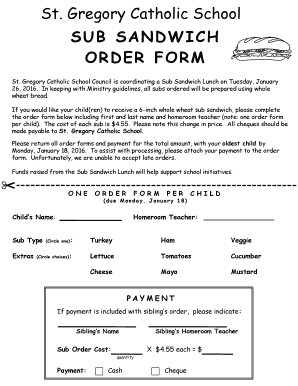
Get Canada St. Gregory Catholic School Sub Sandwich Order Form 2016-2026
How it works
-

Open form follow the instructions
-

Easily sign the form with your finger
-

Send filled & signed form or save
How to fill out the Canada St. Gregory Catholic School Sub Sandwich Order Form online
This guide provides clear instructions for completing the Canada St. Gregory Catholic School Sub Sandwich Order Form online. By following these steps, you will ensure that your child's order is submitted correctly and on time.
Follow the steps to successfully complete the order form.
- Click the ‘Get Form’ button to obtain the order form and open it for editing.
- Begin by entering the child’s first and last name in the designated field. This information is essential for identifying the order.
- Next, locate the section for the homeroom teacher and fill in the teacher's name. This will help to ensure that the order is processed by the correct staff member.
- Select the desired sub type by circling one of the options: Turkey, Ham, or Veggie.
- Indicate any extras you would like to add by circling your choices from the list provided including Lettuce, Tomatoes, Cucumber, Cheese, Mayo, or Mustard.
- If your child has a sibling also ordering, fill in the sibling’s name and their homeroom teacher in the appropriate fields.
- Choose your payment method by selecting either Cash or Cheque. If payment is included with a sibling’s order, ensure this is indicated.
- Finally, review the form to ensure all information is correct before submitting. Save any changes you have made, and prepare the form for submission.
Complete your order form online today to ensure your child receives a delicious sub sandwich!
He was a strong opponent of slavery, and he extended tolerance to Jews. He wrote the Pastoral Rule, a guide for church government, and other works. His extensive recodification of the liturgy and chant led to his name being given to Gregorian chant. He is remembered as one of the greatest of all the medieval popes.