Loading
Get Epcc Registrar
How it works
-

Open form follow the instructions
-

Easily sign the form with your finger
-

Send filled & signed form or save
How to fill out the Epcc Registrar online
This guide provides a comprehensive overview of how to fill out the Epcc Registrar form online. By following these steps, you will ensure that all necessary information is accurately submitted to the registrar's office.
Follow the steps to complete the Epcc Registrar form online.
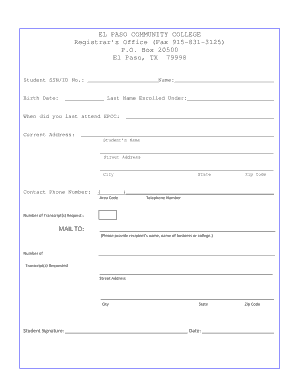
- Press the ‘Get Form’ button to access the Epcc Registrar form and open it in the designated editor.
- Locate the section for your Student SSN/ID No. and input your unique identifier in the provided space.
- In the 'Name' field, enter your full name as it appears on official documents.
- Proceed to the 'Birth Date' field and fill in your date of birth using the specified format.
- In the 'Last Name Enrolled Under' section, indicate the last name you used during your enrollment.
- Fill in the 'When did you last attend EPCC' section with the appropriate date of your last attendance.
- Complete your 'Current Address' by providing your street address, city, state, and zip code in the corresponding fields.
- Enter your contact phone number, making sure to include the area code.
- Indicate the number of transcripts you are requesting in the 'Number of Transcript(s) Request' section.
- In the 'MAIL TO' section, provide the recipient's name or the name of the business or college where the transcripts should be sent.
- Fill in the address for the transcripts, including street address, city, state, and zip code.
- Finally, remember to sign the form in the 'Student Signature' field and add the date before submitting.
Complete your documents online today!
Apply For Admissions. Visit ApplyTexas Website to apply online. ... Apply For Financial Aid. ... Submit Official Transcripts. ... Get the Bacterial Meningitis Vaccine. ... Take Assessment Tests. ... Meet With a Counselor or Advisor. ... Attend a New Student Orientation. ... Register For Classes.