Loading
Get Written Reprimand - Epcc
How it works
-

Open form follow the instructions
-

Easily sign the form with your finger
-

Send filled & signed form or save
How to fill out the WRITTEN REPRIMAND - Epcc online
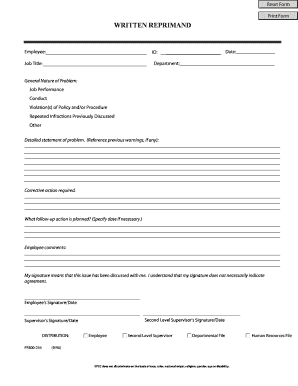
Filling out the WRITTEN REPRIMAND - Epcc form online can streamline the process of addressing employee performance issues. This guide provides clear, step-by-step instructions to ensure all necessary information is properly documented.
Follow the steps to complete the WRITTEN REPRIMAND form effectively.
- Click the 'Get Form' button to access the WRITTEN REPRIMAND form and open it for editing.
- Enter the employee's name in the designated Employee field. Make sure to spell their name accurately.
- Select the general nature of the problem by checking the appropriate boxes: Job performance, conduct, violation(s) of policy and/or procedure, repeated infractions previously discussed, or other options as applicable.
- In the detailed statement of the problem section, clearly outline the issues being addressed. Reference any previous warnings or discussions related to this reprimand if applicable.
- Describe the corrective action required to address the problems outlined. This should be a clear and actionable plan for improvement.
- Indicate any follow-up actions that are planned, including specific dates if necessary. This can help both the employee and the supervisor track progress.
- Allocate space for employee comments. Encourage the employee to provide their perspective on the reprimand and any additional feedback they may have.
- Finally, ensure both the employee and the supervisor sign and date the form to acknowledge that the issue has been discussed. Note that signing does not indicate agreement with the reprimand.
- After filling out all relevant sections, review the form for accuracy. Save your changes, and consider downloading, printing, or sharing the completed form as necessary.
Complete the WRITTEN REPRIMAND - Epcc form online to address performance issues promptly and effectively.
Any student on academic probation who does not maintain a minimum term GPA of 2.0 will be placed on academic suspension. A student on academic suspension may not be enrolled for one semester.