Loading
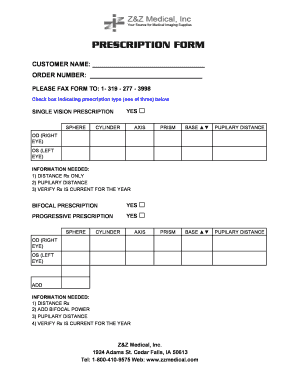
Get Z&z Medical Prescription Form 2009-2026
How it works
-

Open form follow the instructions
-

Easily sign the form with your finger
-

Send filled & signed form or save
How to fill out the Z&Z Medical Prescription Form online
Filling out the Z&Z Medical Prescription Form online is a straightforward process that ensures your prescription needs are met efficiently. This guide will provide clear, step-by-step instructions to help you complete the form correctly.
Follow the steps to complete your prescription form effortlessly.
- Click ‘Get Form’ button to obtain the form and open it in the editor.
- Begin by entering the customer name in the designated field. This should be the name of the person for whom the prescription is intended.
- Next, input the order number. Ensure that this corresponds to your specific order to facilitate processing.
- Indicate the prescription type by checking the appropriate box: Single Vision, Bifocal, or Progressive Prescription. Only select one type at a time.
- Fill in the SPHERE, CYLINDER, and AXIS fields as required for your prescription. These values will be provided by your eye care professional.
- Complete the PUPILARY DISTANCE section for both the right eye (OD) and left eye (OS). This measurement is crucial for proper lens fitting.
- For bifocal prescriptions, provide the ADD bifocal power in addition to the distance Rx and pupilary distance. Ensure these values are accurate.
- Verify that the prescription is current for the year as required. This is essential to ensure the validity of your order.
- Once all sections are completed, review the information for accuracy.
- Save your changes and then proceed to download, print, or share the form as needed.
Complete your Z&Z Medical Prescription Form online today for a seamless experience.
Related links form
VA Form 21-0960G-1. Esophageal Abnormalities - Disability Benefits Questionnaire
Form W-7 (SP) (Rev. January 2012). Application For IRS Individual Taxpayer Identification Number
State Of Oklahoma Credit For Employees In The FORM 564
New York State Department Of Taxation And Finance Amended Nonresident And Part-Year Resident Income